English
15
Rinse Aid Setting
The amount of rinse agent released into the final wash can be adjusted.
The factory setting is at the midpoint. If there are rings of calcium (hard
water) spots on dishes, try a higher setting.
To Adjust the Rinse Aid Setting
Remove the dispenser knob; then turn the adjuster counterclockwise to
increase the amount of rinse agent.
Low Rinse Aid Level Indicator
When the rinse aid level becomes low in the dispenser, the "Rinse Aid"
icon in the display will light. Once the dispenser is refilled, the icon will
shut off.
Using the 3-in-1 program
Your dishwasher has ability to utilize 3-in-1
tablets.
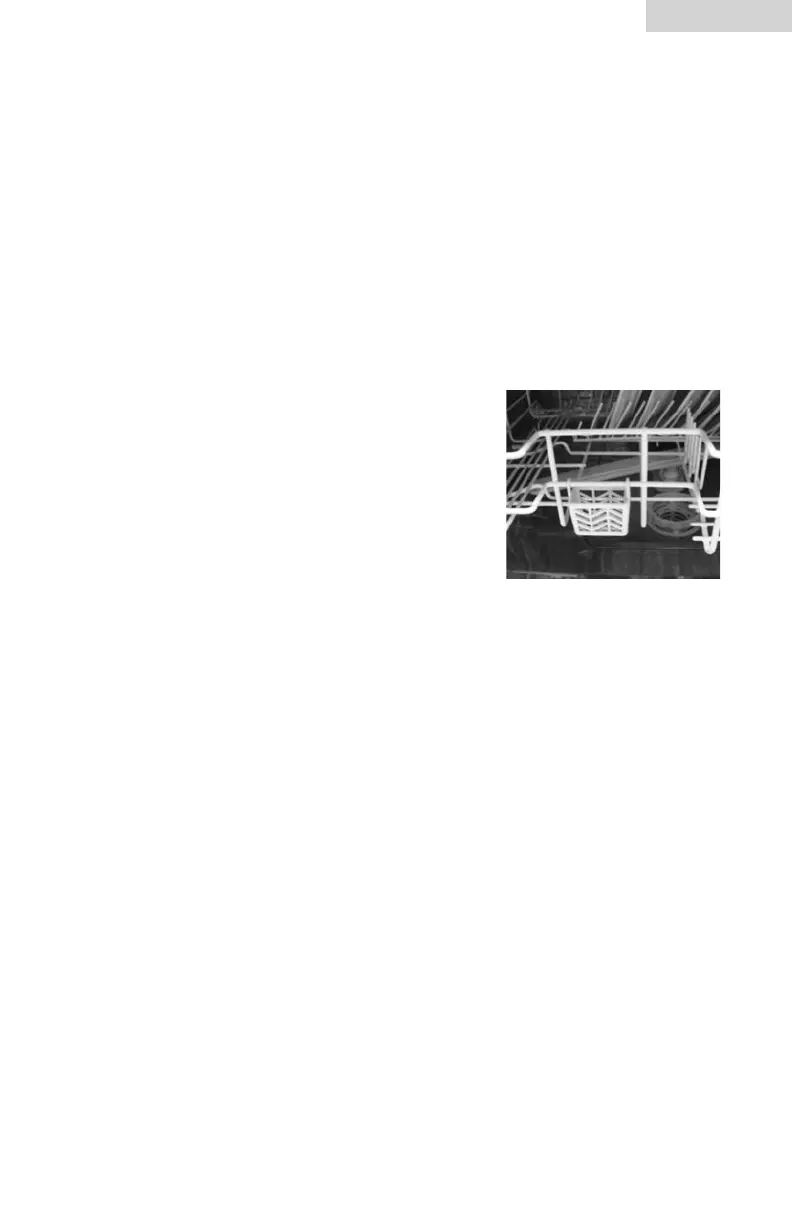
1. Hang the 3-in-1 tablet container on to rack
(see diagram below)
2. Put the 3-in-1 tablet into the container and
press the 3-in-1 button on the control panel.
A “3-in-1” icon in the display will illuminate.
Note: Performance will not be as effective if you attempt to us tablets
when dishwasher is set to program other than 3-in-1.


 To Next Page