EasyManua.ls Logo

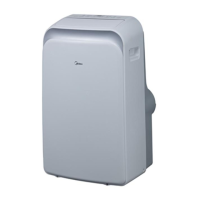
Midea MPPD33H - User Manual

Midea MPPD33H
56 pages
Print Icon
To Next Page IconTo Next Page
Loading...
PORTABLE AIR CONDITIONER(Local Air Conditioner)
Owner’s Manual &
Installation Manual
IMPORTANT NOTE:
Read this manual carefully before installing
or operating your new air conditioning
unit. Make sure to save this manual for
future reference.
MODEL: MPPD33H

Questions and Answers

  • R
    ramirezdanielAug 7, 2025
    Why is my Midea Air Conditioner not cooling well?
    • C
      Cody KimAug 7, 2025
      Several factors can cause your Midea Air Conditioner to not cool effectively: * A dirty air filter blocked with dust or animal hair. Turn off the unit and clean the filter according to instructions. * A disconnected or blocked exhaust hose. Turn off the unit, disconnect the hose, check for blockages, and reconnect it. * Low refrigerant. Call a service technician to inspect the unit and top off the refrigerant. * An incorrect temperature setting. Decrease the set temperature. * Open windows or doors. Ensure all windows and doors are closed. * The room area is too large for the unit. Double-check the cooling area specifications. * Heat sources in the room. Remove any heat sources if possible.
  • A
    Adam BeckerAug 16, 2025
    What to do if my Midea MPPD33H Air Conditioner is noisy and vibrates too much?
    • M
      Michele WeaverAug 16, 2025
      If your Midea Air Conditioner is excessively noisy and vibrating, it could be due to: * An unlevel surface. Place the unit on a flat, level surface. * A dirty air filter blocked with dust or animal hair. Turn off the unit and clean the filter according to the instructions.
  • D
    djohnsonAug 27, 2025
    What to do if my Midea MPPD33H makes a gurgling sound?
    • P
      patrick06Aug 27, 2025
      This is normal.

Summary

Safety Precautions

General Safety Warnings

General safety instructions for operation and installation.

Flammable Refrigerant Safety

Precautions for units using R32/R290 refrigerants and general handling.

Disposal and Environmental Notes

Information on proper disposal and environmental considerations.

Servicing and Repair Safety

Safety guidelines for maintenance, repair, and handling of refrigerant systems.

Installation Instructions

Preparation and Location

Initial setup steps, design considerations, operating ranges, and placement guidelines.

Exhaust Hose and Window Setup

Guidance on exhaust hose, tools, accessories, and window mounting.

Wall Installation Procedure

Instructions for installing the unit through a wall, including Vent Control.

Operating Instructions

Control Panel Overview

Overview of the unit's control panel buttons, indicators, and their functions.

Basic Operation Modes

Detailed steps for operating the unit in various modes like Cool, Dry, Auto, Fan, and Timer.

Advanced Features and Drainage

Explanation of airflow, power management, and water drainage features.

Maintenance

Maintenance Safety

Essential safety guidelines to follow before cleaning or servicing the unit.

Air Filter Care

Instructions for removing, cleaning, and mounting the air filters.

Unit and Storage Cleaning

Steps for cleaning the unit exterior and proper storage procedures.

Troubleshooting Tips

Unit Not Turning On

Troubleshooting steps for issues with the unit not powering on.

Poor Cooling Performance

Solutions for when the unit is not cooling effectively.

Unit Noise and Vibration

Tips to address excessive noise and vibration from the unit.

Gurgling Sound

Explanation and solution for gurgling sounds from the unit.

Impedance Information

Technical details regarding system impedance compliance.

Remote Controller Owners Manual

Remote Controller Specifications

Technical specifications for the remote controller unit.

Handling and Usage

Instructions for battery installation, disposal, and general usage guidelines.

Buttons and Functions

Detailed explanation of each button and its function on the remote control.

Screen Indicators

Explanation of the symbols and indicators displayed on the remote's screen.

Basic Operation Guide

Step-by-step guide for basic operations like setting modes and temperature.

Timer and Mode Operations

Instructions for setting timers and operating through different modes.

Advanced Functions Overview

Guide on using advanced features like Shortcut, Sleep, LOCK functions.

Specific Advanced Functions

Details on Sleep, LOCK, I SENSE, and other specific functions.

Setting and Connectivity Features

Using SET, FRESH, and AP modes for customization and connectivity.

Smart Kit User Manual

Smart Kit Specifications and Setup

Technical specs, app download, and preparation steps for the Smart Kit.

Network Configuration and Connection

Steps for network setup, device connection, and app login.

Using the MSmartHome App

Instructions on controlling the air conditioner via the MSmartHome mobile app.

Special App Features

Overview of special functions like Schedule, Sleep Curve, Energy Monitor, and Check available via app.

App Declaration and Compliance

Important notes on app compatibility, network security, and regulatory declarations.

Midea MPPD33H Specifications

General IconGeneral
BrandMidea
ModelMPPD33H
CategoryAir Conditioner
LanguageEnglish

Related product manuals