To get the best performance from your dishwas her, read all operating instructions before using
it for the first time.
3
1
77
6
4
7
6
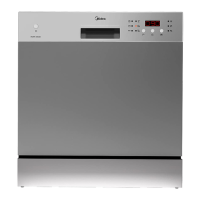
Display : To display dela y time or er ror codes.
3
1
R inse Aid Warn in g Li ght: To c o me on w hen the
di spenser needs to be refil led.
2
Option: To select washing program
whenpress thebutton.
De laye d Star t Button: Press th is button to set the
del aye d h ours f or washi ng . You can de lay the sta rt
of washing up to24 hours. One press on this
but ton delays th e st art of wa shin g by one hou r.
5
Detergent Dispenser
6
Cup Shelf
7
Silverware Basket
8
Coarse Filter
9
Rinse Aid Dispenser
Lower Basket
3
Spray Arms
2
Upper Basket
1
Main Filter
4
1
2
3
4
5
6
7
8
9
on
Off
Fr ont view
Prog.
SANITIZE
HI
TEMP
HE
ATED D RY
Child Lock
1
3
2
4
5
6
7
8
9
5
START/CANCEL : To stop or reset the wash cycle, press
the START/CANCELbutton, the dishwasher will stop
wash ing.
When Sanitize is selected, the temperature
of the w ate r will rea ch 70 C (158 F)max .
“”
°°
Note : it is poss ible that the 70 C (158 F) m ax may not
be reachedif the temperature of theincoming hotwater
does not mee t the sugge sted temperat ures.
°°
W hen the Hi Tem p is selected, t he te mp erature
of t he wate r wi l l rea ch 60 C ( 140 F) m ax,
“”
°°
When t he Hea ted D ry op tion is s elec ted,
the heaterwill w ork during the dr ypr ocesses.
“”
Pre ss the SANI TIZE an d HEATE D DRY b utton s
for 3 seco nds the
LOCK li ght will displ ay on the LC D. N o buttons
can be operated
when th e d ishwashe r con trols are locked .
To cancel t he Chi ld Lock option, press the
SA NITI ZE and
HEATED DRY buttons for 3 seconds, the LOCK
ligh twillno long er
be shown on the LCD andthe dishwasher
con trols w ill be unlocked.
“”
8
9


 To Next Page