PREPARATIONS BEFORE USE
NOTES
The app supports iOS versions 13.0 and above and
Android versions 8.0 and above. The app is not available
for use with tablets.
This model does not support a WEP encrypted router.
The home wireless network name and password must
contain only letters, numbers and standard symbols.
The network accessing configuration of the robotic vacuum
requires a wireless network of 2.4GHz frequency range.
The robotic vacuum must be connected to wireless network
to enable controlling the robotic vacuum using the app.
Once you have set up the app and connected the robotic
vacuum to wireless network, the app can be used to control
the robotic vacuum in the wireless network/2G/3G/4G/5G
network environment.
If your home wireless network password is changed or the
the app; you will need to reconnect the robotic vacuum to
the wireless network following the wireless network
connection instructions.
●
●
●
●
●
●
In the App Store or Google Play, search for
SmartHome, download and install the app.
Open the SmartHome app and complete the
registration process, which includes an email
address confirmation, and once you have
confirmed your email address you can log in
and follow the setup instructions in the app.
Connect your phone to your home wireless
network.
In the app select Add Devices and choose
the device SmartHome app.
Connect your robotic vacuum to your wireless
network. After assembling and powering on the
robotic vacuum, press and hold the " " button
for 3 seconds until a beep is heard.
The network indicator light should start flashing
white. Follow instructions on app for next steps.
1.
2.
3.
4.
5.
Setting Up App and Connecting the Device
Using SmartHome App
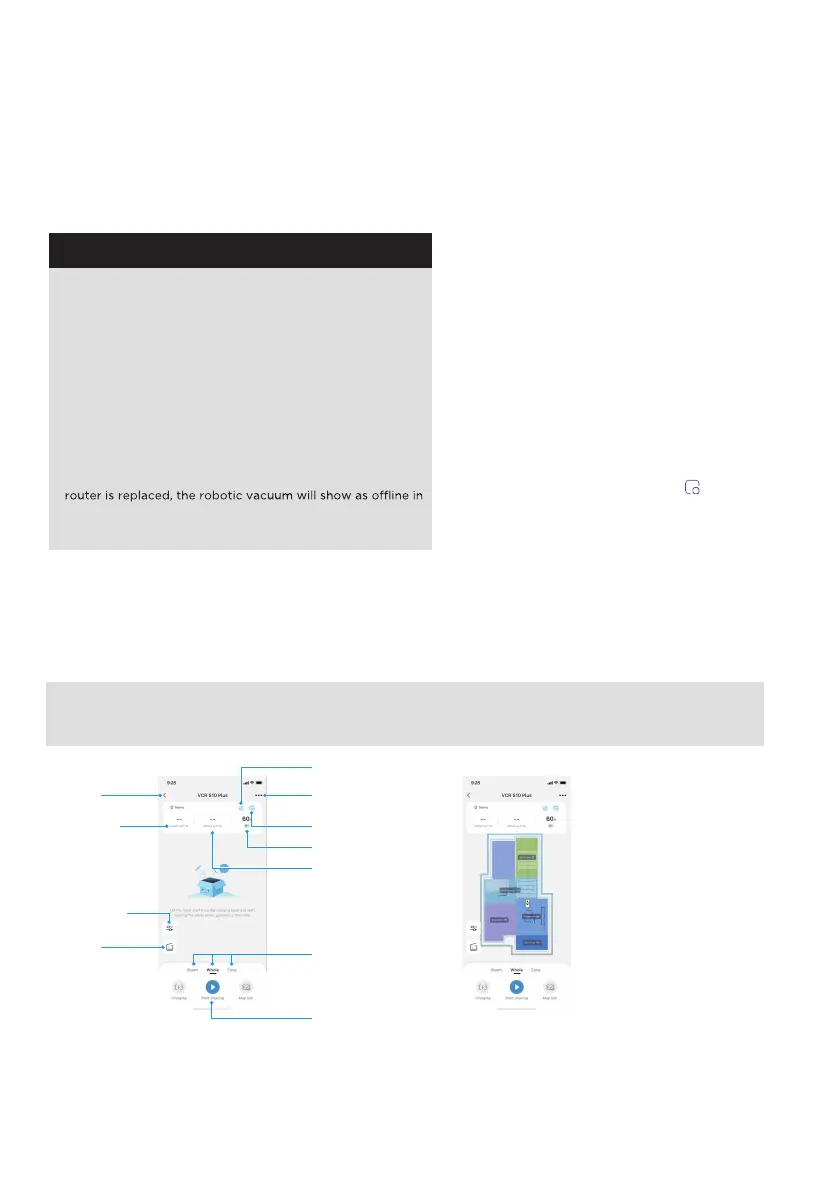
Back to
previous
page
Robotic Vacuum
Do not disturb
Child Lock
settings
Cleaning area
Start cleaning
Battery
Dust
collection
Cleaning
time
Cleaning
mode
NOTE: If the wireless network in your home is unstable, it may cause issues with the operation of the SmartHome App.
The content of the SmartHome App may change when the version is updated. Please refer to the Midea Robotic
Vacuum interface for details. This interface will be upgraded later, this interface is for reference only.
NOTE: When you start clean,
the machine automatically
scans and creates a map.
11
Parameter
adjustment


 To Next Page