GETTING STARTED
Start / Pause / Resume
The robot vacuum will enter sleep mode when it is in standby mode for more than 10 minutes. In sleep mode,
press any key to wake up the robot vacuum.
Do not immerse the robot in water. Doing so may damage the equipment, causing short-circuit or current leakage.
1.
2.
NOTES
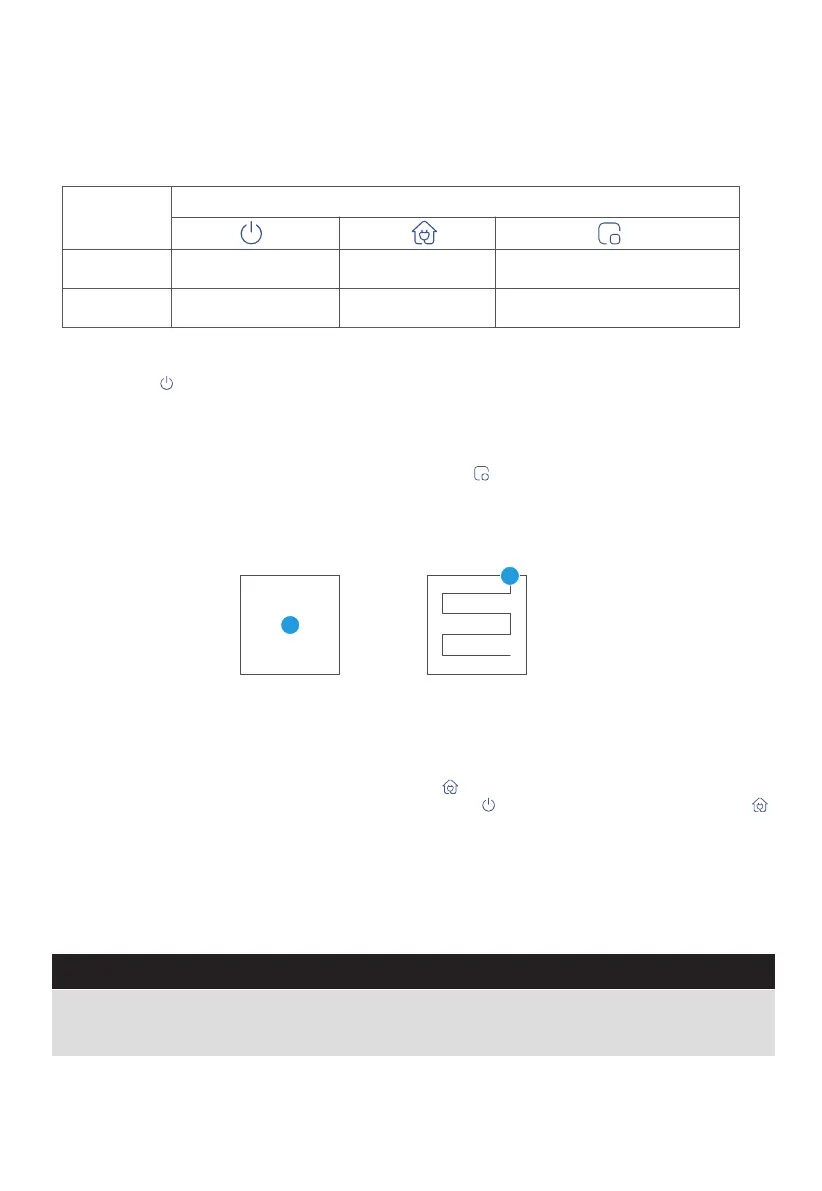
SPOT Cleaning
1.0m 1.0m
1.0m 1.0m
Operation
Short Press
Start/pause/resume Return to the base Start spot cleaning
Shut down
/
Enter the network pairing state
Press and
hold for 3s
Button
Briefly Press " " to start/pause/resume cleaning or use your App to control.
Recharge
1. When the robot vacuum is in standby mode, press " " and the robot vacuum will start recharging.
2. When the robot vacuum is in cleaning process, pressing " " can stop cleaning, and then press " "
can start recharging.
Under special circumstances (such as power depletion, robot vacuum jamming, etc.), the robot vacuum
may not be able to recharge automatically. Please manually place the robot vacuum back to the
charging base.
12
When the robot vacuum is in standby/pause mode, press " " to start spot cleaning. The robot will
begin to clean an area of one square meter centered on itself. After spot cleaning, the robot will
automatically return to the charging base to recharge.
Note that starting the spot cleaning mode will automatically stop the current cleaning cycle.


 To Next Page