2.3. Using the metronome
2.3.1. Start and stop
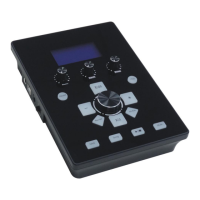
1. Press [Click] button.
2. Turn the [value knob] or [+], [-] button to select the metronome.
3. Press the Start / Stop button [ ] to play or stop the metronome.
2.3.2. Adjust the tempo
1. Press [CLICK] button lights.
2. Turn the [value knob] or [+], [-] button to select the playback.
3. Then press the [Edit] button, after the lights, press [CLICK] button to select Volume
/Tempo option.
4. Turn the [value knob] or [+], [-] button to adjust the tempo.
5. Setup is complete then press [Edit] button, you can put out the lights.
2.4. Record Performance
2.4.1. Recording
4. Press [Rec]button lights. (automatically deleted Before tracks)
5. Percussion Drum group began recording.
6. Press [Rec]button, lights off, it stops recording.
2.4.2. Playing
7. Press the [Play] button lights.
8. Started playing percussion drum set.
9. Press the [Play] button, lights off, it stops recording


 To Next Page