REVERB LEVEL
Press FUNCTION button, the display will show “F-“ to prompt you to input a function code.
Then press REVERB button, current reverb level will appear on the display. Now, you can set
reverb level your desire ranging from 1 to 128. You can also use + or - button to change it.
Transmitted reverb level is the figure on the display minus 1. For example, volume “099” on
the display is transmitted as 98, etc. About 3 seconds after you complete the operation, the
display will return to indicate program number.
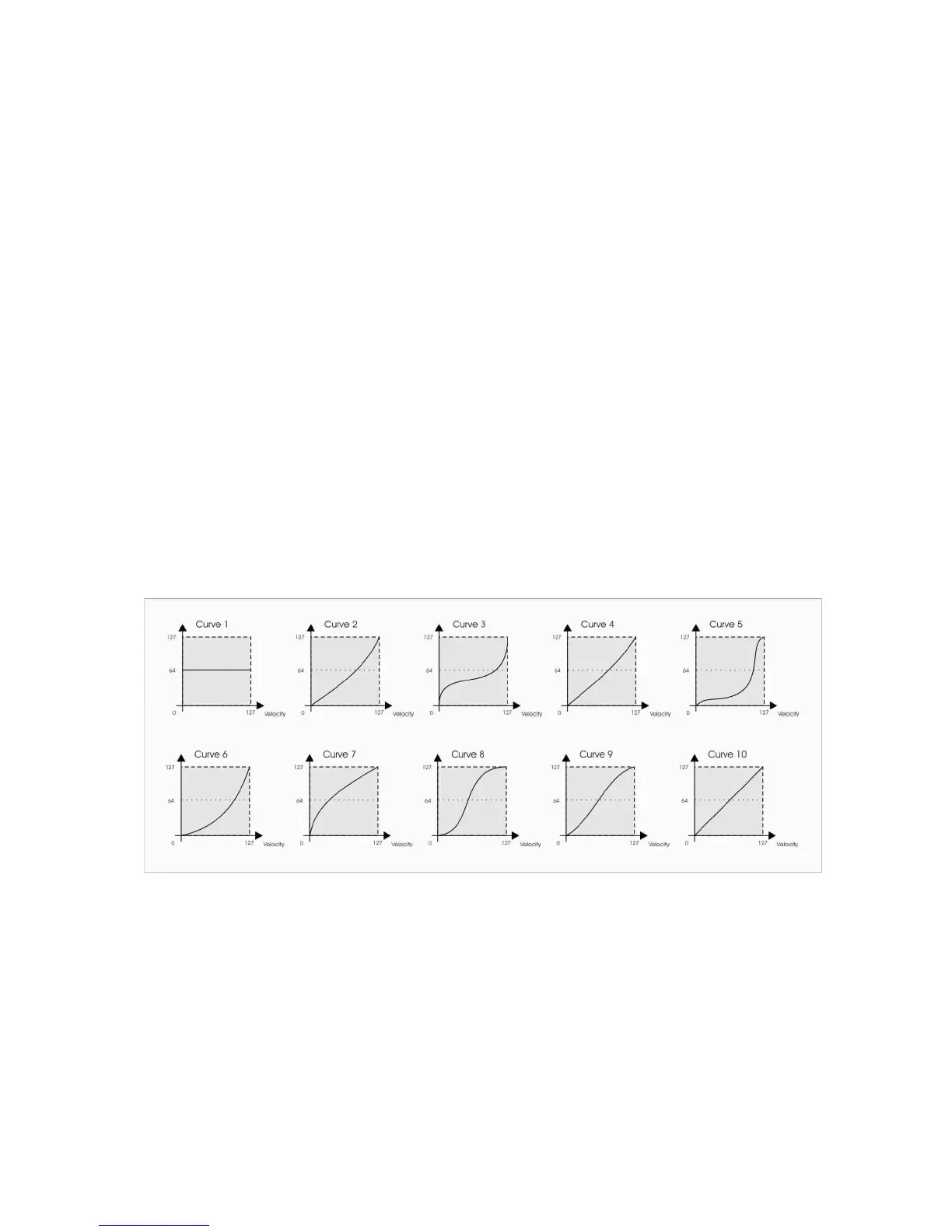
VELOCITY CURVE
Press FUNCTION button, the display will show “F-“ to prompt you to input a function code.
Then press V.CURVE button, current velocity curve number will appear on the display. Now,
you can select a velocity curve your desire, as you can see in the picture below, ranging from
1 to 10 with single numerical button. You can also use + or - button to change.
About 3 seconds after you complete the operation, the display will return to indicate program
number.


 To Next Page