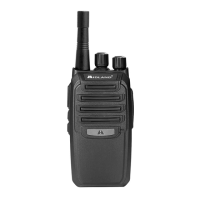
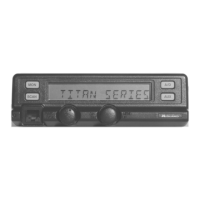
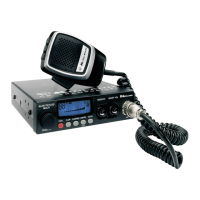
The Midland BR180 is an on-site business radio designed for reliable communication in various professional environments such as restaurants, retail, and hospitality. It offers a robust communication solution with a focus on quality, reliability, and value.
Function Description:
The BR180 functions as a two-way radio, enabling users to transmit and receive voice communications. It operates on UHF frequencies and requires an FCC license for operation. The radio features a 1-watt transmit power and 4 channels, with a selection of 99 frequency channels and 142 privacy codes to ensure clear and secure communication. It supports both CTCSS (Continuous Tone Coded Squelch) and DCS (Digitally Coded Squelch), allowing multiple users to share the same channel frequency without interference. When CTCSS or DCS is enabled, the channel remains muted to all incoming signals unless they carry the matching tone, unmuting only for relevant transmissions.
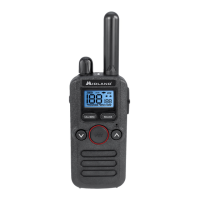
The radio includes a range of features to enhance usability and safety. It has a clear LCD display with backlighting for easy viewing of channel numbers, battery status, and active features. A NOAA Weather Alert function allows users to stay informed about local weather conditions. For hands-free operation, the radio supports VOX (Voice Operated eXchange). It also includes a vibrate alert for discreet notifications and silent operation mode. Other operational features include auto squelch, 5 call alerts, monitor function to check channel traffic, scan mode to rapidly cycle through available channels, and a Time-Out-Timer to prevent accidental long transmissions.
The BR180 is powered by a Li-Ion rechargeable battery, providing up to 14 hours of battery life. It features a 4-hour rapid recharge capability and a battery save mode to extend usage. A battery gauge with a low battery alert keeps users informed about the power status.
Usage Features:
Operating the BR180 is straightforward. To power on and adjust volume, users rotate the POWER/VOLUME knob clockwise to turn the radio on and increase volume, or counter-clockwise to decrease volume and turn it off. Upon power-on, the radio announces the current channel.
Transmitting and receiving calls involves holding the PTT (Push-To-Talk) button and speaking into the microphone, keeping the radio at least 1 inch (2.5 cm) from the mouth for optimal clarity. The RX/TX LED glows red during transmission and green when receiving. Releasing the PTT button allows the user to receive. Channel selection is done using the channel up or down buttons, with the display showing the selected channel number. It's crucial for all radios in a communication group to be on the same channel and frequency.
The radio offers a menu system for activating various features. Users press and hold the Call/Menu button for 3 seconds to enter menu mode. Within the menu, users can activate VOX, vibrate alert, keypad tones, backlight mode, and weather alert. The menu is navigated using the up and down arrow buttons, and settings are saved by pressing PTT or after a 4-second timeout.
For convenience, the BR180 includes a keypad lock feature, activated by pressing and holding the WX/Keypad Lock button for 3 seconds, to prevent accidental changes to settings. The Call Alert button sends an alert to co-workers. The Scan/Monitor side key can be pressed to turn scanning on or off, allowing the radio to rapidly scan channels and stop on active ones. Holding the Scan/Monitor side key for 3 seconds activates or deactivates the monitor function, which is useful for checking channel traffic before transmitting.
The BR180 supports both keypad programming and PC programming. Keypad programming allows for basic configuration of radio functions, including setting frequencies and privacy codes for each of the 4 channels. For more advanced customization, free programming software is available on the Midland website, requiring a BA1 programming cable. Additionally, the radio features a Radio to Radio Cloning function, which allows the transfer of all programmed settings from a "Host" radio to a "Clone" radio using a BA22 cloning cable, simplifying the setup of multiple devices.
Maintenance Features:
Maintaining the BR180 involves simple steps to ensure its longevity and performance. The radio should only be cleaned with a soft, damp cloth, avoiding alcohol or cleaning solutions. It should not be immersed in water, especially with the accessory cover removed. If the radio gets wet, it should be dried with a lint-free cloth.
For battery maintenance, only the Midland Lithium-Ion battery pack should be used. Charging should be done using the supplied desktop charger or the optional BGC180 Multi-Unit Charger. The battery pack should be charged when the "Charge Battery Alert" appears and removed once fully charged. For long-term storage, the radio should be turned off, and the batteries removed to prevent leakage and damage.
The battery installation and removal process is designed to be user-friendly. To install, the battery door is slid down, the battery is aligned with contacts and pressed into place. Removal involves sliding the battery up and lifting it out. Care should be taken not to short-circuit the contacts during these processes.
The BR180 is designed for maximum coverage under optimum conditions, such as open warehouse floor plans, open rural areas, or flat areas with clear line of sight. Using fully charged batteries and setting the radio to its highest transmit power level are also important for optimal performance. Regular checks of battery contacts and charger terminals for cleanliness and good condition are recommended for efficient charging.


 To Next Page
 General