3
© 2018 Midmark Corp. | 60 Vista Drive Versailles, OH 45380 USA | 1-800-643-6275 | 1-937-526-3662 |
MA10564-1i
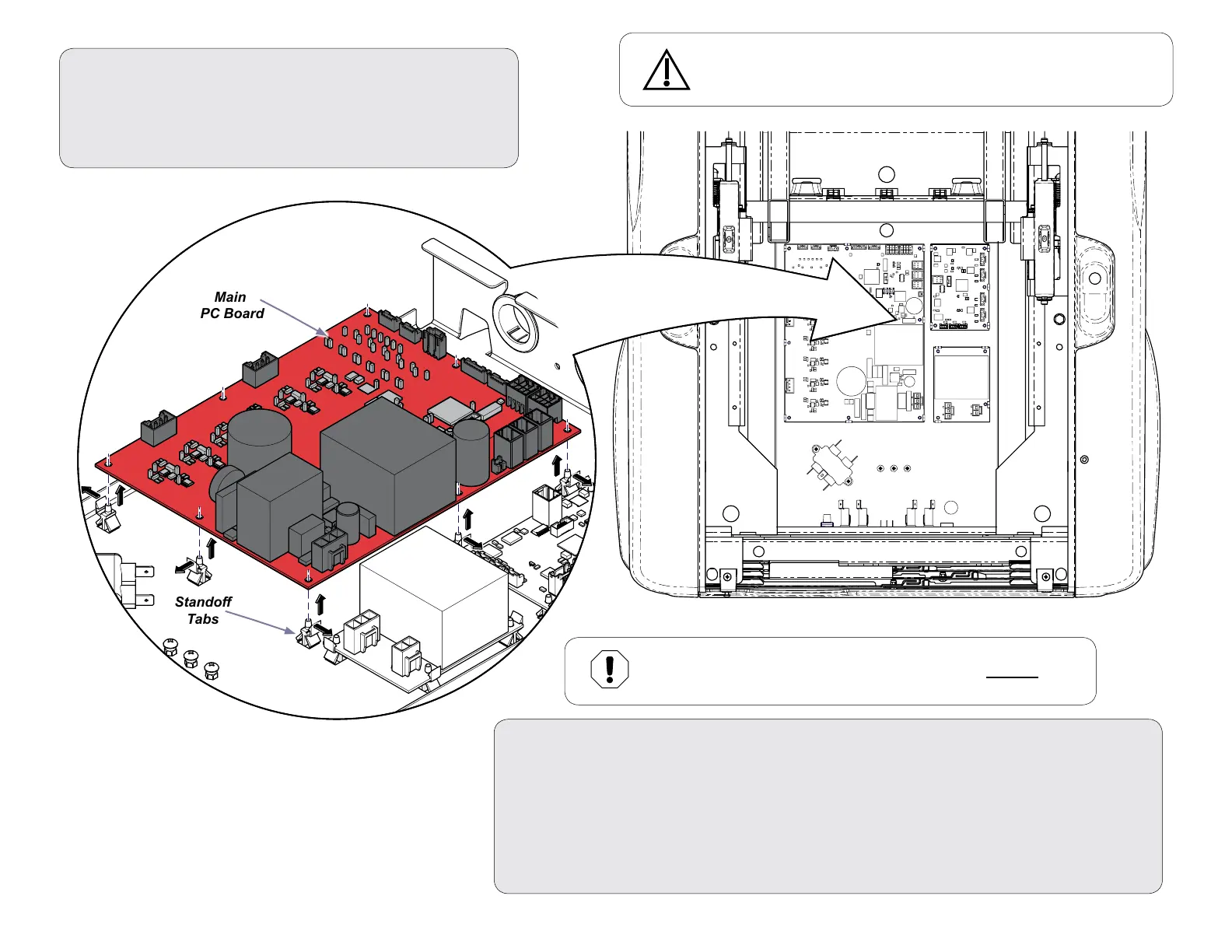
Main
PC Board
Step 5: Install New Main PC Board & Re-assemble Chair.
A) Position the Main PC board on the standoffs as shown and press down to secure.
B) Install harness connections back into Main PC Board and connect ground wire to frame.
C) Install PCB Shelf Assembly and reconnect harnesses.
D) Install Control Board Housing Cover.
E) Perform Calibration Procedure shown on next page.
D) Install Top Cover.
D) Program Home & Quick Exam Functions attached.
Step 4: Remove Main PC board.
A) Remove harness connections from Main PC board and
disconnect ground wire from frame.
B) Press standoff tabs away form Main PC board and lift up.
C) Remove Main PC board.
Stando
Tabs
Caution
Risk of electric shock. Always disconnect chair power for three minutes
allowing capacitance to dissipate prior to changing the Main PC Board.
Equipment Alert
When installing new PC Board, only apply pressure at Standoff points.
Failure to do so could result in damage to PC Board.



 To Next Page