4
© 2018 Midmark Corp. | 60 Vista Drive Versailles, OH 45380 USA | 1-800-643-6275 | 1-937-526-3662 |
Step 3:
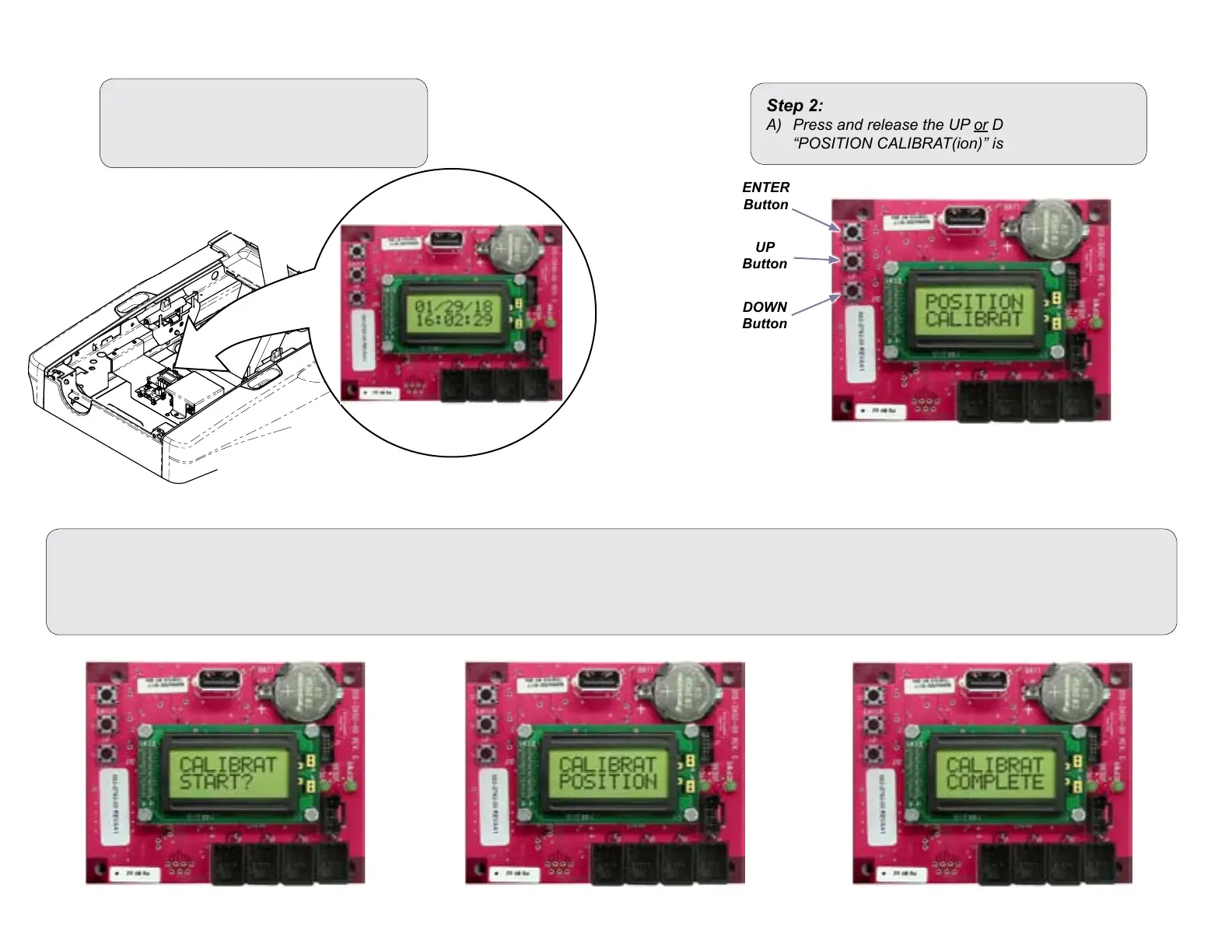
A) Press ENTER button once. The display will show “CALIBRAT(ion) Start”.
B) Press ENTER button again. The chair base and back will start to cycle up & down and the display will show “CALIBRATING (Scrolling) POSITION”.
C) You will hear a steady pattern of “beeps”. When calibration is completed you will hear three short beeps and the display will show “CALIBRAT COMPLETE”.
Chair Postion Calibration Procedure
Step 1:
A) Power up chair.
B) Locate the Diagnostic PC Board.
Step 2:
A) Press and release the UP or DOWN button until
“POSITION CALIBRAT(ion)” is displayed.
MA10556-1i
ENTER
Button
DOWN
Button
UP
Button



 To Next Page