Using for the first time
21
Before using for the first time
Set up the coffee machine and
remove any protective film and
stickers (see "Installation").
Clean the machine thoroughly before
filling it with water and coffee beans
(see "Cleaning and care").
Insert the plug of the coffee machine
into the socket (see "Electrical
connection").
Switching on for the first time
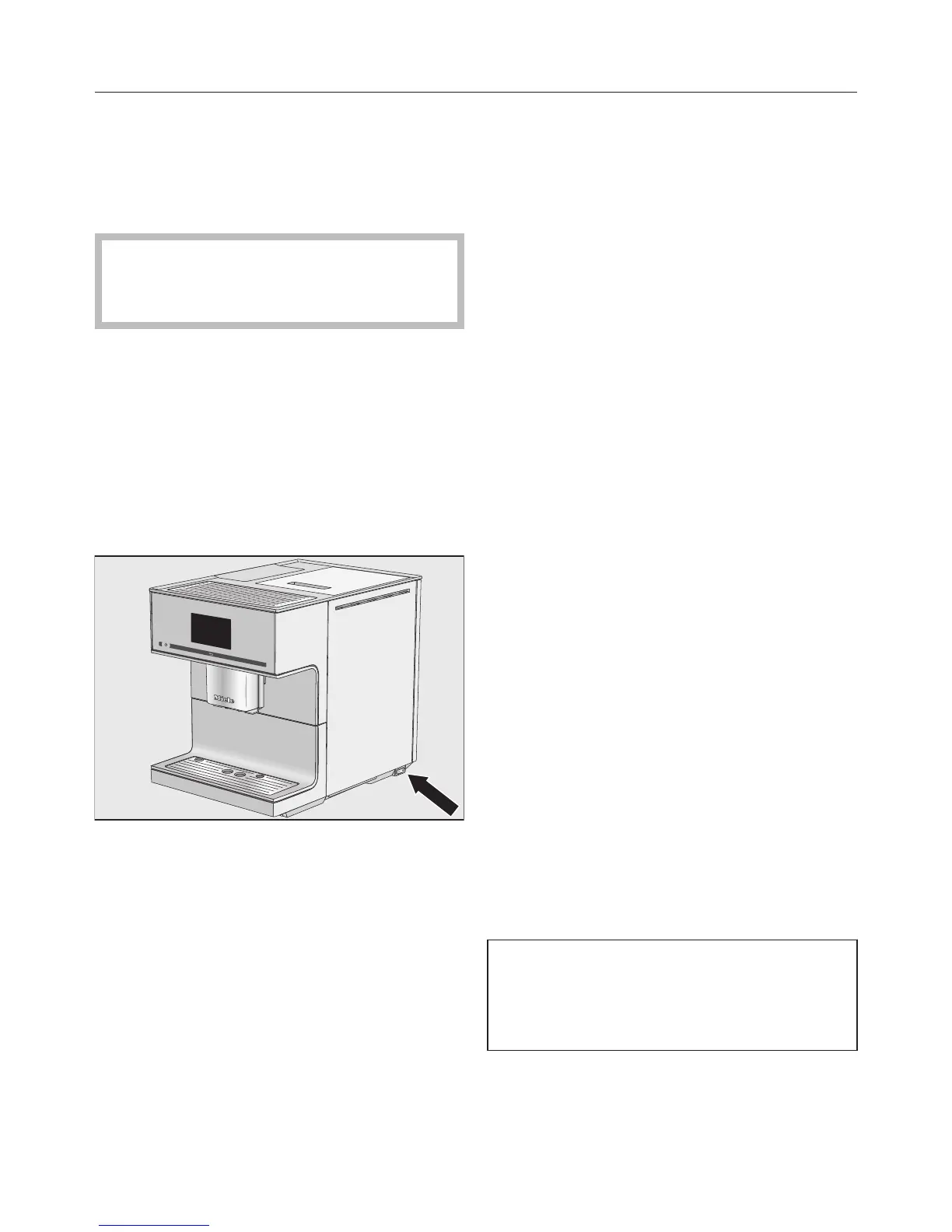
Switch the master switch on the right
hand side of the machine to the "I"
position.
When you switch the machine on for
the first time the following message will
appear in the display: "Miele -
Willkommen".
When you switch the coffee machine
on for the first time, you will be
prompted to set the following:
– Language and country
– Date
– Time of day
– Clock display
Touch the On/Off sensor .
Set the language
Select the language and touch OK.
Select the country and touch OK.
The setting is now saved.
Set the date
Enter the current date and touch OK.
The setting is now saved.
Set the time
Enter the current time of day and
touch OK.
The setting is now saved.
Clock display
You can choose from the following
options:
– On: the time and date are always
visible in the display when the
machine is switched off.
– Off: the display is dark when the
machine is switched off.
– Night dimming: the date and the time
are only displayed between the hours
of 5:00 and 23:00.
Select the time of day display and
touch OK.
The coffee machine will use more
energy depending on the option you
choose for the display. Information
about this will appear in the display.
The coffee machine is now successfully
set up for use.
Fill the water container with fresh,
cold tap water.



 To Next Page