Grinder setting
42
When the beans are ground correctly,
the coffee or espresso will flow evenly
into the cup with a good crema.
The crema should have an even
hazelnut brown colour.
The grinder setting you select will be
used for all coffee drinks.
There are various ways to tell whether
the coffee grinder is set correctly.
The coffee has been too coarsely
ground if:
– Espresso or coffee flows into the cup
too quickly,
– the crema is very pale and uneven,
Set a finer grinder setting.
The coffee has been too finely ground
if:
– espresso or coffee flows into the cup
very slowly,
– the crema is dark brown,
Set a coarser grinder setting.
Only adjust the grinder one setting at
a time.
Start making a new drink, to grind
beans again. Adjust the grinder
setting one setting at a time again.
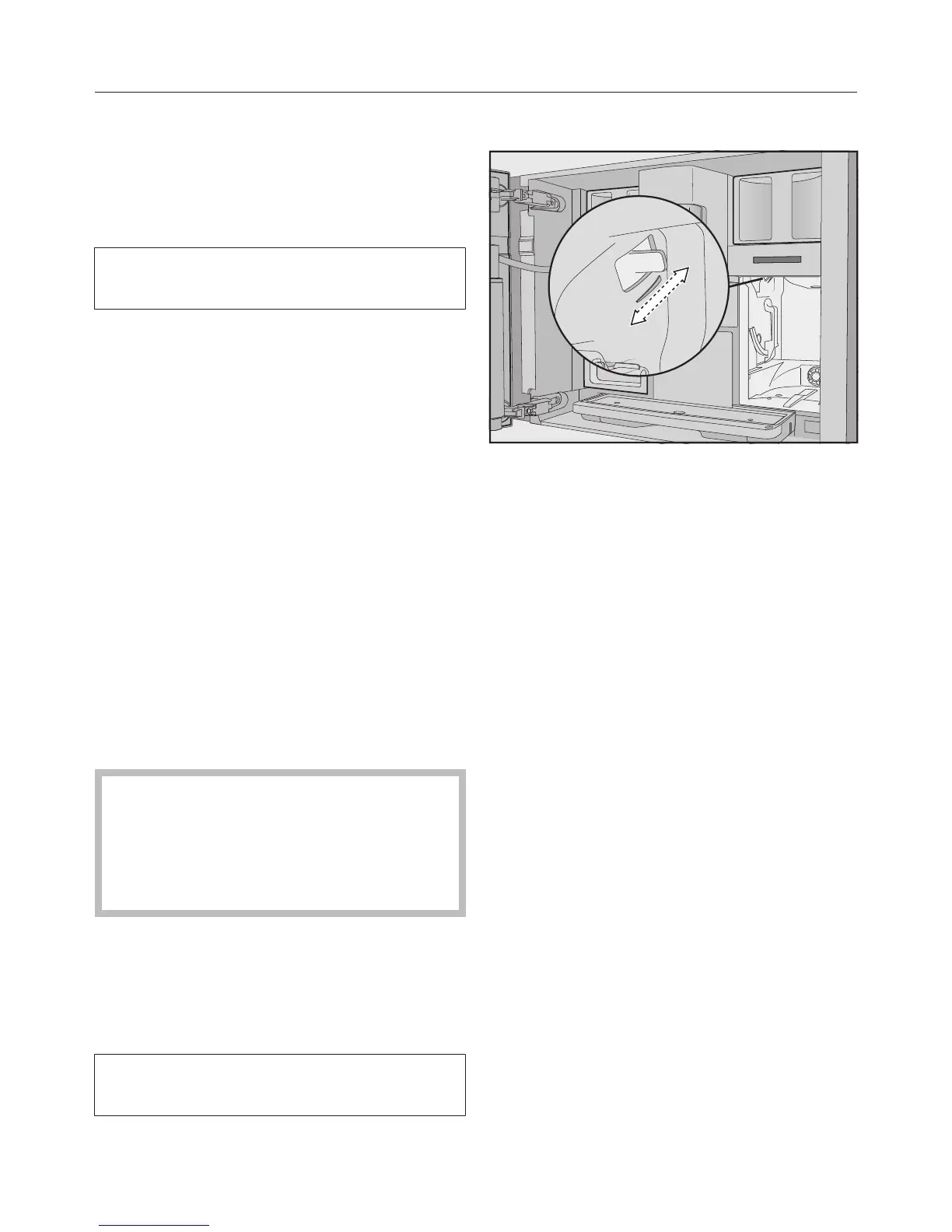
Adjusting the fineness of grind
The slide control for adjusting the
fineness is located on the top left
behind the water container.
The grinder setting is set for all bean
types.
Open the machine door.
Remove the water container.
Push the slide control a maximum of
one setting forwards (for finer
grinding) or one setting backwards
(for coarser grinding).
Replace the water container.
Close the machine door.
Make one cup of coffee.
Adjust the grinder setting again, if
required.



 To Next Page