Before using for the first time
19
Touch the On/Off switch.
All symbols light up with reduced
brightness.
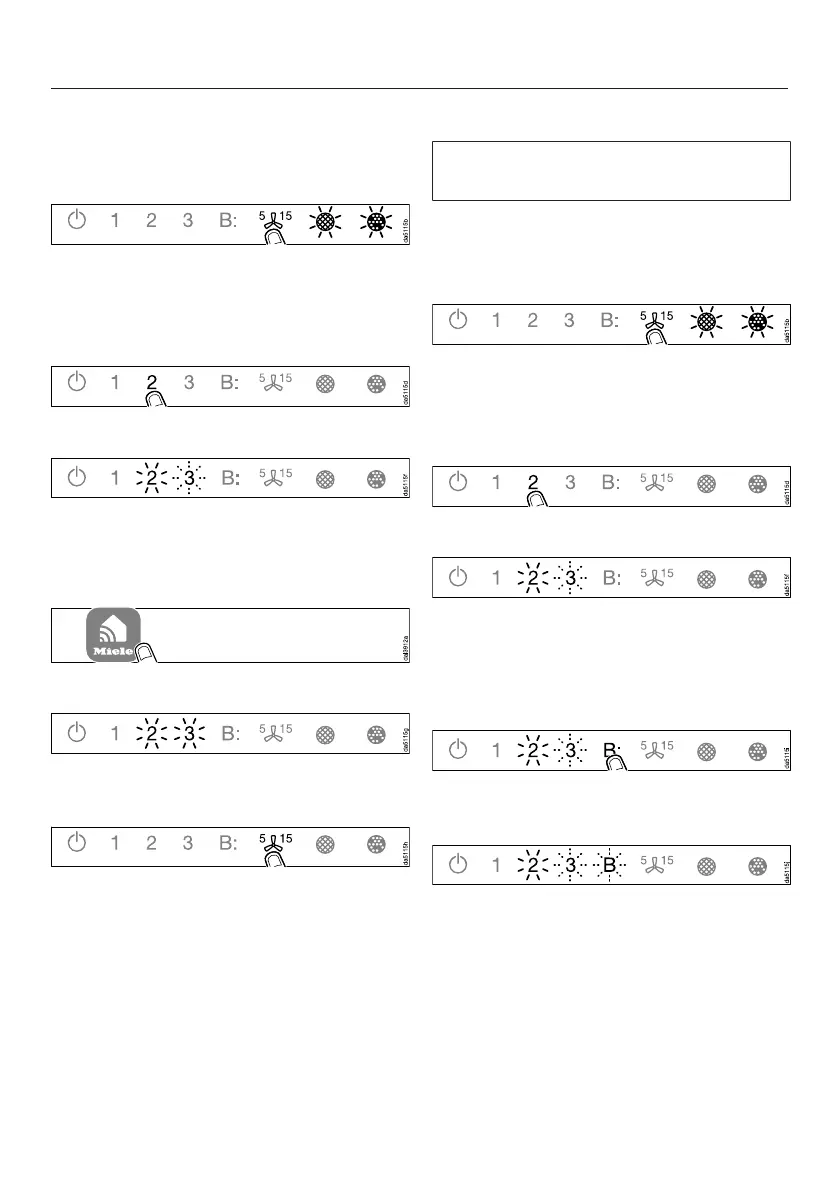
Press and hold the run-on option
control until the grease filter
and charcoal filtersymbols light
up.
Touch 2.
2will light up constantly, 3will flash.
The cooker hood will be ready for
connection in the next 2minutes.
Follow the instructions in the app.
When successfully connected, 2and
3will light up constantly.
Quit connection mode on the cooker
hood by touching the run-on option
control.
The cooker hood can now be operated
via the app.
Connecting via WPS
Your WiFi router must support WPS
(WiFi Protected Setup).
Touch the On/Off switch.
All symbols light up with reduced
brightness.
Press and hold the run-on option
control until the grease filter
and charcoal filtersymbols light
up.
Touch 2.
2will light up constantly, 3will flash.
The WiFi connection must be started on
the cooker hood at the same time as on
the WPS router.
Press B on the cooker hood after a
few seconds.
After a short while, 2will light up
constantly, and 3and B will flash.
The cooker hood is ready for
connection for the next two minutes


 To Next Page