3. Select a programme
20
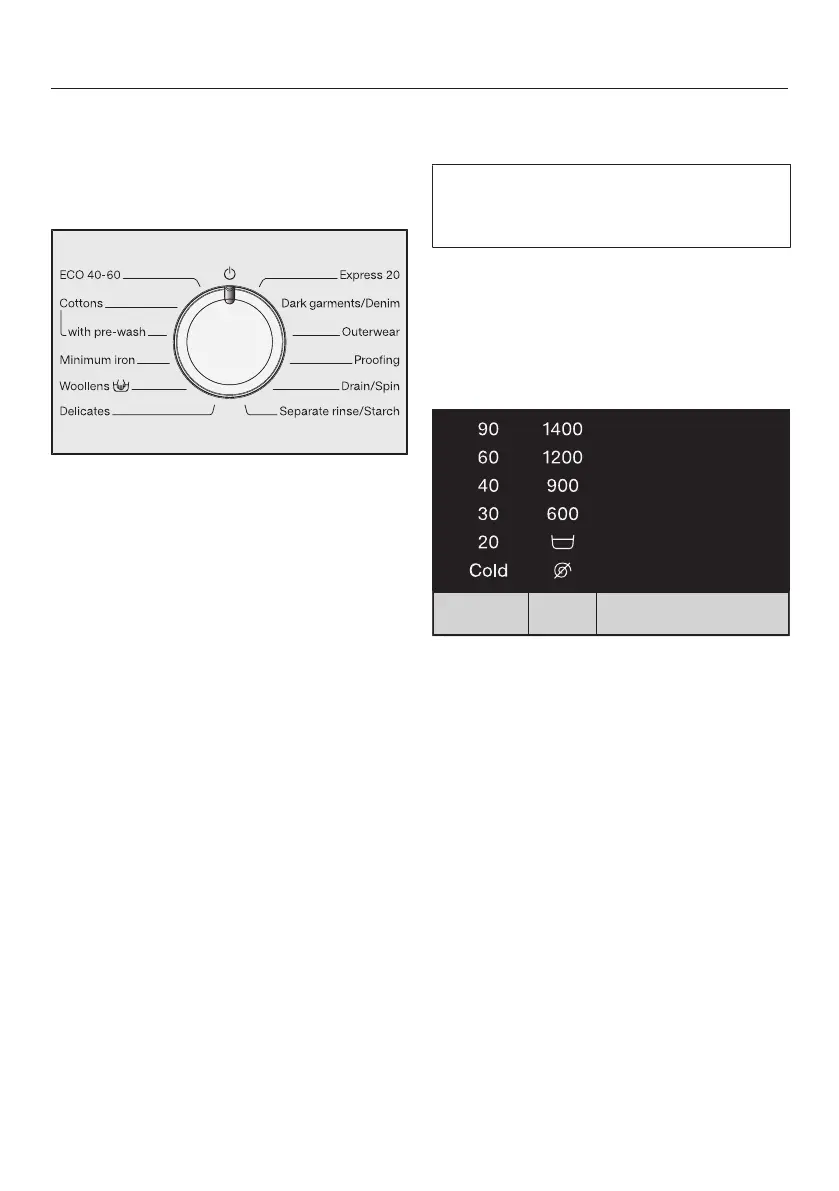
Programme selection
The washing machine is switched on by
turning the programme selector to a
wash programme.
Turn the programme selector to the
required programme.
The estimated wash time is shown on
the time display and the pre-set tem-
perature and spin speed light up.
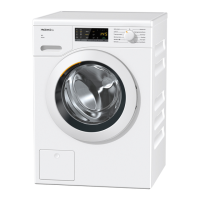
Selecting a temperature and spin
speed
The wash programme’s pre-set tem-
perature and spin speed light up
brightly.
The temperatures reached inside the
washing machine might not be the
same as the temperatures selected.
Perfect wash results are achieved
through a combination of energy use
and wash duration.
Touch the sensor control to change
the pre-set temperature. Touching the
sensor control decreases the value.
After the smallest value is reached,
the display jumps to the maximum
value.
Touch the sensor control to
change the pre-set spin speed.
Touching the sensor control de-
creases the value. After the smallest
value is reached, the display jumps to
the maximum value.


 To Next Page