Need help?
Do you have a question about the Mikado VBAR CONTROL TOUCH and is the answer not in the manual?
Details precautions for handling and charging the built-in LiPo battery to prevent hazards.
Explains the two states of VBar Control for power off: OFF and STANDBY.
Details how to charge the built-in battery via USB or wall charger, and charging indicators.
Describes the elements displayed on the main screen upon powering on the device.
Explains how to magnify menu items for better viewing, like live event logs.
Details how to access the context-sensitive manual using the (?) icon.
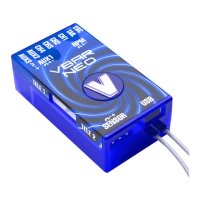
Lists the key features of the VBar Control Satellite Receiver.
Explains the meaning of the green and red LEDs on the receiver.
Provides guidance on how to properly install the receiver in a model.
Details best practices for antenna placement for optimal reception.
Outlines the warranty coverage and terms for the VBar Control.
Provides information on worldwide after-sales support and spare parts.
Instructions for proper disposal of the internal Lithium Polymer battery.
Guidance on recycling electronic devices according to local regulations.
Important safety warnings for operating helicopters with VBar systems.
Details the correct servo and component wiring for VBar systems.
Describes the self-test procedure the VBar system undergoes upon startup.
Essential checks to perform before each flight for safe operation.
Disclaimer regarding the manual's completeness and user liability.
Information on where to find compatible accessories for VBar products.
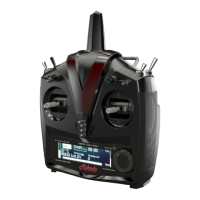
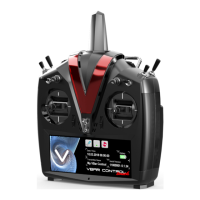
The VBar Control Touch is an advanced, multi-function FHSS radio control system designed for various remote-controlled models, including helicopters and airplanes. Its unique programming and operation concept makes it an ideal companion for VBar-equipped models. The device is developed and manufactured in Germany, adhering to high quality and safety standards, and has undergone thorough inspection and flight testing. It complies with European (ETSI) and US-American (FCC) requirements, ensuring high noise immunity and operational reliability.
The VBar Control Touch allows for the setup, programming, and adjustment of VBar-controlled models directly via the radio. It features a readily understandable graphic user interface and an easy-to-use VBar setup wizard for new models. An ESC setup wizard is also included for programming various speed controllers, with direct programming support for ESCs compatible with VBar Control. Users can fine-tune up to eight parameters simultaneously using optional inputs, with adjustable limitations for their respective value ranges. The system supports bank switching with three banks, plus an optional fourth bank for Autorotation.
Real-time logging and graphical vibration analysis are available on the screen, along with a graphical telemetry log analyzer for stored flights, providing an overview of energy consumption and event logs. Users can create custom screen designs directly on the touch-screen display. The radio includes a full manual with context-sensitive help, allowing users to access information directly when needed. An easy bind process facilitates binding and flying any VLink-equipped model with the user's transmitter, supporting "Model Sharing." The device also features automatic power-on from Standby if a previously bound model is switched on.
Several telemetry functions are available, such as voltages, current, RPM, speed, temperature, and battery power consumption, though some may require additional hardware. Multiple timer functions are included, offering warnings and reminders via sound, voice, or vibration output. Wireless buddy boxing is supported with two VBar Control radios, fully configurable. The VBar Control Touch can interact with smartphones via WiFi, enabling control of music players, photo exchange, web browsing, and expanding the display for telemetry purposes. Cloud functions are under development for archiving and user interaction. The device allows access to an App Store and over-the-air online updates via WiFi. VBar NEO-flybarless systems can also be updated online via WiFi.
The VBar Control Touch features an extra bright, capacitive 5.8-inch multi-touch color display with an ambient-light sensor for automatic brightness control, ensuring good readability even in bright sunlight. A built-in WiFi module connects to home networks or personal hotspots. The system boasts a very fast start-up time, becoming fully operational in three seconds. It uses a high-performance, low-power controller for an optimal user experience and long runtimes. The reliable 80 Channel 2.4 GHz FHSS bidirectional flight control system handles programming, setup, and telemetry. It offers unlimited model memory and a virtually unlimited number of control channels. High range, low latency, and antenna diversity are present on both the transmitter and receiver, supported by intelligent antenna monitoring and management.
The transmitter is fully equipped with four 3-position switches, two 3-position quick-break-switches, and six rotary inputs (four trim wheels, two rotating knobs), all fully programmable. Precision gimbals with four ball bearings are fully adjustable, and the collective stick can be fitted with an optional throw limiter. The device features a delicate rubber lining for comfortable, slip-free, and safe holding. It is well-balanced with a two-point neck-strap attachment, eliminating the need for additional retainer brackets. A large 2 Watt loudspeaker provides alarms and voice output, complemented by an adjustable vibration alarm. Memory is accessible as a USB memory stick, requiring no drivers. A built-in Lithium Polymer battery ensures long runtimes, and charging can be done via the USB connector or the included built-in charger.
The VBar Control Touch offers two power-off states: OFF and STANDBY. To power on from OFF, press the Power Button. From STANDBY, press the Power Button or swipe from right to left on the touchscreen. To enter STANDBY, swipe from left to right on the touchscreen or press the Power Button, then tap the red button. To turn off completely, press and hold the red button, then confirm. The device cannot be turned off if a model is connected. Forced shutdown (15+ seconds power button press) is possible but may lead to data loss.
The built-in battery charges when connected to a computer via USB or to the wall charger. A green light indicates charging via USB, and a red light indicates charging via the wall charger. Charging time from the wall charger is up to three hours, with trickle charge maintaining full capacity. USB charging takes up to twenty hours if the transmitter is off, or only buffers the system if on. Both USB and wall chargers can be connected simultaneously, with the integrated circuit prioritizing the highest power input.
The main screen displays date, time, battery status, transmitter name, serial number, and version. Icon shortcuts for Bind, WiFi, and Transmitter Settings are available, varying based on connected models and features. Swiping left from the right margin accesses the main menu, which can be navigated by scrolling. Menu items with submenus have a triangle/arrow symbol. Transmitter Settings covers basic radio settings, App Store access, and Buddy Boxing. The Archive stores flight and battery logs. Applications manage downloaded apps. Certain menu items can be magnified by tapping them. Context-sensitive help is accessed via the (?) icon.
Multi-touch gestures include:
To ensure safety and longevity, the touchscreen display should be kept clean with a soft cloth and non-aggressive detergents to prevent scratches. The device should not be disassembled or modified beyond what is described in the manual, nor should a soldering iron be used on its electronics. The supplied wall charger and appropriate adapter must be used for charging, ensuring the correct voltage (100-240 V AC). Batteries other than those sold by Mikado Model Helicopters should not be used. The charging process should always be monitored, and if the device gets hot, charging should be stopped immediately. Batteries should not come into contact with liquids, and damaged insulation or connectors should prompt immediate discontinuation of use. Battery liquids are dangerous; in case of contact, rinse thoroughly with clean water. Battery condition should be monitored by checking operating and charging times, as significant deviations may indicate the end of battery life.
The VBar Control and its battery should not be stored in high temperatures, dusty, or humid conditions, and should be kept out of reach of children. Charging in very cold conditions (below 0 °C/32 °F) is not recommended. Used Lithium Polymer batteries are not domestic waste and should be discharged, terminals insulated, and taken to a store/dealer or collection point for harmful substances. The VBar Control should not be kept in direct sunlight for extended periods.
For cleaning, a soft brush can remove dirt and sand from surfaces and gimbals. A dry or damp microfiber cloth with neutral detergent can be used for surfaces, avoiding firm rubbing. Special care should be taken when cleaning the display to prevent scratches. Dripping wet cloths, hot water, benzine, gasoline, model fuels, thinner, or other volatile detergents should not be used, as they can permanently damage surfaces or internal electronics.
For support and service, Mikado Model Helicopters offers warranty repair or replacement during the legal warranty period for faulty devices used according to specifications. Repairs for improper use or after the warranty period will be charged. The warranty covers the VBar Control itself, not other model components. Mikado Model Helicopters is not responsible for physical damage, injury, or data loss. After the warranty period, repairs will be offered at cost, with an estimate provided. Users are advised to save files to their computer before sending the device for repair, as it may be reset. Extensive after-sales service is available on forums at www.vstabi.info and via email. Spare parts and accessories are available at www.mikado-heli.de.
 General
| Display | Touchscreen |
|---|---|
| Telemetry | Yes |
| Channels | 8 |
| Operating System | VBar |
| Battery | LiPo |
| Frequency | 2.4 GHz |
| Display Size | 4.3 inches |

 To Next Page