14
Note (2):
The first move from the position you have constructed cannot be a capture
en passant
. To create a
position where such a move is possible, set up the immediately preceding position, then carry out the move
that allows the capture.
5.9
Menu: Verify
The ‘Verify’ function displays half the chessboard in diagrammatic form, with the pieces in the correct current
positions. To switch between the two halves of the board, press ñ or ò.
This function can help you adjust the pieces on the chessboard in case of confusion. To return to the ‘info’
screen, press RED.
5.10
Menu: Save/load game
The computer’s memory contains 9 ‘slots’ in which games can be saved (stored). A saved game can later be
loaded (retrieved) so that you can continue it or play through the moves (using ), etc.
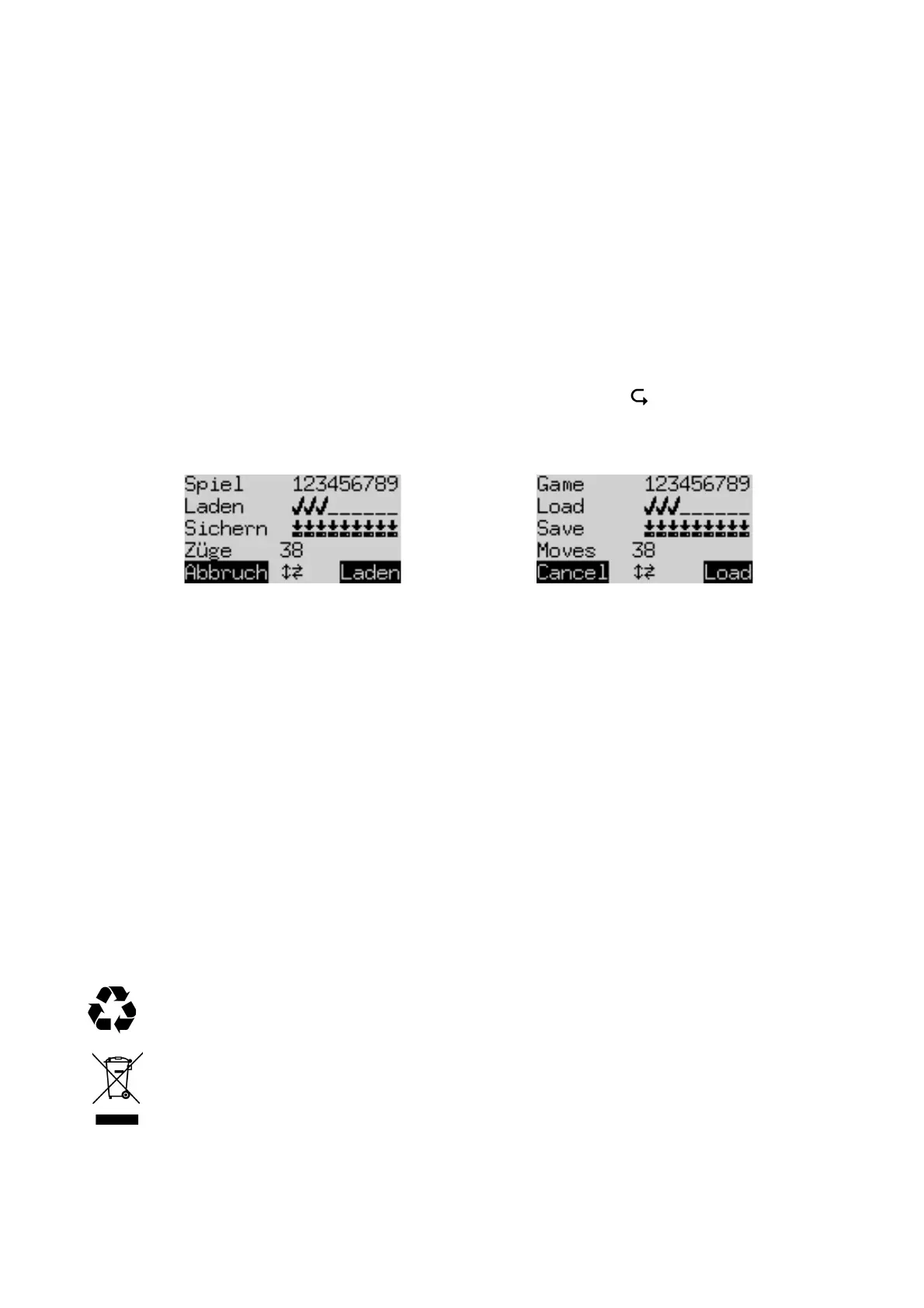
To use this feature, select ‘Save/load game’ from the menu. The screen shows something like this:
The ‘blinking’ cursor ( ▋) can be moved right/left and from one line to the other by means of the ‘direction’
buttons (ïðñò).
In the above example, slots 1-3 are occupied, while 4-9 are vacant. The game in slot number 1 is 38 moves
long.
To save the current game: Place the cursor on the ‘Save’ line, bring it to the slot where you want the game to
be saved, and press the GREEN button. This will erase any game that was stored in the slot previously.
To load a game: Place the cursor on the ‘load’ line, bring it to the desired slot and press GREEN.
To clear an occupied slot: ‘Save’ to this slot when the current game is still in the starting position with no
moves played.
To return to the menu without any saving or loading, press RED.
Games may also be saved to your PC or laptop and loaded from there. For this, see the ‘Expert’ user manual
on the Millennium website.
6
Disposal
Dispose of packing materials in an environmentally friendly manner by using the relevant collection
containers provided for the purpose.
Within the European Union, the device must be disposed of properly at the end of its service life,
according to EC Directive 2012/19/EU. Suitable parts of the device will then be recycled, reducing
environmental pollution. For more information, please contact your local waste disposal company
or your municipal administration.


 To Next Page
 Loading...