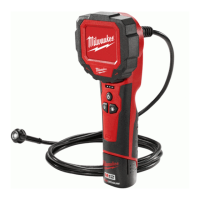
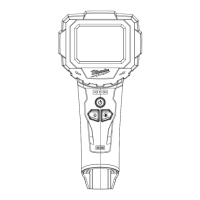
The Milwaukee M12™ M-SPECTOR™ 360 Inspection Camera is a portable, battery-operated device designed for visual inspection in various environments. It is not intended for medical or personal inspection. The tool features an LCD screen that displays images captured by a camera head attached to a flexible cable. This allows users to inspect hard-to-reach areas, such as inside walls, pipes, or machinery, without direct visual access.
Function Description
The primary function of the M12™ M-SPECTOR™ 360 Inspection Camera is to provide visual feedback from confined or obstructed spaces. The camera head, located at the end of a flexible cable, transmits images to the integrated LCD screen. The device incorporates several features to enhance its utility:
- Image Capture: Users can save still photos of the current view displayed on the LCD screen.
- Video Recording: The camera can record video footage, which is indicated by a "REC" display and a timecode counter on the LCD during recording.
- Zoom Functionality: The tool offers multiple zoom levels, allowing users to magnify specific areas of interest within the displayed image.
- Image Rotation: The LCD image can be rotated 180 degrees, providing flexibility in viewing orientation, especially when the camera head is positioned in awkward angles.
- Camera LED Brightness Control: The camera head is equipped with LEDs, and their brightness can be adjusted to illuminate dark inspection areas.
- Gallery Mode: The device includes a gallery mode for reviewing saved photos and videos. This mode allows users to navigate through stored media, play videos, and delete unwanted files.
- Memory Card Storage: Images and videos are stored on a Micro-SD card, which is inserted into a dedicated slot on the device. The tool comes with a pre-formatted 32GB Micro-SD card.
- Battery Operation: The inspection camera is powered by a 12-volt MILWAUKEE® battery pack, ensuring portability and cordless operation.
Usage Features
Operating the M12™ M-SPECTOR™ 360 Inspection Camera involves several steps, from initial setup to performing inspections and managing captured media:
- Power On/Off: The tool is turned on and off by pressing and holding the power button. The LCD screen will display the camera's view once powered on.
- Battery Insertion/Removal: To use the tool, a MILWAUKEE® 12-volt battery pack must be inserted securely into the handle. Removal is accomplished by pressing the release buttons and pulling the battery pack away. It is crucial to remove the battery pack when the tool is not in use to prevent accidental activation or discharge.
- Memory Card Management:
- Insertion: The Micro-SD card is inserted into a slot under a protective cover, with the top of the card facing away from the LCD screen. It should click securely into place.
- Removal: To remove the card, press it in and release, allowing it to pop out.
- Formatting: The camera comes with a pre-formatted card, but if a new card is used or existing data needs to be cleared, the card can be formatted to FAT32 directly on the device. Formatting will erase all existing data.
- Accessory Attachment: The camera cable is designed to accept various accessories, which can be snapped onto the detents at the end of the cable. These accessories can be removed by unclipping and pulling them away.
- Performing Inspections:
- Cable Adjustment: The flexible cable should be adjusted to best fit the opening of the inspection area.
- Hazard Check: Before inserting the cable, users must check the workspace for potential hazards.
- Image Manipulation: During inspection, users can utilize the zoom button to magnify or reduce the image, the rotate button to change the image orientation, and the power button to adjust the camera LED brightness.
- Saving Media: Photos are saved by pressing the dedicated photo button, and video recording is initiated and stopped using the video record button.
- Gallery Mode Navigation: In gallery mode, users can browse through saved photos and videos using navigation buttons. Videos can be played and paused. Files can also be deleted from the memory card within this mode.
- Screen Rotation: The entire LCD housing can be rotated approximately 270 degrees clockwise or counter-clockwise, allowing for comfortable viewing angles during extended use.
- Safety Precautions:
- Always wear eye protection compliant with AS/NZS 1337 to reduce the risk of injury.
- Before beginning any job, always check the work area for electrical, chemical, or moving hazards to reduce the risk of explosion, electric shock, and property damage.
- When inspecting behind walls, shut off circuit breakers to the entire area.
- For pipe inspections, ensure there is no electrical charge to the pipes. Prevent liquid from flowing down the cable and into the tool.
- When inspecting vehicles, turn off the engine and allow it to cool. Avoid contact between the camera/cable and oil, gas, or other corrosive materials.
- Do not use excessive force or "kink" the cable.
- Avoid contact between the camera/cable and corrosive or oily substances.
- The cable is not designed to clear clogs or move obstructions and should not be used as a drain cleaner.
- Automatic Shut-off: The tool will automatically shut off after 5 minutes of inactivity to conserve battery life.
- Indicators: The LCD displays various indicators, including battery level, zoom level, LED brightness level, memory card status (missing, no media detected, full, or archive), and an over-temperature warning.
Maintenance Features
Proper maintenance is essential for ensuring the longevity and safe operation of the M12™ M-SPECTOR™ 360 Inspection Camera:
- General Maintenance Program: Adopting a regular maintenance program is recommended. For comprehensive service, the tool should be returned to a MILWAUKEE® service facility after six months to one year of use, depending on usage.
- Cleaning:
- Always remove the battery pack before cleaning.
- Clean dust and debris from vents.
- Keep the tool clean, dry, and free of oil or grease.
- Use only a mild soap and a damp cloth for cleaning. Avoid using petrol, turpentine, lacquer thinner, paint thinner, chlorinated cleaning solvents, ammonia, or household detergents containing ammonia, as these can be harmful to plastics and other insulated parts.
- Never use flammable or combustible solvents around the tool.
- Never immerse the tool in liquid or allow liquid to flow inside it.
- Battery Contact Cleaning: If the tool does not start or operate at full power with new batteries, clean the contacts on the battery door.
- Repairs: For any repairs, the tool, battery pack, and charger should be returned to the nearest authorized service center. Users should never disassemble the tool or attempt any rewiring of its electrical system.
- Label and Nameplate Maintenance: Ensure that all labels and nameplates are legible and intact, as they carry important information. Contact a MILWAUKEE® service facility for replacements if they are unreadable or missing.
- Storage: Do not store the tool in areas of high heat or humidity. Avoid exposing the tool to extended high heat from the sun, such as on a vehicle dashboard, as this can damage the product or the battery pack.
- Accessory Use: Only use accessories specifically recommended for this tool. Using unapproved accessories may be hazardous.

 Need help?
 General

 To Next Page