Need help?
Do you have a question about the Mini Advanced Car Eye 3.0 and is the answer not in the manual?
Explains continuous and incident recording during driving and legal checks.
Describes automatic recording triggered by impacts while the vehicle is parked.
Introduces the main settings available in the ACE 3.0 app for product configuration.
Details settings for audio, HDR, Night Vision, and channel configuration.
Covers settings for driving mode, G-Sensor sensitivity, entry/exit phases, and parking mode.
Explains how recordings are saved and can be moved to a computer or app.
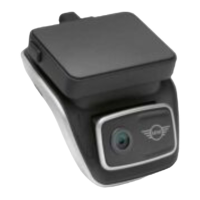
The MINI Advanced Car Eye 3.0 (ACE 3.0) is a sophisticated in-car camera system designed to monitor your vehicle both while driving and when parked. It utilizes intelligent sensors to record risky traffic situations, attempted break-ins, and accidents, providing an extra layer of security and peace of mind. The system includes a front camera, with an optional rear camera for comprehensive coverage.
The core function of the ACE 3.0 is continuous video recording. While driving, it records videos in 1-minute segments, storing them in the "DRIVING" folder on the provided microSD™ card. In the event of an impact, the system automatically triggers an "Incident recording," capturing video from 10 seconds before to 50 seconds after the incident, saved in the "INCIDENT" folder. This ensures crucial moments surrounding an event are preserved.
When the engine is turned off, the product transitions to "Parking mode" after a defined "Exit phase" time. In Parking mode, if an impact is detected, a video is recorded for 10 seconds before and after the impact, stored in the "PARKING" folder. This feature is particularly useful for monitoring your vehicle when it's unattended. The system also supports "Manual recording" (REC) via a button on the front camera, allowing you to take pictures or record videos manually, which are saved in the "SNAPSHOT" folder. These manual recordings include 10 seconds before and 50 seconds after the button press.
The ACE 3.0 incorporates several advanced features to enhance recording quality and user experience. "HDR (High Dynamic Range)" can be activated for the front camera to improve video and picture quality by providing brighter highlights, more detailed shadows, and a wider range of colors, especially in challenging lighting conditions. "Night Vision" further enhances recording in low-light environments by utilizing real-time image signal processing (ISP) to brighten videos recorded while parked at night.
A "GPS function" is integrated to add speed information and current location to recordings, and it enables a "Vehicle location" feature. When the product is in Parking mode and connected to the ACE 3.0 app, pictures and videos taken by the cameras, along with the vehicle's location, are saved and displayed on a digital map within the app, helping you easily find your parked car.
The ACE 3.0 is designed for user-friendly operation. It automatically switches on when the vehicle's ignition is turned on and automatically switches off after a defined "Exit phase" once the ignition is turned off. Manual power control is also available by pressing the power button.
The system is controlled and managed primarily through the "ACE 3.0 app" on your smartphone. This app allows you to view recorded events, archive them, and customize various settings. Connection to the smartphone is established via Bluetooth and Wi-Fi. The app provides access to "Camera settings" such as enabling/disabling "Audio Recording," selecting "REC Button Action" (video or picture), turning "HDR" and "Night Vision" on or off, and configuring "Channel setting" for front camera only or front and rear camera recording. You can also adjust "Brightness" for both front and rear cameras.
"Recording settings" within the app allow you to fine-tune the "Driving mode" (Continuous recording or G-Sensor only) and "G-Sensor sensitivity" for driving incidents. You can also set the "Entry phase" and "Exit phase" times. For "Parking mode," you can enable/disable it and adjust "G-Sensor sensitivity" for parking incidents.
"Volume settings" include adjusting "Beep sound" and "Voice guidance" volumes. "System settings" allow you to select the "Language" for voice announcements, choose your "Country/Region," and configure "Date and time" settings. Other system options include selecting "Voice gender," enabling/disabling the "Security LED," turning "Overlays" (date, time, speed, GPS) on or off in recordings, selecting "Speed unit," and enabling/disabling "GPS." The app also offers a "Factory reset" option to clear settings, all recordings, or both.
A key hands-free feature is "Voice recognition," available in English, German, Korean, Chinese, and Japanese. By saying "Hi Camera" to activate it, you can then use various commands to control the camera, such as "Turn sound off," "Take a picture," or "Save video."
Proper maintenance ensures the longevity and optimal performance of your ACE 3.0. The product uses a microSD™ card for storing recordings. It is crucial to ensure the product is turned off before inserting or removing the memory card to prevent data loss or damage. Only authentic memory cards are recommended, as MINI does not guarantee compatibility or proper operation with third-party cards.
The ACE 3.0 app plays a vital role in maintenance by facilitating "Firmware updates." MINI recommends enabling the automatic update function in the app. App updates often include firmware updates, which are transmitted and installed as soon as the camera is connected to the smartphone. Customized settings are retained even after firmware updates.
Before delivering the product to a third party, it is important to "Erase all recordings and settings" using the ACE 3.0 app. Additionally, the user guide and Declaration of Conformity should be handed over with the product. In case of an important event (incident recording), it is advisable to back up the video or picture data to the ACE 3.0 app or an external memory to prevent data loss.
For any questions or support regarding the ACE 3.0, regional email contacts are provided, ensuring assistance is available worldwide.
 General
| GPS | Yes |
|---|---|
| Wi-Fi | Yes |
| G-Sensor | Yes |
| Parking Mode | Yes |
| Battery | Supercapacitor |
| Operating Temperature | -20°C to 70°C |
| Resolution Front | 2560x1440 (QHD) |
| Resolution Rear | Full HD (1920 x 1080) |
| Field of View Front | 150° |
| Storage | MicroSD (up to 256GB) |


 To Next Page