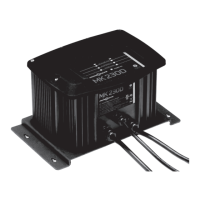
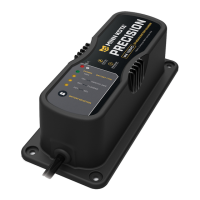
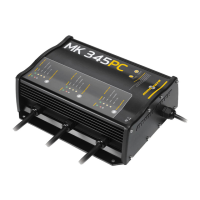
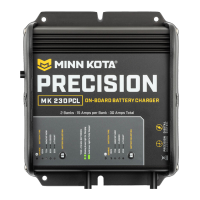
The Minn Kota Precision Onboard Charger is a high-performance, microprocessor-based battery charger designed for marine use. It offers a fast, precise charge profile by automatically controlling current and voltage, preventing overcharging of your batteries. This charger is suitable for charging and maintaining 12-volt, 6-cell lead-acid batteries, including Flooded Lead-Acid, Maintenance Free, Gel Cell, and AGM/Starved Electrolyte battery types. It is not intended to supply power to low-voltage electrical systems other than for charging and maintaining batteries, nor is it designed for charging dry-cell batteries commonly used with home appliances, as these may burst and cause injury or property damage.
Function Description:
The Minn Kota Precision Onboard Charger is engineered to optimize battery performance and longevity through its advanced charging capabilities. Each output bank operates independently and is isolated from one another and the AC input, allowing for the charging of independent batteries or combinations of batteries hooked in series or parallel without the need to disconnect any switches or wires/straps joining them. The charger features an automatic multi-stage charging process, including Bulk Mode, Absorption Mode, Mild Equalize Mode (for Flooded Lead-Acid only), Equalize Mode (user-selectable for Flooded Lead-Acid only), and Maintenance Mode.
- Bulk Mode: During this initial stage, the charger delivers full current until the battery reaches approximately 75% charge.
- Absorption Mode: The charging current tapers down while the battery voltage is held constant.
- Mild Equalize Mode (Flooded Lead-Acid Only): The voltage is automatically increased with each charging cycle for a maximum of 1.5 hours to desulfate and mix fluids in each battery.
- Equalize Mode (Flooded Lead-Acid Only): This mode must be manually selected for each bank to be equalized. The voltage is increased for a maximum of 4 hours to desulfate and mix fluids in each battery. It is recommended to perform Deep Equalization every 30th charge cycle or once a year. The charger will only allow selection of the Equalize Mode if the previous selection was Flooded Lead-Acid. If the equalize process is interrupted (by unplugging the AC or a DC cord), the charger will revert back to the Flooded Lead-Acid battery type.
- Maintenance Mode: When the battery reaches full charge, the charger voltage is reduced. A flashing 100% GREEN LED indicates the battery is in Maintenance Mode and ready to use. After 12 hours, the charger automatically turns off, and a steady 100% GREEN LED indicates the battery is in long-term Maintenance Mode and ready to use. The charger will automatically resume charging when the battery voltage drops below 12.6V.
The charger incorporates several advanced features for optimal performance and safety:
- Automatic Temperature Compensation: Adjusts charging parameters based on ambient temperature to prevent over or undercharging.
- Low-Line Voltage Compensation: Ensures consistent charging performance even with fluctuations in AC input voltage.
- True-Rated Output: Delivers the specified charging current reliably.
- Battery Selection by Bank: Each bank can be independently set to one of four modes: Gel Cell, Flooded Lead-Acid, AGM/High Performance AGM, and Equalize. The factory default setting is Flooded Lead-Acid. To change the battery type, plug the charger into an AC outlet, wait for the 1 YELLOW LED to indicate the current battery type, then press and hold the Battery Selection button until the desired YELLOW LED illuminates. The setting is saved even if power is disconnected.
- Battery Equalization (Flooded Lead-Acid only): Automatic equalization technology cleans and conditions batteries with each charge cycle.
Important Technical Specifications:
The Minn Kota Precision Onboard Chargers are available in various models with different output configurations:
- Input Voltage: 95-135VAC, 60Hz
- Waterproof, Shock-Resistant, Vibration-Resistant Construction: Designed for harsh marine environments.
- DC Output Cords: Each DC output cord is six feet long. They can be lengthened by splicing and soldering 12 AWG (minimum) wire, with a maximum extension length of 15 feet. Each splice should be covered with dual wall adhesive-lined heat shrink tubing. The fuse holder should remain within 7 inches of the battery terminals.
- Inline Fuses: Each output cord has inline fuses on the RED and BLACK leads near the ring terminals. These fuses protect against surges and short circuits caused by damaged charger output cables. If a fuse blows, it should be replaced with a 30 amp ATC 32V automotive fuse.
- Input Power (120VAC, 60Hz) and Output per Bank:
- MK106PC: 12V system, 1 bank, 6 amps/bank, 6 amps total, 100W input.
- MK110PC: 12V system, 1 bank, 10 amps/bank, 10 amps total, 165W input.
- MK212PC: 12/24V system, 2 banks, 6 amps/bank, 12 amps total, 200W input.
- MK220PC: 12/24V system, 2 banks, 10 amps/bank, 20 amps total, 330W input.
- MK230PC: 12/24V system, 2 banks, 15 amps/bank, 30 amps total, 500W input.
- MK318PC: 12/24/36V system, 3 banks, 6 amps/bank, 18 amps total, 300W input.
- MK330PC: 12/24/36V system, 3 banks, 10 amps/bank, 30 amps total, 500W input.
- MK345PC: 12/24/36V system, 3 banks, 15 amps/bank, 45 amps total, 700W input.
- MK440PC: 12/24/36/48V system, 4 banks, 10 amps/bank, 40 amps total, 660W input.
- MK460PC: 12/24/36/48V system, 4 banks, 15 amps/bank, 60 amps total, 900W input.
- Battery Amp Hour (AH) Rating Compatibility:
- 5 AMPS output: 20-125 AH
- 6 AMPS output: 24-125 AH
- 10 AMPS output: 40-125 AH
- 15 AMPS output: 60-180 AH
- Operating Temperature: The charger can reach up to 150°F. The maximum recommended room temperature for charging batteries is 122°F. If the charger gets too hot, the output current will drop to protect the charger and the battery.
Usage Features:
- Comprehensive LED Display: Provides clear indications of charging status and battery type.
- RED LED (solid): Indicates an issue with the battery connection.
- RED LED (flashing): Indicates an error (refer to troubleshooting).
- YELLOW LEDs (25%, 50%, 75%): Indicate the progress of charging.
- GREEN LED (flashing 100%): Battery fully charged, in Maintenance Mode, ready to use.
- GREEN LED (solid 100%): Battery fully charged, in long-term Maintenance Mode, ready to use.
- GREEN and 25% YELLOW LEDs (flashing): Battery voltage is less than 10.5 volts, in low power safety mode. Full charging begins once the battery reaches 10.5 volts.
- Installation:
- Charger should never be placed above the battery, below the waterline of the boat, or directly adjacent to fuel tanks.
- Ensure adequate ventilation with a minimum of six inches of unobstructed area on all sides for proper air circulation.
- Mount securely using nuts, bolts, and washers in all four mounting holes. Apply marine-grade silicone sealant in drilled holes for a waterproof seal.
- An AC plug holder is supplied to store the power cord plug in a dry site, preventing corrosion and contact with battery posts.
- Before making connections in confined spaces, open the compartment for 15 minutes to allow gasses to escape.
- AC Power Cord Connection: The charger is equipped with an electric AC power cord and must be grounded to reduce the risk of electric shock. Plug into a properly installed outlet in accordance with local codes. Do not alter the AC cord or plug. An adapter should not be used.
- DC Connection: Connect RED lead to POSITIVE battery terminal and BLACK lead to NEGATIVE battery terminal. Follow specific steps for connecting to batteries in a boat/vehicle or outside a boat/vehicle to reduce the risk of sparks.
- Extension Cables (Optional Accessory MK-EC-15): Available for extending charger output cables up to 15 feet. Features WAGO® Wall-Nut™ quick connectors and fused positive and negative leads.
- AC Power Port (Optional Accessory MKR-21/MKR-23): Allows quick thru-hull connection to an AC extension cord, preventing corrosion with a watertight cover and gasket.
- Compatibility with Odyssey Batteries: All Minn Kota On-board Precision Chargers are tested and approved for use with Odyssey batteries rated from 7-114 Ah.
- Charging Multiple Batteries: While not recommended, it is possible to charge two batteries on one charger bank, though it will take twice as long and may result in errors if batteries take too long to charge. Connecting two charger banks to one battery is possible for faster charging, but requires more frequent electrolyte level checks due to increased evaporation.
Maintenance Features:
- General Cleaning: Regularly check the battery charger and ring terminals for dirt, oil, and battery corrosion. Clean with a water and baking soda solution, then wipe dry with a clean cloth. Disconnect from battery posts before cleaning terminals.
- Cord Management: Coil the power cord when not in use to prevent damage.
- Storage: Store the battery charger in a clean, dry area.
- Damaged Cords/Plugs: If the power cord or plug becomes damaged, contact the Minn Kota Service Repair Department for service information. Otherwise, dispose of the battery charger in compliance with local law, as damaged cords and plugs can cause electric shock or electrocution.
- Long-Term Storage: Leaving the charger plugged in for long periods of non-use will not damage batteries, as the charger floats battery voltage between 13.2V and 13.5V in maintenance stage. However, check electrolyte levels approximately every 30 days and fill with water as needed after charging.
Safety Precautions:
- Always work near a lead-acid battery with someone nearby for assistance.
- Have fresh water and soap available in case of battery acid contact.
- Wear complete eye and clothing protection.
- Immediately wash skin/clothing with soap and water if acid contacts, and flush eyes with cold water for at least 10 minutes, seeking medical attention.
- Never smoke or allow sparks/flames near the battery or flammable equipment.
- Be cautious to avoid dropping metal tools onto the battery or terminals, which could cause sparks or short circuits.
- Remove personal metal items (rings, bracelets, necklaces, watches) when working with a lead-acid battery to prevent severe burns from short circuits.
- Do not operate the charger with a damaged cord or plug, or if it has been dropped or otherwise damaged.
- Do not disassemble the charger, as incorrect reassembly poses risks of electric shock or fire.
- Unplug the charger from the outlet before any maintenance or cleaning.
- Never touch ring terminals together while the charger is plugged into an outlet or extension cord.
- External connections must comply with United States Coast Guard electrical regulations (33CFR183, Sub Part 1).
- Avoid recharging batteries with the watercraft or motor lower unit in the water during electrical storms to prevent severe damage.
- If using a generator, ensure it has a clean sine wave output and meets the charger's power requirements.



 To Next Page
 General