8
5. Try wearing Mio LINK on the same arm as your GPS watch for better
ANT+ connection.
6. If you often have cold hands or poor circulation, try exercising for a
few minutes to increase blood flow before you begin to track your
heart rate.
Getting Your Heart Rate
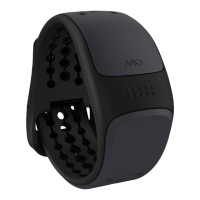
1. To turn on Heart Rate Mode on your Mio LINK, press and hold the
Button until the LED lights up. The colour of this LED is an indicator
of the battery level:
Light Blue Battery is charged
Yellow Battery level is below 30%
Red (flash twice) Battery level is low and unable to provide HR
measurement
2. Mio LINK will immediately begin searching for your heart rate (HR),
indicated by the pulsing LED light.
3. Hold your arm still until the LED blinks in a distinctively slower
pattern. When this occurs, Mio LINK has found your heart rate. The
LED colour at this point is an indicator of the HR zone, calculated as
a percentage of your maximal heart rate (MHR):
ENGLISH


 To Next Page