6 7
5.SPECIFICATIONS:
T.H.D.
Dimensions(m/m)
Approvals&Patent
Note
MA-101
PLL
27W(RMS)/4Ω (load)
50Hz-15KHz3dB±
UHF600~950MHz
40KHz
Newstylepatents;Telecomandsafetyregulationsapproved
Variousspecificationsoncarrierfrequencyranges,maximum
deviationsandRFoutputpowercomplywiththeregulationsof
differentcountries.
Model
Spec
CarrierFrequencyRange
OscillationMode
Max.Deviation
Antenna
Sensitivity
PowerOutput
FrequencyResponse
AudioInput
Speaker
PowerSupply
ChargingTime
OperatingTime
Weight
RX
BuiltIn
12/2.7AHrechargeablebatteryandintelligentcharger
with90~260VACadapter
Built-inwirelessreceiver,1/4"micandline-injacks
4hoursAutomaticrechargeablebatterymanagement()
285(L)x160(W),178(H)
8hourstalktime
Black
3Kgs(withbattery)
Built-in5inchhighsensitivityfullrangespeaker
<1%
6dBmVatS/N>70dB
ExteriorColors
OperationMode Directoperationonspeakerunit
Withpropercareandcharging,it is unlikely that it will be necessary to
replace theMA-101battery for sometime.However,there is anaccess panel
providedforthispurpose.Ifextendedperiodsofusearerequiredwithouttimeto
rechargethebattery,youmaywishtohaveasecondbatteryfullychargedand
readytoinstallanduseoncetheexistingoneisdrained.Thebatteryisa
standard12V/2.7AgelcellandisavailablefromMIPRO.
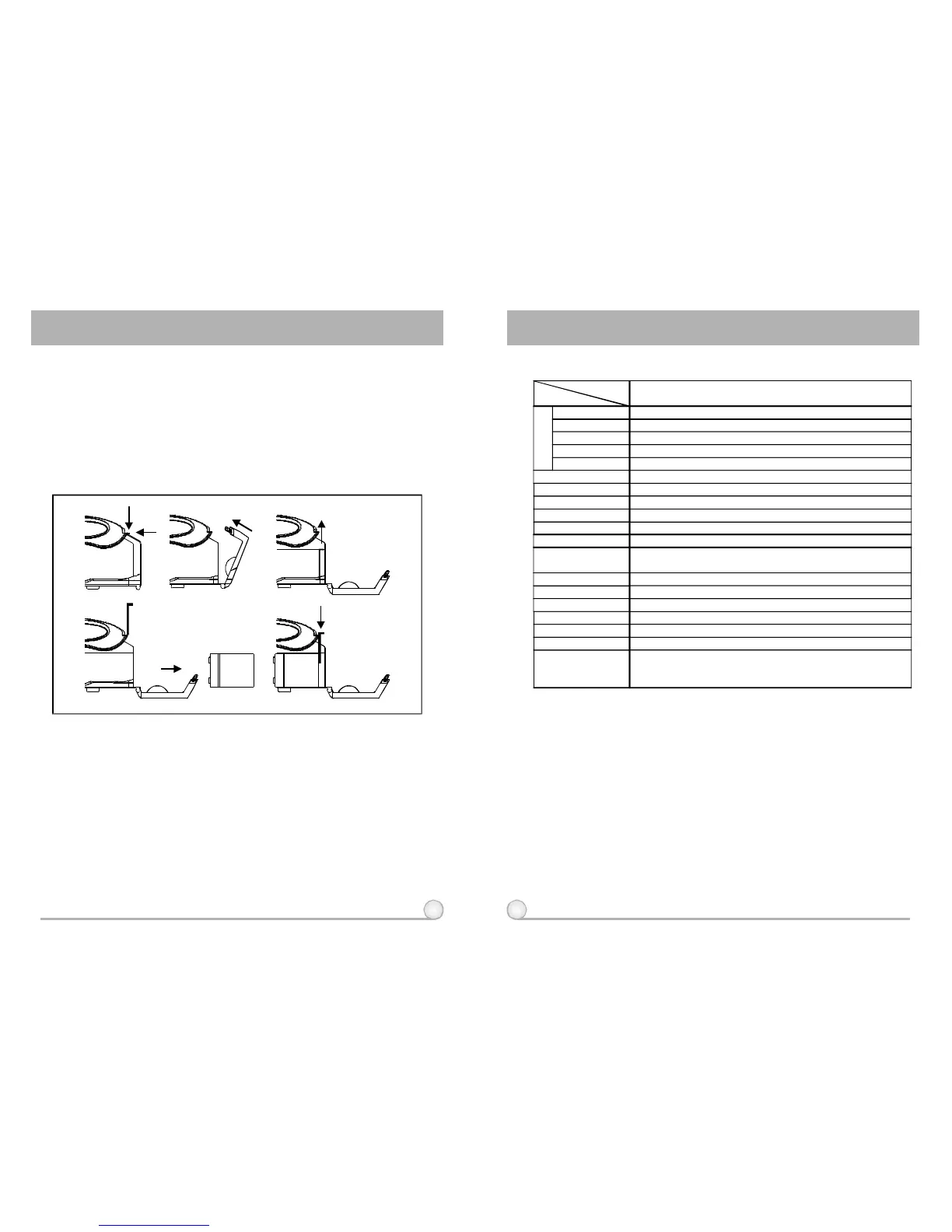
1.LaythePAsystemonaflatsurface.
2.Pressdownonthetwofastenersatthetopofbatterycompartment.The
compartmentdoorwillnowswingdownonitshinge.
3.Removetheinteriorrearpanelofthebatterycompartmentbyslidingitup.Use
caution,asthebatterymay"spring"forwardwhenyoureleasethispanel.
Carefullyremovethebattery.
4.Insertafullychargedbattery,observingthecorrectpolarity.Thetwoterminalson
thebatteryshouldbenearthetopofthebatterywiththeprintedsideup.This
alignmentcorrespondswiththespringsandterminalsinsidetheunit.
5.Pressthebatteryintotheunit,holdingitfirmlyagainstthesprings,whilesliding
therearpanelbackintospace.Thismayrequiretwohands.
6.Closethebatterycompartmentdoor.Liftuponthetwofastenersuntilthey"click"
intoplace.
4.REPLACINGTHEMA-101BATTERY
WirelessPortablePAAmplifierWirelessPortablePAAmplifier



 To Next Page