Operating Manual
WIRELESS AMPLIFIER
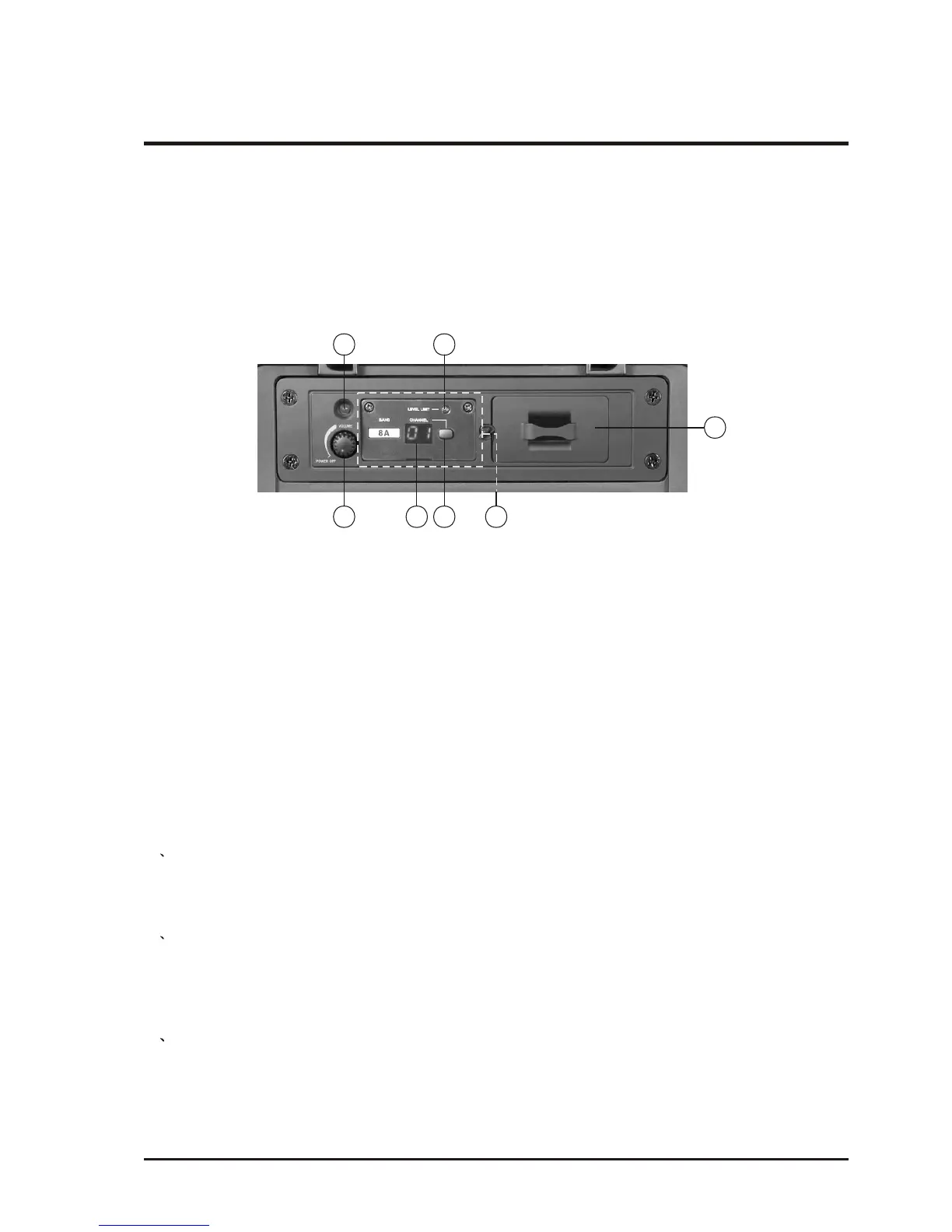
6. Optional wireless transmitter and receiver module:
(D1) Power Switch/Volume Knob (D2) Channel LED Display
(D3) MT-90 transmitter module (D4) Channel-Selecting Button
(D5) Power Indicatorr (D6) Volume Limit Indicator (D7) Bodypack Transmitter Storage
D4
D2
D6D5
D1
D7
D3
Users have options to add the MTM-90 wireless transmitter or MRM-72 receiver
module if they have the needs.
(1) Additional installation of MTM-90 interlinking transmitter:
1. Respective name and function on the control panel of MTM-90 wireless
interlinking transmitter:
2. Ways to install the MTM-90 interlinking transmitter:
1. Remove the fixed spare cover from the above of MA-708 operation panel.
2. Push the MTM-90 module in horizontal direction into the spare installation
slot.
3. Fasten the front panel of module with screws.
4. Further push the MT-90 transmitter module horizontally into the previously
designed installation slot.
5. Fasten the front panel as mentioned above.
- 12 -
1 Turn the transmitter power/volume switch (D1) to ON by rotating the knob
clockwise. When ON, the power indicator (D4) and Channel LED Display (D2)
will be lit. Rotate volume knob (D1) clockwise to adjust the desired volume.
Rotate same volume knob (D1) counterclockwise to power OFF the transmitter.
2 To select channel one a time: Press and hold the Channel-Selecting button (D3)
for around 2 seconds and release when channel LED display (D2) starts flashing.
Press and release button once to move to the next available channel. If button is
not pressed again when Channel LED flashes 6 times, the channel appearing in
Channel Display is automatically saved and set.
3 To select channel continuously: Press and hold the Channel-Selecting button (D3)
for around 2 seconds until channel LED display (D2) starts flashing. Press and
hold same button will automatically advance channel continuously. There are a
total of 16 preset channels. If button is not pressed again when Channel LED
flashes 6 times, the channel appearing in Channel Display is automatically saved
and set.
3. How to Set up Wireless Interlinking Transmitter.



 To Next Page