Operating Manual
WIRELESS AMPLIFIER
- 13 -
4 Press and hold the Channel-Selecting button (D3) for around 2 seconds until
channel LED display (D2) starts flashing. If button is not pressed again when
Channel LED flashes 6 times, the channel appearing in Channel Display is
automatically saved and set.
5 The volume limitation Indicator won't be lit under the normal audio volume. If the
audio input exceeds the set limitations, volume restriction control will activate and
the indicator will lit.
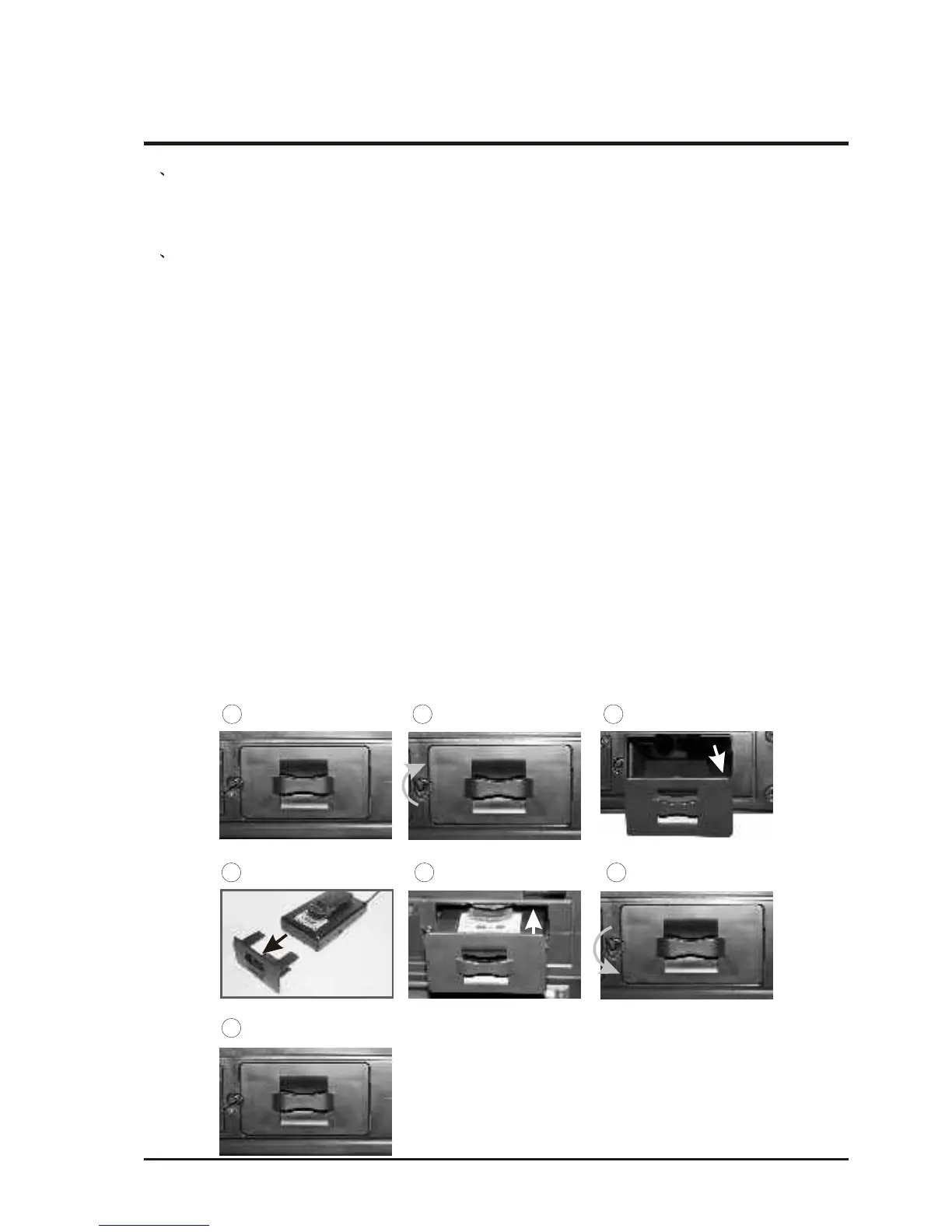
(4) MTM-90's compartment for body pack transmitter:
1. Each MTM-90 module can store one pcs of body pack transmitter.
2. Steps of storing the body pack transmitter:
A. To undo the fixed panel, it is required to have the fastening knob turned in
clockwise direction to position.
B. Slightly move the fixing panel to the left side and then withdraw it in
horizontal direction.
C. Have the rear of body pack transmitter fixed to the storage panel, plus to
insure the front of body pack transmitter faced upward and the antenna
faced forward.
D. Push the body pack transmitter horizontally into the compartment and to
position, carefully keep the antenna in horizontal position to prevent from
being squeezed.
E. Press the fixed panel and have the fixed knob turned in anticlockwise
direction to the highest point to get fasten up.
F. Pull the fixed panel mildly to make sure the panel not go up or get loose.
B
A
D
C
FE
G



 To Next Page