EasyManua.ls Logo

Miranda NV8144 - Page 100

Default Icon
140 pages
Print Icon
To Next Page IconTo Next Page
To Previous Page IconTo Previous Page
Loading...
90 Rev 2.2 • 27 Mar 10
2. Installation
Connecting to Power
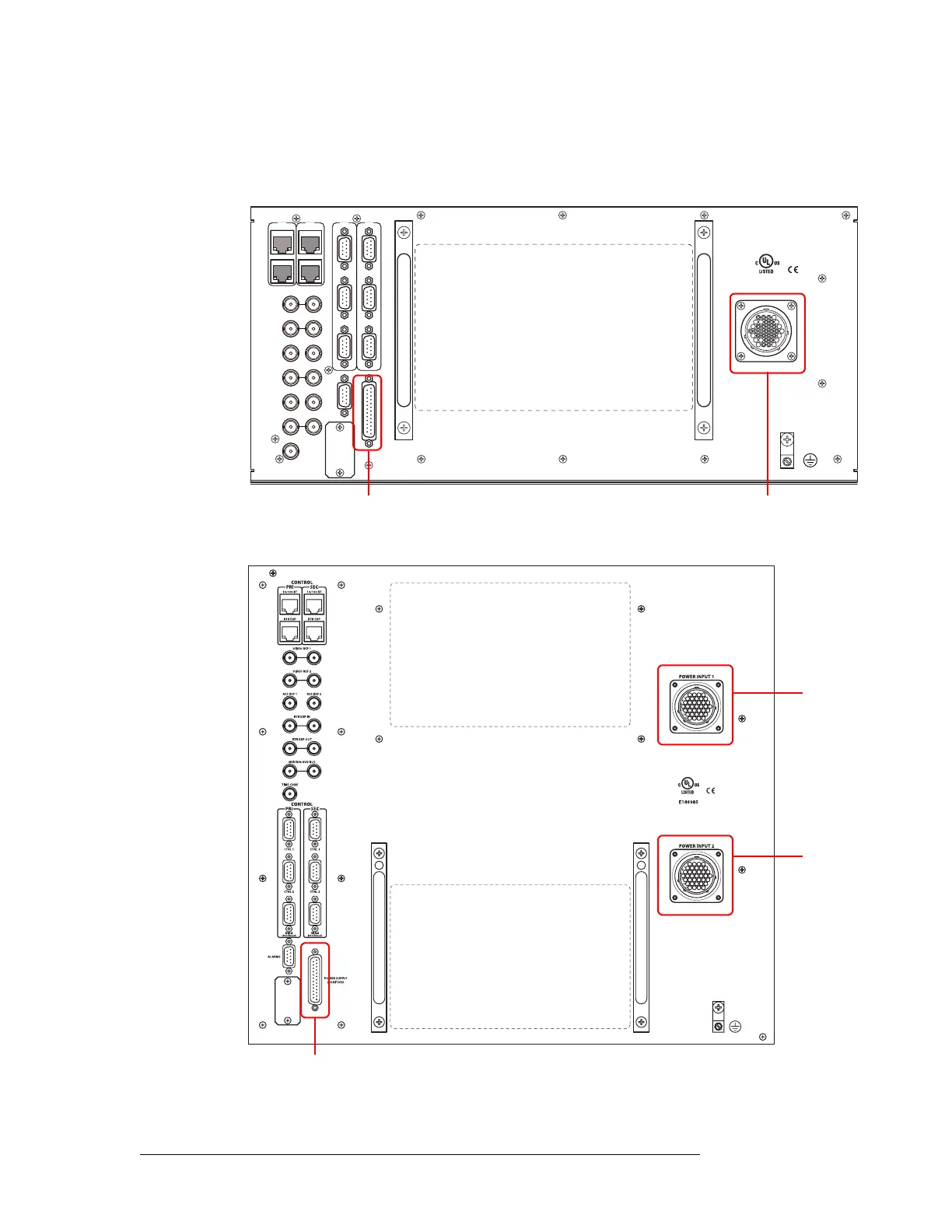
3 Facing the rear of the router, connect the other end of the power cable to ‘Power Input 1’, as
shown in Figure 2-34 for NV8280/NV8280-Plus or Figure 2-35 on page 90 for NV8576/
NV8576-Plus.
Figure 2-34. NV8280 Power Supply Monitor and Power Supply Connections on Router
Figure 2-35. NV8576 Power Supply Monitor and Power Supply Connections on Router
10/100 BT
RTR EXP
10/100 BT
RTR EXP
VIDEO REF 1
PRI
SEC
CTRL 1
CTRL 2
CTRL 1
CTRL 2
DIAG (38.4 Kbaud)
DIAG (38.4 Kbaud)
VIDEO REF 2
AES REF 1
AES REF 2
RTR EXP IN
ALARMS
RTR EXP OUT
NVISION AUX BUS
POWER
SUPPLY
MONITORS
TIME CODE
E146905
POWER INPUT
PRI
SEC
Power
Input
Power Supply
Monitor Connector
Power
Input 1
Power
Input 2
Power Supply Monitor
Connector

Table of Contents

Related product manuals