19
INSTALLATION
15. Start ToBeSure® system
Press the cold or ambient water buttons for 15 seconds. After 15 seconds, the UV lamp lights on. The ToBeSure® sytem
is operational.
16. Starting up the water heater = Hot version
• Check that the water heater switch, at the back of the water cooler, is on the «O» position (Figure 8).
Figure 8
SET THE PERIODICITY OF THE FILTER (Optional)
Figure 7
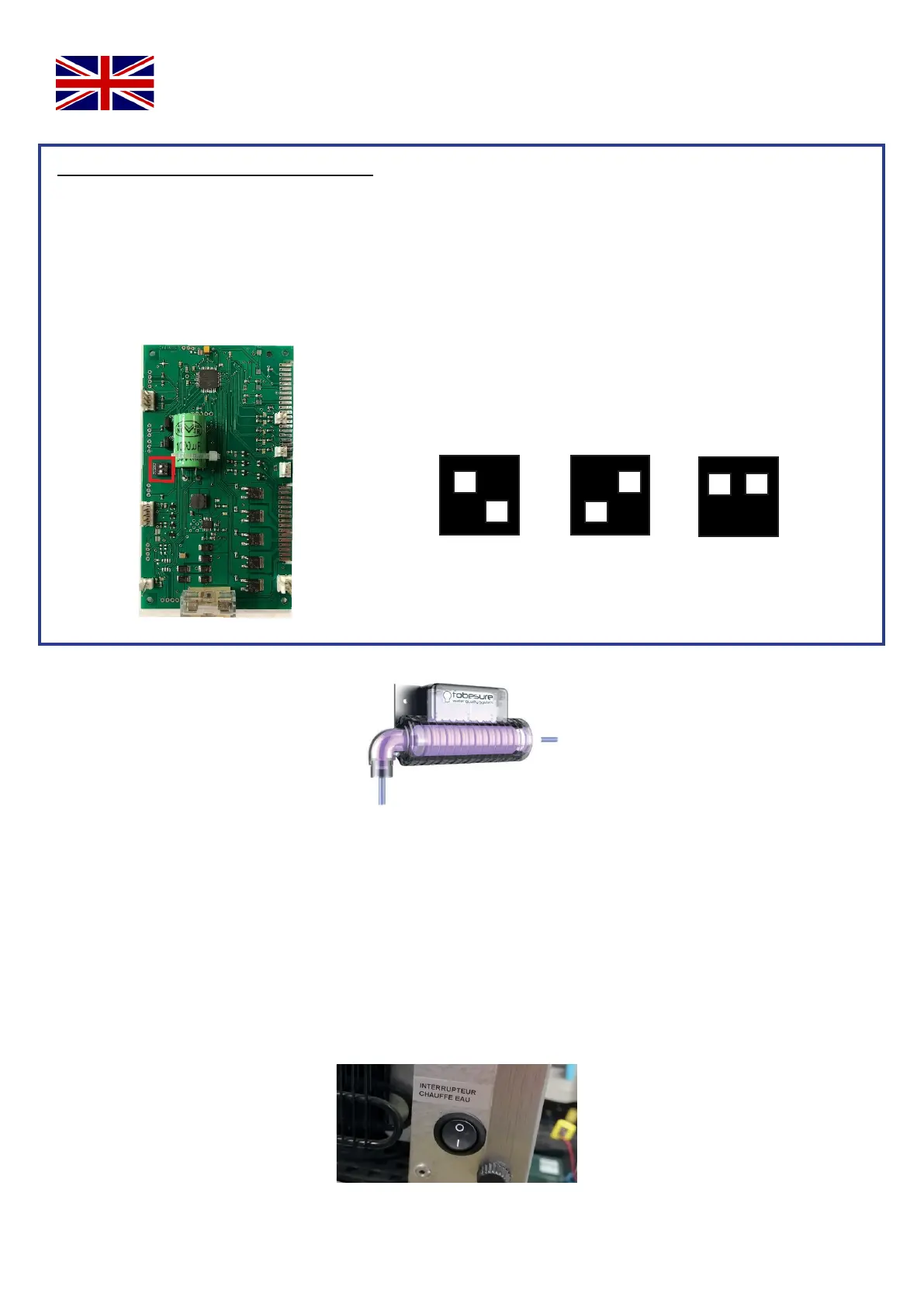
You can set the periodicity of the filter on 3, 6 or 12 months. This adjustment is done on the corresponding dipswitch on
the main circuit board (Figure 7).
These dipswitchs have 2 switchs to lower or lift, to set the delay within which the filter will be signalled as used.
1. Unplug the electric cable from the circuit board.
2. Slightly unscrew the 2 screws.
3. Slightly lift the circuit board and pull towards you.
4. If needed, modify the settings according to the below calibration.
3 MONTHS
Below the dipswitch position to valibrate the periodicity :
6 MONTHS
12 MONTHS
FACTORY SETTING OF THE CIRCUIT BOARD : 6 MONTHS
1 2 1 2
1 2
For transport you may need to purge the Carbonator using CO2 pressure, during this operation the ToBeSure® system
may cause disturbances because it is not full of water.
Provide a container large enough to receive the water from the Carbonator (ideally a minimum 2 liter container).
In case of keyboard malfunction, you can reset it by placing the palm of your hand on it for 10 seconds, the keyboard will
reset itself. If the system does not respond, it will be necessary to cut off the power supply (in this case, remember to run
the water again for the 15 seconds “exception” of the ToBeSure® system).


 To Next Page