13
Cleaning the Air Filter
If the air lter becomes clogged
with dust/dirt, the air lter should be
cleaned every two weeks. Depending
on indoor air quality, more frequent
cleaning may be needed. A dirty air
lter will decrease airow and reduce
efciency.
1. Press the Power button to turn OFF the
air conditioner and pull out the plug from the
wall socket.
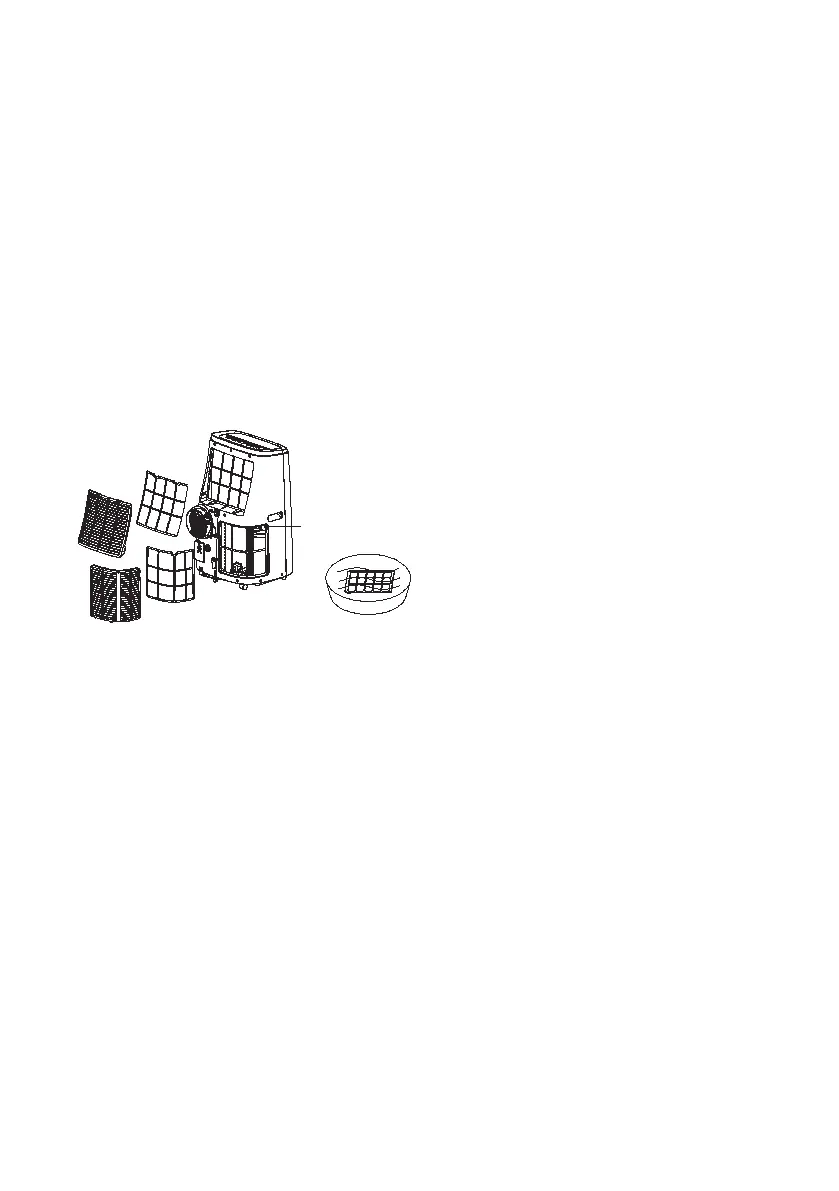
2. Remove the screw on bottom of lter.
Take off up and bottom lters from the air inlet
vents. (See illustration below).
Screw
3. Dust/Dirt clogged in the lter can
be removed by vacuum cleaner. If lter is very
dirty, wash it in lukewarm soapy water while
rubbing it gently with a brush. A mild detergent is
recommended.
4. Wipe the lter with a soft cloth soaked
in water and dry it up in the shade. Do not use
harsh cleaners or very hot water. Do not wash in
a dishwasher.
5. Allow lters to dry completely before
reinstalling. Replace the air lter as it was. Do not
operate the air conditioner without the air lters
in place.
After a Long Idle period and before
next use
1. Remove the drain plug and drain
water completely.
2. Set the fan going for a few hours to
dry out the inside completely.
3. Switch the air conditioner OFF and
unplug it from the wall socket. Clean the lter
and outer surface.
4. Allow it to dry completely, then
reinstall the lter.
5. Take out batteries from remote
controller and store with air conditioner in a
clean, dry location, away from direct sunlight,
extreme temperatures, and excessive dust.
6. Remove air exhaust hose and store
with air conditioner in a clean, dry area.
Warning Display
Water Full Indicator ashing indicates that
internal water tank is full.
This must be emptied rst or will be unable to
operate the appliance.


 To Next Page