4
CAUTION: For optimal performance of the lithium battery:
y
Do not charge the battery where the temperature is high (e.g. in direct sunlight).
y
Recharge the battery when it is nearly discharged. When recharging, make sure that the battery is fully charged.
Doing so can extend the battery life.
y
If you will not use the product for a long period of time (over one month) or nd the discharge/recharge time has
been shortened, be sure to fully discharge the battery rst before recharging it. You are also advised to fully
discharge and recharge the battery once every 1~2 months.
y
Failure to follow the battery usage instructions could cause damage to your device, battery and even bodily injury
or property damage and will void the warranty.
Turning the device ON and OFF
1. Press and hold the Power button for about 2 seconds to turn on your device.
Wait for the boot screen to display.
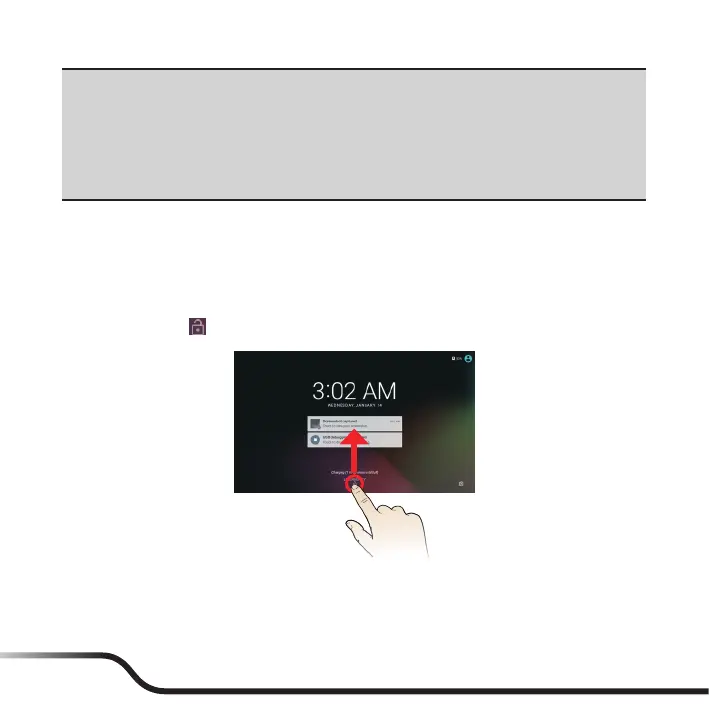
2. The Home screen will display and the device is in Lock mode by default. Drag
the Lock icon (
) upwards. The device is ready for use.
3. To turn off the devide, press and hold the Power button until the option window
displays. Then tap Power off.
Note: You can also choose to restart the device by selecting Restart from the option window.



 To Next Page