http://www.tyan.com
23
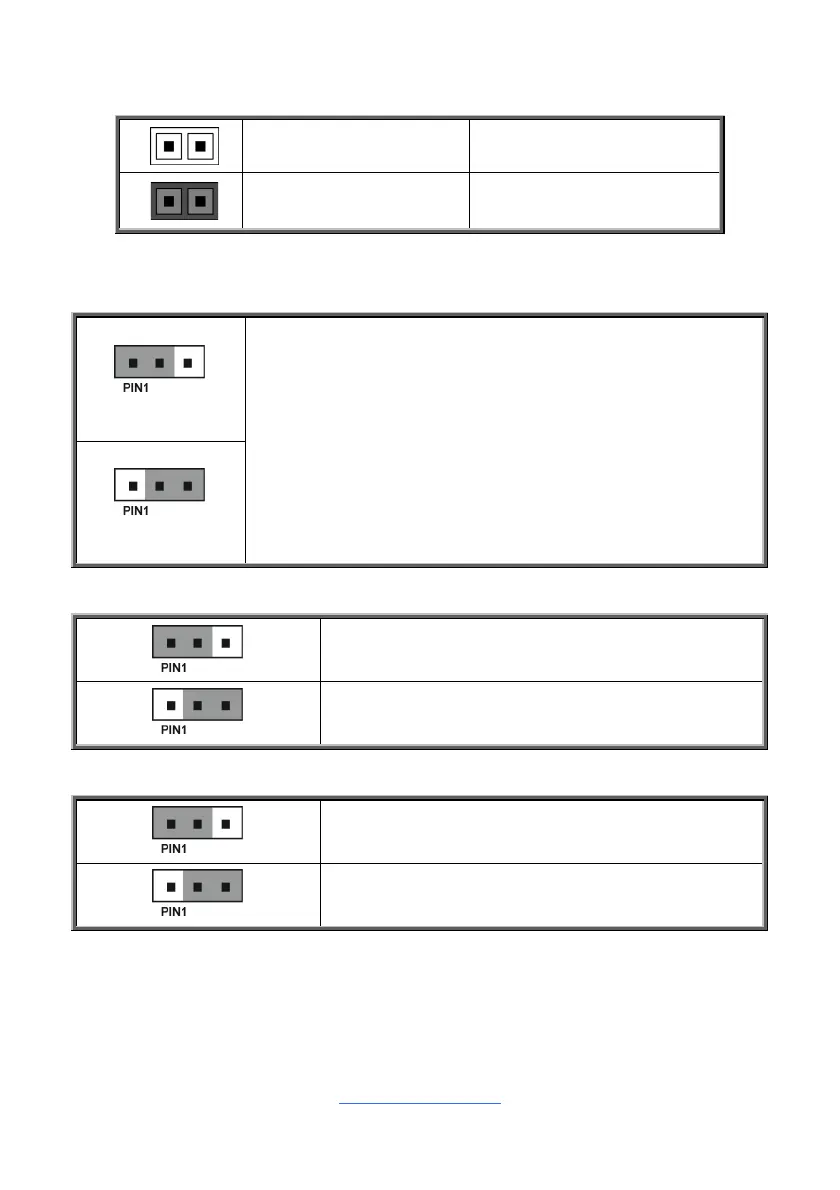
Jumper Legend
OPEN - Jumper OFF
Without jumper cover
CLOSED - Jumper ON
With jumper cover
J36: Clear CMOS Jumper
Normal (Default)
You can reset the CMOS settings by using this jumper. This can be
useful if you have forgotten your system/setup password, or need to
clear the system BIOS setting.
1. Power off system and disconnect power connectors from the
motherboard.
2. Remove the jumper from Pin_1 and Pin_2 (Default setting).
3. Move the jumper cap to close Pin_2 and Pin_3 for several seconds
to Clear CMOS.
4. Put jumper cap back to Pin_1 and Pin_2 (Default setting).
5. Reconnect power connectors to the motherboard and power on
system.
Clear CMOS
J15: COM Port Select Jumper
Pin 1-2 Closed: AMD COM Port0
Pin 2-3 Closed: BMC Console Port1 (Default)
J39: FPGA JTAG Select Jumper
Pin 1-2 Closed: Switch to CONN
Pin 2-3 Closed: Switch to BMC (Default)


 To Next Page