Need help?
Do you have a question about the MiTAC 5114VU and is the answer not in the manual?
Warning: Explosion risk from incorrect battery replacement. Use only manufacturer-recommended types and follow disposal instructions.
FCC statement on Class B digital device compliance, limits for radio frequency interference, and user guidance.
Canadian notice on Class B digital apparatus compliance with radio noise emission limits.
Instructions for installing audio and video drivers on Windows 98, including running SETUP.EXE.
Instructions for installing audio and video drivers on Windows NT 4.0 via Control Panel and CD-ROM.
Lists key motherboard features: Socket 7, Plug and Play, Audio/Video subsystems, USB, and Power Management.
Details motherboard specifications: CPU/Memory types, cache size, and ROM BIOS capabilities.
Describes motherboard chipset, audio/video controllers, I/O interfaces (ports), and expansion slots.
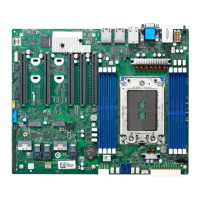
Identifies and describes key motherboard hardware components like chipsets, controllers, and memory sockets.
Defines internal and external motherboard connectors, including power, IDE, PCI, USB, and audio ports.
Details jumper configurations for CPU type/speed (AMD K6) and CMOS settings.
Step-by-step guide for installing a CPU into the motherboard socket, including alignment and securing.
Details the process of installing DIMM memory modules into the motherboard sockets, including alignment and clip securing.
Explains the purpose of the SETUP program, how configuration data is stored in CMOS RAM, and when it needs to be run.
Covers how to start the SETUP program and navigate menus using keyboard keys for selections and changes.
Details configuration categories: Standard CMOS, Advanced BIOS, Chipset, Integrated Peripherals, Power Management, PnP/PCI.
Covers PC Health Status, loading defaults, setting passwords, and exiting the SETUP program.
 General
| Form Factor | MicroATX |
|---|---|
| Number of Memory Slots | 2 |
| USB Ports | 4 x USB 2.0 |
| Audio | 6-channel audio |
| Serial Ports | 1 |
| Parallel Ports | 1 |
| BIOS | AMI BIOS |


 To Next Page