ENGLISH
ENGLISH
© Mitchell Acoustics Limited UK 2021 uStream One IB Ver 2.0 Rev 1
13 of 11612 of 116
4. In the Box
Here is what you will find in the box. The accessories can be found in 2 plain white boxes.
Please check all these parts are present before proceeding. Please inform your dealer if any part is
missing or damaged.
2 x uStream One Speakers 1 x Remote control handset
4 x mains power cable (2 x North America, 2 x Europe)
2 x UK mains adaptor (located in the bottom of the packaging)
2 x AC Mains Adaptor (100-240v)
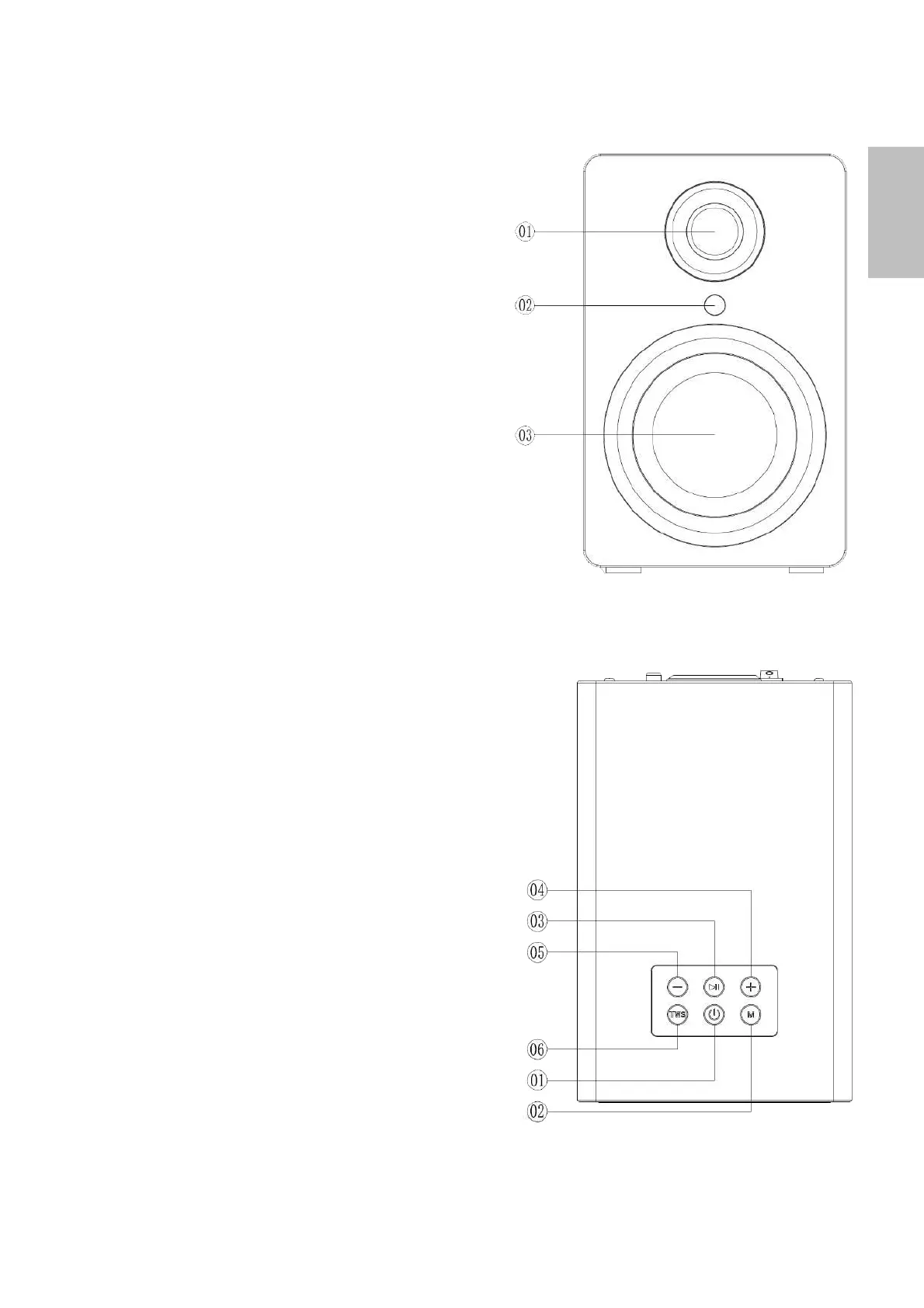
5. Description of Parts
FRONT
1. Tweeter (High frequency driver)
2. Remote Control Receiver
3. Woofer (Low Frequency driver)
TOP
1. Power button: press and hold for 2 seconds to turn
on, press and hold for 5 seconds to turn off. (*The unit
will turn off automatically after 15 min if no signal input).
2. Mode Button: Press and hold for 2 seconds for
option list, in a sequence of function is
BLUETOOTH / AUX-IN / LINE-IN / OPTICAL. Each press is
accompanied by a voice command confirming the mode.
3. Play/Pause button: Press and hold for 2 seconds to play
the track, then press and hold for 2 seconds to pause
the track. Press and hold for 5 seconds to discounnect
BT connection.
4. Volume+/ Next Button: Long press to access the
next track in the playlist. Short press to increase the
volume.
5. Volume-/ Previous Button: Long press to access the
last track in the playlist. Short press to lower the
volume.
6. TWS button: Short press either one to connect the
speakers, the unit will be automatically on TWS mode.
(The units will automatically attempt to connect via TWS
when powered on once initial setup has been done, so
use of this button is only necessary if pairing ever fails
due to repositioning the speakers)


 To Next Page