ENGLISH
ENGLISH
© Mitchell Acoustics Limited UK 2021 uStream One IB Ver 2.0 Rev 1
15 of 11614 of 116
REAR
1. DC in 24V 3A. Insert the round connector at the end of the AC adaptor cable.
2. Power On/Off switch
3. AUX IN 3.5mm stereo jack socket
4. RCA Left and Right stereo line input
5. OPTICAL IN for TOSLINK optical input
6. USB input for USB firmware upgrade
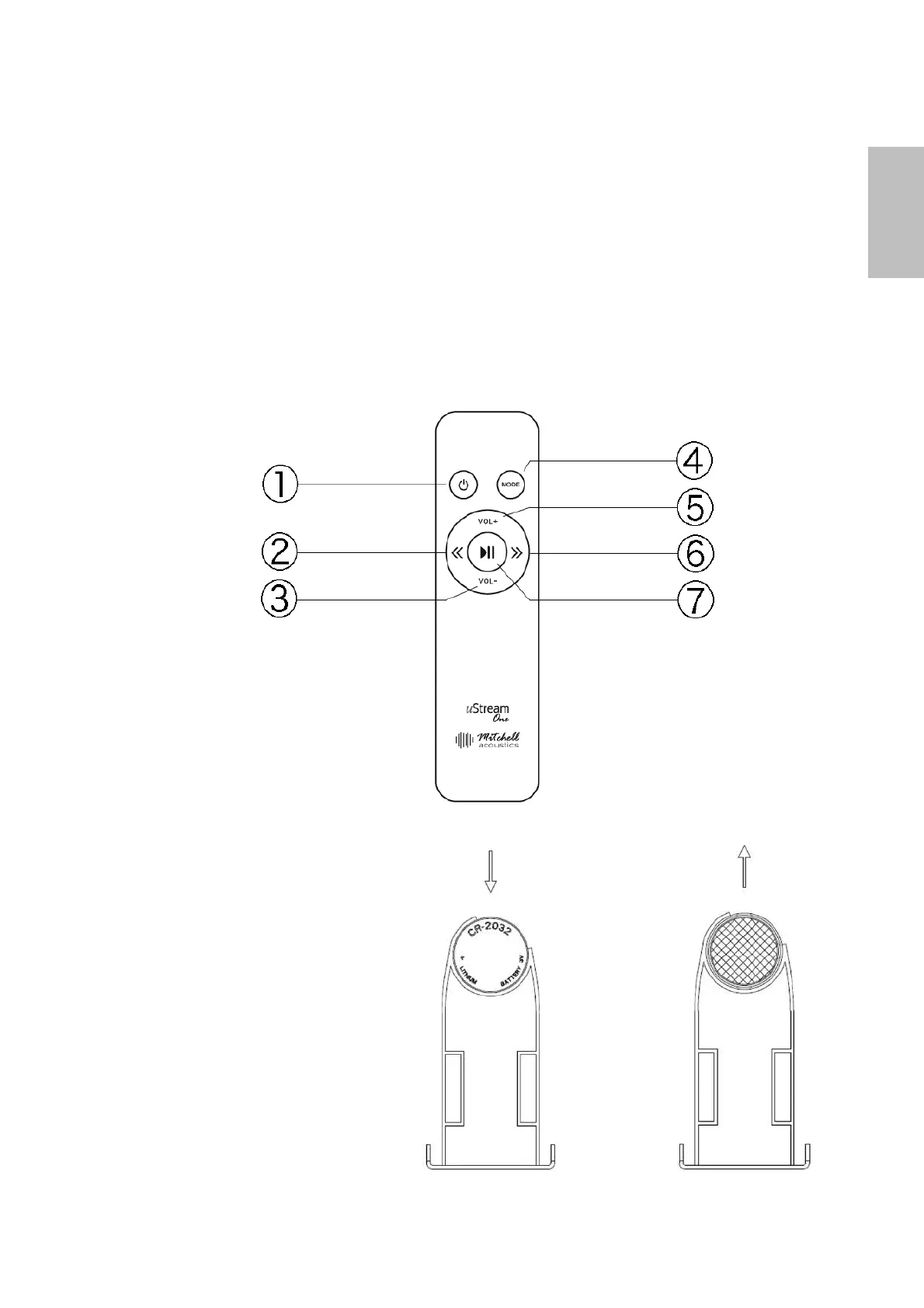
Remote Control Handset
1. Power On from standby mode
2. Previous Track
3. Volume Down
4. Mode Changer
5. Volume Up
6. Next Track
7. Play/Pause. Press and hold for 5 seconds to discounnect BT connection.
Remote Control Handset Battery
The remote control handset is supplied with
a CR-2032 battery. However, it has been
deliberately fitted in reverse to preserve the
battery life before first use.
Remove the battery tray as indicated and
remove the battery and replace with
numbers facing down. Then replace the
battery tray as indicated.


 To Next Page