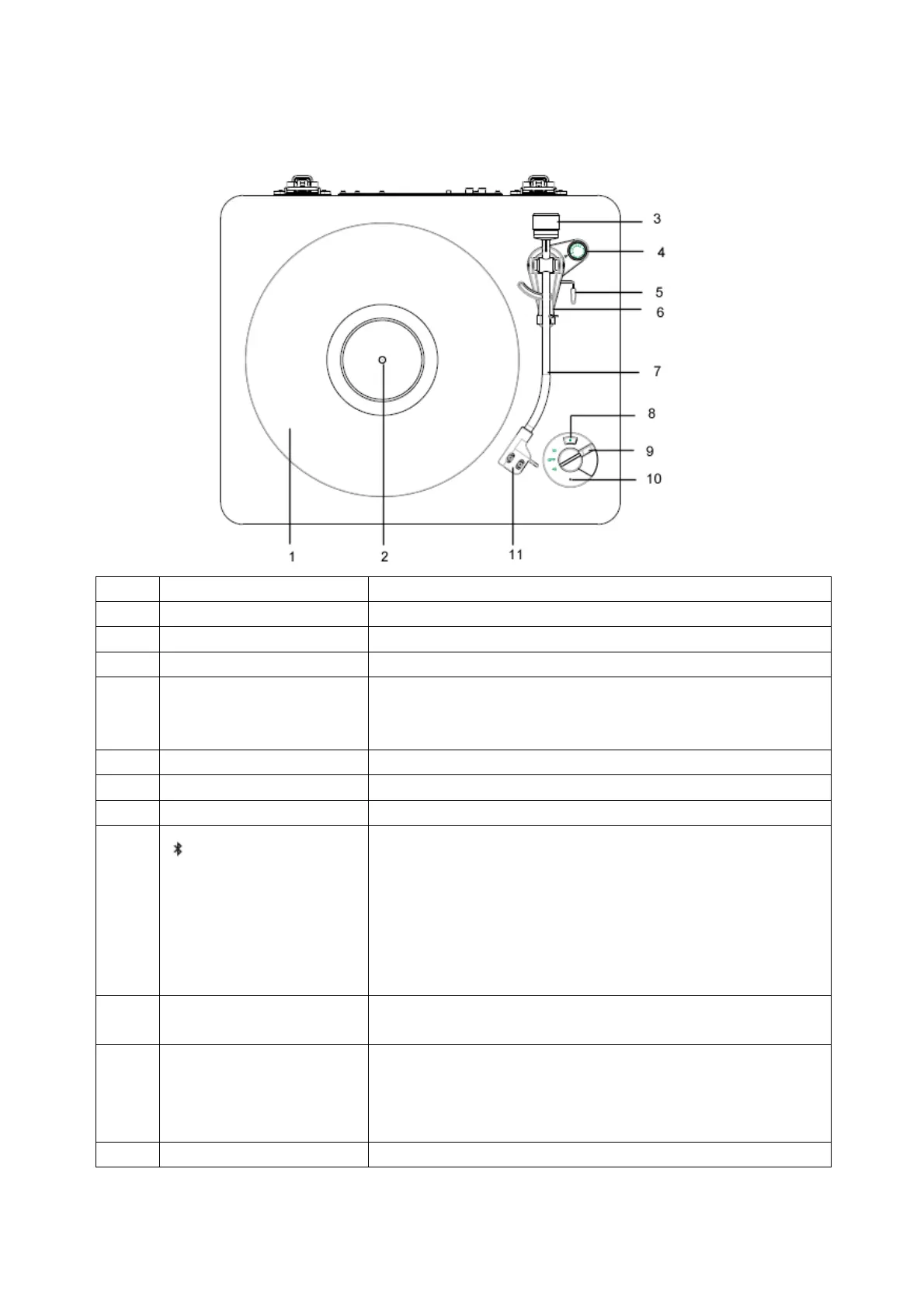
Product Overview
Top view
Aluminum alloy turntable.
Place a record onto the spindle to play.
Turn to adjust the needle pressure.
Turn to adjust the inward tracking forces that occur with
certain pick-up when the stylus nears the center of the
record.
Push forward and pull back to raise and lower tone arm.
Place the tone arm on this holder when not in use.
Holds the stylus that produces sound from the record.
Press to open Bluetooth transmitting. The white Bluetooth
indicator slowly flash. Wait for 5 seconds, press again to
start Bluetooth pairing. Your turntable pairs to audio
devices (such as Bluetooth speakers, headphones, and
receivers). The white Bluetooth indicator quickly flash.
When the turntable paired with a Bluetooth speaker, the
white indicator lights solid.
Turn to select the record type (33 or 45) or OFF to turn off
your turntable.(The default OFF)
Bluetooth standby: white light slowly flash
Bluetooth pairing: red and white light quickly flash.
Bluetooth paired: white light solid.
Bluetooth pairing failed: red light solid.
Generates sound from a playing record.



 To Next Page