Display Icons and Texts
QUICK REFERENCE GUIDE
Mitel 5634 VoWi-Fi Handset
2
Display Icons and Texts
Functions and settings available to the user are shown as icons and text on the display. This section
describes the status and system icons and their functions.
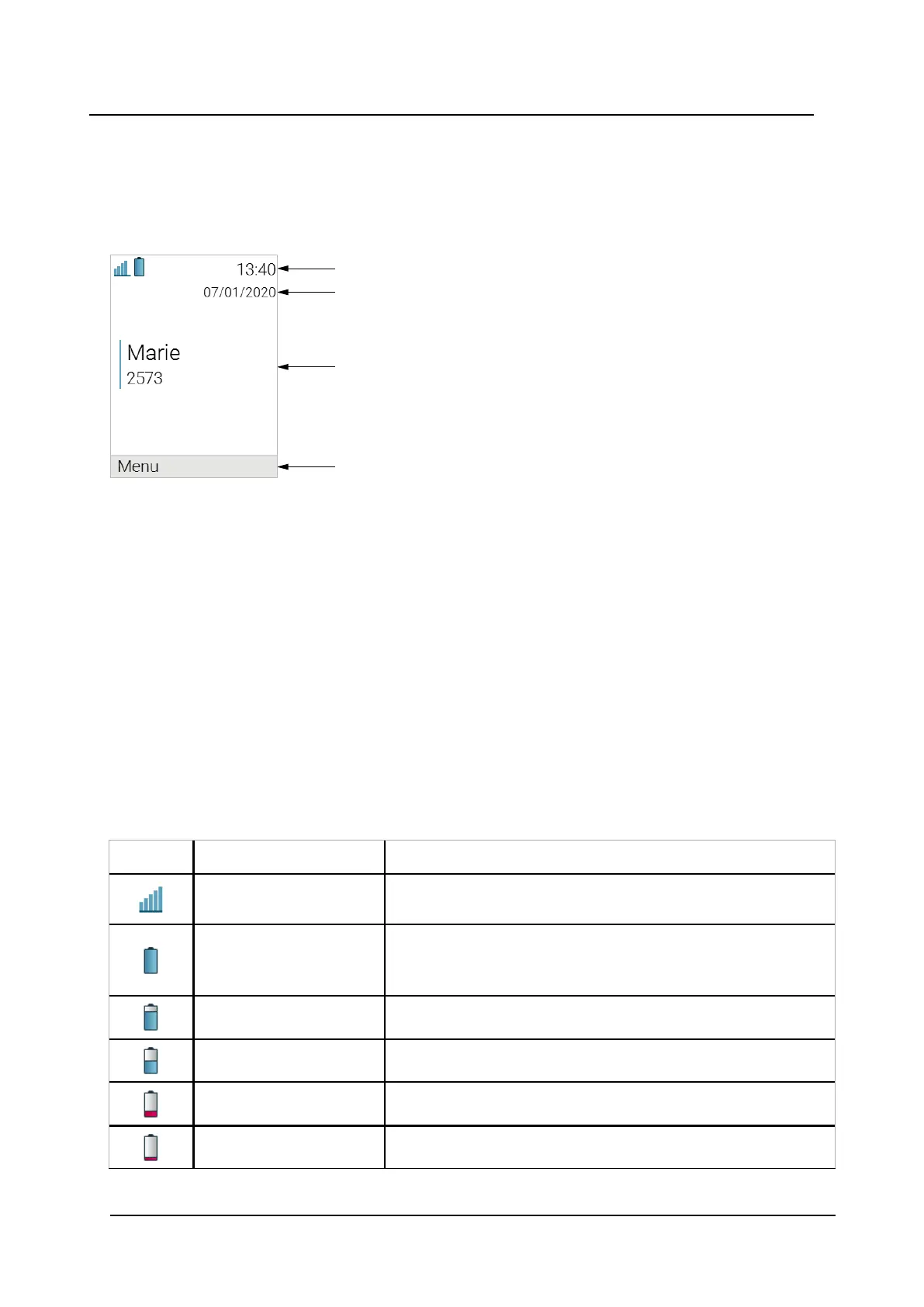
Figure 1. Example of Idle Screen
Status bar
Header bar
Active area
Soft key bar
The Status bar shows icons that give the user information about signal strength, battery status, sound off,
missed calls, new messages/voicemail, key lock/phone lock, and time. This row is always visible on all
screens.
The Header bar displays headset connection, Bluetooth connection/Bluetooth headset connection, and the
current date.
The Active area displays information such as the user identity provided by the system and/or an owner ID if
it is configured. This is also the area for dialog window text, for example Missed calls or to confirm an
action.
The Soft key bar is used for soft keys that can be used as shortcuts for functions in the handset.
The Scroll bar can be found on the right of the Active area. It becomes visible when a menu screen has
more than six menus, or if the complete text in a message cannot be displayed on the screen
simultaneously.
Table 1 Status and system icons description
Icon
Name
Description
Signal strength
Indicates the strength of the signal. The icon is located in the
Status bar.
Full battery Indicates that battery has 75 to 100% remaining capacity. All
icons indicating the battery capacity status are located in the
Status bar.
High battery level Indicates that battery has 50 to 75% remaining capacity.
Medium battery level Indicates that battery has 25 to 50% remaining capacity.
Low battery warning Indicates that battery has 10 to 25% remaining capacity.
Very low battery warning Indicates that battery has 7 to 10% remaining capacity.


 To Next Page