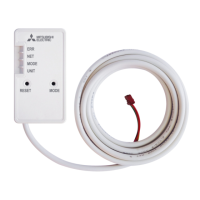
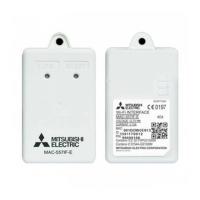
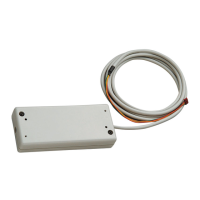
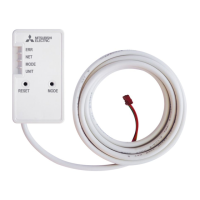
The Mitsubishi Electric Wi-Fi Interface, model MAC-567IF-E, is designed to facilitate communication between an indoor unit and the MELCloud service, allowing for remote monitoring and control of the air conditioning or ATW (Air-to-water) system. This interface transmits status information and receives control commands from the MELCloud, enhancing user convenience and system management.
Function Description
The Wi-Fi interface acts as a bridge, connecting the indoor unit to the MELCloud service via a Wi-Fi network. Users can then manage their air conditioning or ATW unit remotely through the MELCloud application. Key functionalities include:
- Remote Control: Sending commands to the indoor unit (e.g., adjusting temperature, changing modes).
- Status Monitoring: Receiving real-time information about the indoor unit's operational status.
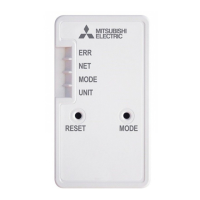
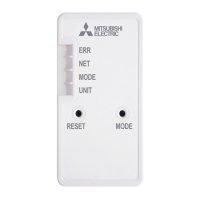
- System Reset: The device features a RESET switch that, when held for 2 seconds, reboots the system. Holding it for 14 seconds initializes the Wi-Fi interface to its factory default settings, which will erase all configuration information. This operation should be performed with caution.
- Mode Selection: A MODE switch is available for selecting different configuration modes.
- LED Indicators: The interface includes several LED indicators to display its status:
- ERR LED (Orange): Shows the network error state.
- NET LED (Green): Shows the network state.
- MODE LED (Orange): Shows the Access Point mode state.
- UNIT LED (Green): Shows the indoor unit state.
Important Technical Specifications
- Input Voltage: DC12.7 V (supplied from the indoor unit).
- Power Consumption: Maximum 2 W.
- Size (H×W×D): 79 × 44 × 18.5 mm.
- Weight: 110 g (including the cable).
- Transmitter Power Level (MAX): 17.5 dBm @ IEEE 802.11b.
- RF Channel: 1ch ~ 13ch (2412~2472 MHz).
- Radio Protocol: IEEE 802.11b/g/n (20).
- Encryption: AES.
- Authentication: WPA2-PSK.
- Software Version: XX.00.
- Length of Cable: 2,040 mm.
Usage Features
- Compatibility: It is crucial to ensure that the indoor unit is compatible with the Wi-Fi interface before installation. Some indoor units may require a software upgrade, especially ATW units. Information on compatible models and software upgrades can be found on the MELCloud website.
- Installation: The interface connects to the indoor unit via a CN105 cable. It can be mounted inside the indoor unit (if specified in the indoor unit's installation manual), on a wall, or on the underside/side of the indoor unit. When mounting on a wall, the cable side of the interface unit should face downward. The holder (part ⑥) is mounted first, ensuring the cable mark faces downward, and then the interface unit (part ①) is inserted until it clicks. Screws are used to secure the holder, with an elongated hole for adjustment.
- Network Configuration: To connect the Wi-Fi interface to a router, users should refer to the "SETUP QUICK REFERENCE GUIDE" and "SETUP MANUAL" provided with the product or available on the MELCloud website. The router must support WPA2-AES encryption.
- User Registration: The Wi-Fi interface will not transmit operational data until the end-user registers and accepts the terms and conditions of the Wi-Fi service.
- Safety Precautions:
- Installation should only be performed by authorized personnel or a professional installer to prevent fire, electric shock, injury, or water leaks.
- The Wi-Fi interface must be securely installed in a location that can support its weight.
- Electrical wires must be connected and fastened securely to prevent external force on terminals.
- Only Mitsubishi Electric's designated components should be used for installation.
- The breaker or power supply plug of the indoor unit must be turned off before connecting the Wi-Fi interface to prevent electric shock.
- The connector of the Wi-Fi interface must be properly connected to the P.C. board of the indoor unit.
- Do not install the Wi-Fi interface near automatic control devices (e.g., automatic doors, fire alarms) as it can cause malfunctions.
- Do not disassemble, modify, or repair the unit yourself.
- Maintain a minimum distance of 20 cm between the device and users/bystanders.
- Avoid using the Wi-Fi interface near medical electrical equipment or individuals with medical devices like pacemakers, as it can cause malfunctions.
- Discharge static electricity from your body by touching a nearby metal object before handling the Wi-Fi interface.
- Avoid installing the unit in places with high steam (e.g., bathrooms), direct sunlight, or extreme temperatures (below 0°C or above 40°C).
- Do not use the Wi-Fi interface in special environments with much oil, steam, or sulfuric gas.
- Turn off the power supply of connected equipment during construction or wiring work.
- The connecting cable must not touch piping directly.
- Avoid using the Wi-Fi interface near other wireless devices, microwaves, cordless phones, or facsimiles, as it can cause malfunctions.
- Do not mount the Wi-Fi interface where children can reach.
- Do not touch the Wi-Fi interface with wet hands or splash water on it.
- If the Wi-Fi interface is dropped, or the holder/cable is damaged, disconnect the power supply or turn off the breaker and consult a dealer.
- In case of abnormal conditions (e.g., burning smell), stop the indoor unit, disconnect power, and consult a dealer.
Maintenance Features
- Cleaning: Cleaning and user maintenance should not be performed by children without supervision.
- Troubleshooting: If the Wi-Fi interface is not functioning correctly, check the LED indications. If issues persist, refer to the "SETUP MANUAL" or contact a professional installer.
- Resetting to Factory Defaults: The RESET switch allows for a factory reset, which can be useful for troubleshooting or reconfiguring the device. However, this will erase all stored settings.
- Documentation: Users are advised to store the installation manual with their indoor unit instruction manual for future reference. It is also recommended to record the model information and other settings on the "Setting information" page of the manual.
- Cable Management: Ensure the connecting cable is run in the designated space on the back of the unit and secured to prevent it from getting caught or damaged, which could lead to communication problems.

 Need help?
 General


 To Next Page
