
 Need help?
Do you have a question about the Mitsubishi FX1N Series and is the answer not in the manual?
Specifies output ranges, resolution, integrated accuracy, and D/A conversion time.
Critical safety precautions to follow before installing or removing the expansion board.
Safety warnings, guidelines for signal cable routing, grounding, and cable selection.
Presents wiring diagrams for both voltage and current output modes.
Provides fundamental PLC programming examples for voltage and current analog outputs.
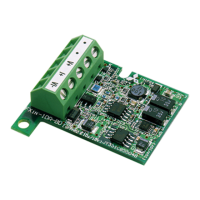
The FX1N-1DA-BD Analog Output Expansion Board is a specialized module designed to enhance the analog output capabilities of Mitsubishi Electric's FX1S and FX1N series Programmable Logic Controllers (PLCs). This expansion board, often referred to as "1DA," allows for the addition of a single analog output point to the existing PLC system. Its primary function is to convert digital values into analog signals, offering either voltage output (0-10V) or current output (4-20mA), which can be selected via a dedicated special auxiliary relay.
One of the key usage features of the 1DA board is its internal mounting design. When installed, it integrates directly into the top of the PLC, meaning it does not require additional installation space, thus maintaining the compact footprint of the overall system. This internal mounting simplifies system design and reduces the physical space needed for the control setup. The digital value intended for analog conversion is stored in a dedicated special data register, D8114, making it accessible and manageable within the PLC's programming environment. However, it's important to note that the digital-to-analog conversion characteristics cannot be adjusted directly on the board itself. If values outside the standard specification range are required, additional programming commands, such as multiplication or division, must be used to adjust the conversion values. This flexibility in programming allows users to tailor the analog output to specific application needs, even if it means that the accuracy and resolution of the digital-to-analog conversion might differ from the board's inherent specifications due to these additional commands. The original range of the analog output, however, remains unchanged.
The 1DA board operates continuously, converting digital values to analog signals regardless of the PLC's RUN/STOP status. As long as power is supplied to the PLC with the 1DA attached, the analog value stored in D8114 will be output. This continuous operation ensures that the analog output remains active even when the PLC transitions from RUN to STOP, providing consistent control. The D/A conversion process initiates after an END statement in the PLC program, with analog signals being sent approximately 10ms later. Subsequent analog signals are triggered by the next END statement, and the conversion of the current value in D8114 is dependent on the PLC scan time.
In terms of system configuration, the FX1N-1DA-BD is designed for exclusive use. Only one expansion board can be installed per FX1S or FX1N PLC main unit; attempting to install multiple boards will result in malfunction. Furthermore, the 1DA board is not compatible with the FX1N-EEPROM-8L or FX1N-5DM modules, so users must ensure compatibility when designing their PLC system.
Installation of the 1DA board involves several steps, emphasizing safety and proper connection. Before any installation or wiring work, it is crucial to cut off all phases of the power source to prevent electric shock or damage to the product. The process typically involves removing the PLC's top cover, plugging the expansion board into the external port, and securing it with M3 self-tapping screws. The recommended tightening torque for these screws, as well as for the top cover, is 0.3 to 0.6 N·m to ensure secure contact and prevent malfunction. After installation and wiring, the PLC's top cover must be replaced before powering on the unit.
Wiring considerations are also critical for reliable operation. Signal cables should not be laid near high-voltage power cables or housed in the same trunking ducts, as this can lead to noise or surge induction. A safe distance of more than 100 mm (3.94 inches) from power cables is recommended. Shielded cables should be grounded, but not at the same point as high-voltage lines. Users should avoid soldering cable ends and ensure that the number of connected cables does not exceed the unit's design capacity. Only cables of permitted sizes (AWG26 to AWG16) should be used, with a maximum tightening torque of 0.5 to 0.6 N·m for terminal connections. For optimal contact, especially with different cable types, crimp terminals are recommended. If significant noise is anticipated, connecting a 0.1 to 0.47µF at 25V DC capacitor in the designated position is advised.
The manual also provides example programs for both voltage and current output modes, demonstrating how to set the output mode and convert digital values to analog signals using the MOV (Move Data) instruction. These examples illustrate the basic functionality and provide a foundation for more complex applications. For instance, in voltage output mode, a digital value in D0 can be converted to analog, while in current output mode, a digital value in D2 can be converted. If the digital value is not stored in a specific register, D8114 can be used directly for other instructions, offering flexibility in programming.
Maintenance features are primarily focused on ensuring proper installation and wiring to prevent malfunctions. The emphasis on secure installation, correct tightening torques, and appropriate cable management contributes to the long-term reliability of the device. The manual serves as an indispensable guide for trained and competent personnel, ensuring safe use and correct operation. It highlights the importance of understanding all safety aspects related to automated equipment and adhering to local and national standards.
 General
| Programming Language | Ladder Logic |
|---|---|
| Output Type | Relay, Transistor |
| Operating Temperature | 0 to 55°C |
| Power Supply | 100-240V AC or 24V DC |
| Program Capacity | 8K steps |
| Communication Ports | RS-422 |
| Data Memory | 8000 words |
| High-speed Counters | Up to 6 channels |
| Expansion Modules | Available |
| Pulse Output | 2 points |


 To Next Page

