Chapter2:ConnectingYourVCR Connectingthe Television(cont.)
Connectingthe VCR to an olderTV
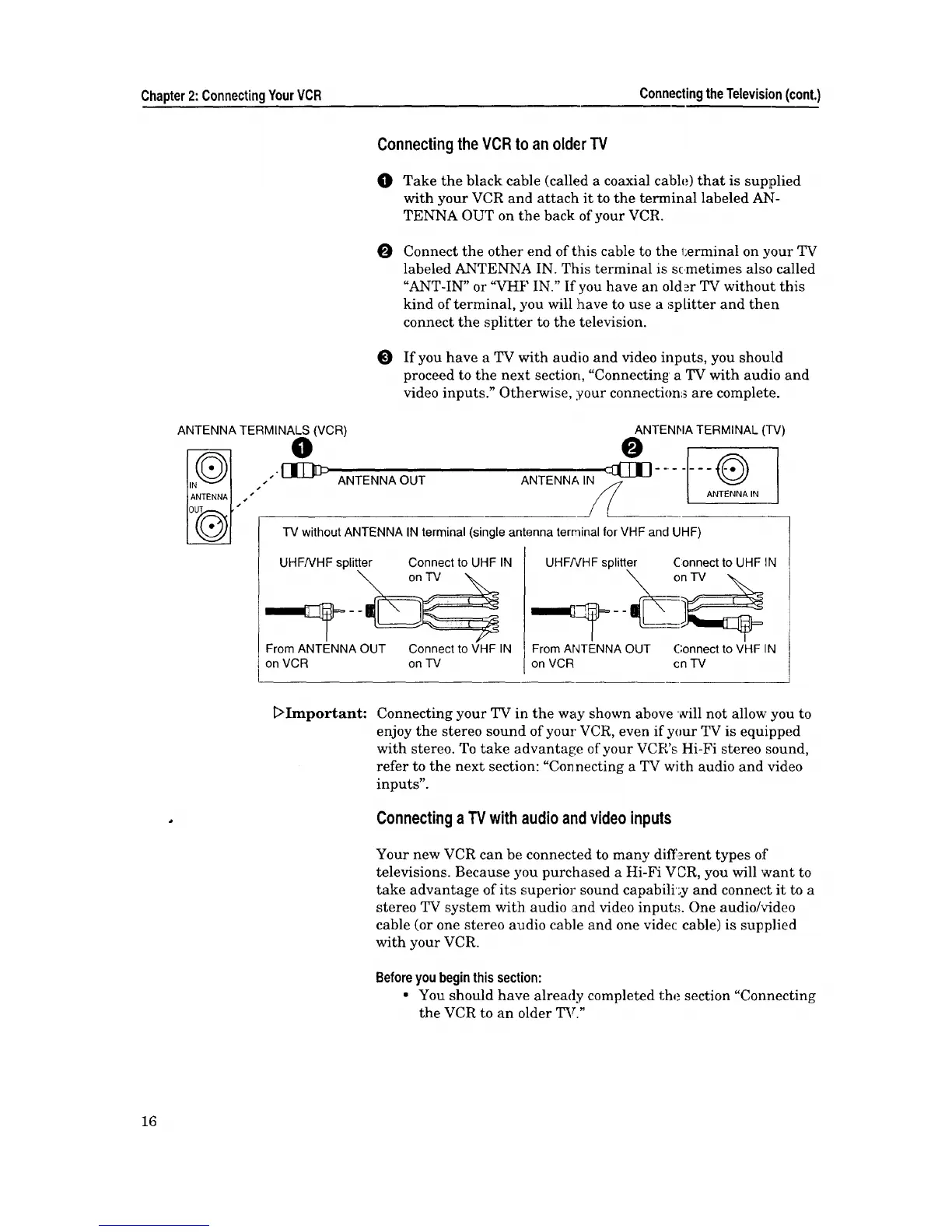
O Take the black cable (called a coaxial cable) that is supplied
with your VCR and attach it to the terminal labeled AN-
TENNA OUT on the back of your VCR.
O
Connect the other end of this cable to the 1;erminal on your TV
labeled ANTENNA IN. This terminal is sc metimes also called
"ANT-IN" or "VHF IN." If you have an older TV without this
kind of terminal, you will have to use a .,_p[itter and then
connect the splitter to the television.
O If you have a TV with audio and video inputs, you should
proceed to the next section, "Connecting a TV with audio and
video inputs." Otherwise, :your connection_ are complete.
ANTENNA TERMINALS (VCR) ANTENFIA TERMINAL ('IV)
O
"'_ ANTENNA OUT ANTENNA IN
s
s
J
-IV without ANTENNA IN terminal (single antenna terminal for VHF and UHF)
UHF/VHFsplitter Connectto UHF IN
From ANTENNA OUT Connect to VHF IN
on VCR on TV
I
UHFNHF splitter ConnecttoUHF IN
From ANTENNA OUT Connect to VHF IN
on VCR cn TV
_>Important: Connecting your TV in the way shown above _ill not allow you to
enjoy the stereo sound of your VCR, even if your TV is equipped
with stereo. To take advantage of your VCR's Hi-Fi stereo sound,
refer to the next section: "Connecting a TV with audio and video
inputs".
Connecting aTV with audioand video inputs
Your new VCR can be connected to many different types of
televisions. Because you purchased a Hi-Fi VCR, you will want to
take advantage of its superior sound capabili'_y and connect it to a
stereo TV system with audio .and video inputs. One audio/video
cable (or one stereo audio cable and one videc cable) is supplied
with your VCR.
Beforeyoubeginthissection:
• You should have already completed the section "Connecting
the VCR to an older TV."
16



 To Next Page