Jl'Prosram t.o record_j ;_ ;
(_ Day - -
Start time
O Stop time
O Record speed AUTO
li_Prosram 1o record
Channel _ , 2
-M nd?y.i 7-
Start time
Stop time
Record speed AUTO
L>hnportant:
J_Prosram%o record ;i-
0 Channel 2
0 Day Monday 17 +
Stop time
Record speed AUTO
m'Prosram%o;recordi_iiiji*:iii?
0 Channel 2
_D_y Monday _7.
0 Stop time
0 Record speed AUTO
If there is at least one programmed recording already entered,
you will see the "recap" screen. You can choose an empty
recording slot, or wait four seconds and t:_e VCR will auto-
matically choose the first empty slot.
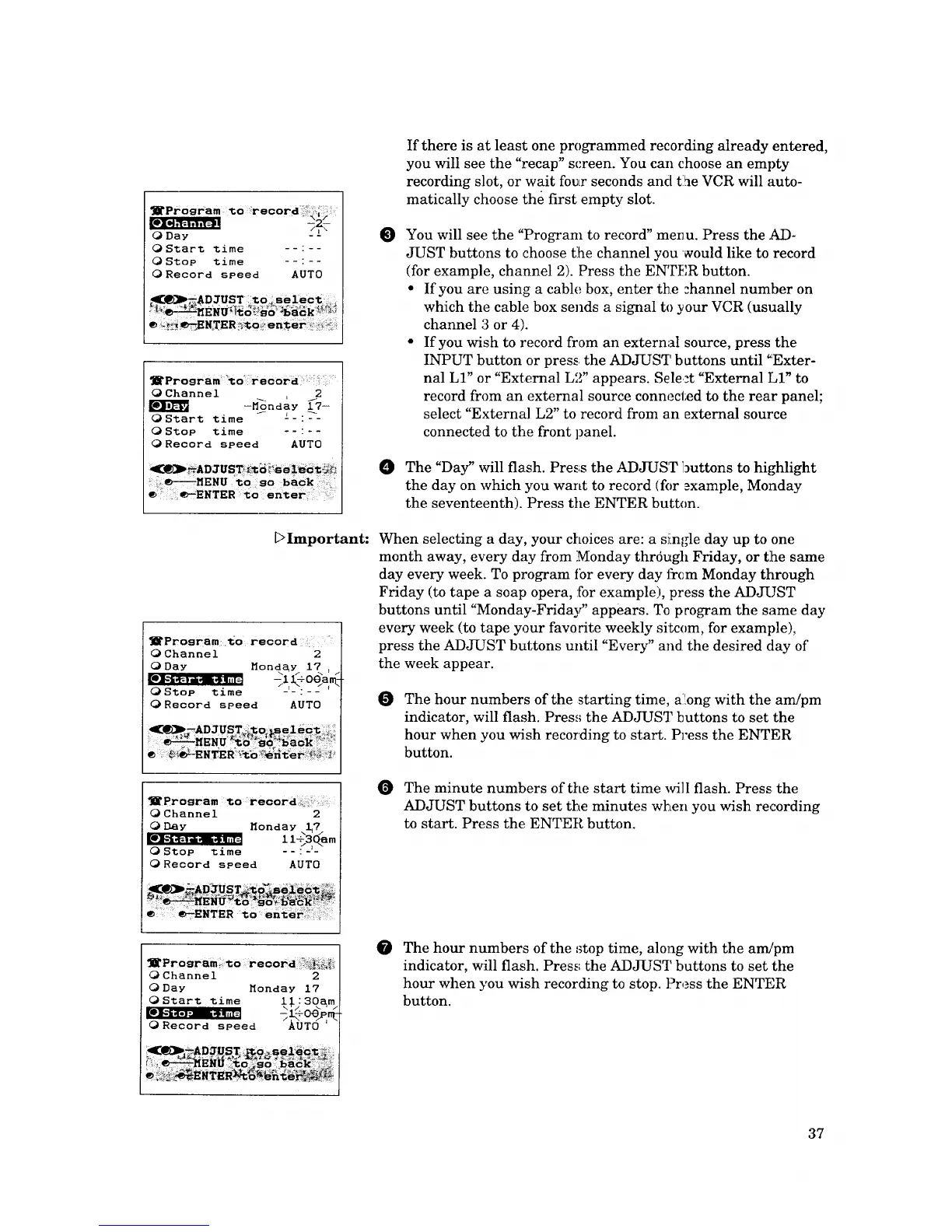
e You will see the "Program to record" meil u. Press the AD-
JUST buttons to choose t:he channel you vzould like to record
(for example, channel 2). Press the ENTER button.
• If you are using a cable box, enter the channel number on
which the cable box sends a signal to your VCR (usually
channel 3 or 4).
• If you wish to record from an external source, press the
INPUT button or pres_ the ADJUST b attons until "Exter-
nal LI" or "External L'_" appears. Select "External LI" to
record from an external source connected to the rear panel;
select "External L2" to record from an external source
connected to the front panel.
O The "Day" will flash. Press the ADJUST l_uttons to highlight
the day on which you want to record (for _xample, Monday
the seventeenth). Press the ENTER button.
When selecting a day, your choices are: a single day up to one
month away, every day from Monday thrdugh Friday, or t:he same
day every week. To program ibr every day from Monday through
Friday (to tape a soap opera, :for example), press the ADJ-UST
buttons until "Monday-Friday" appears. To program the same day
every week (to tape your favorite weekly sitcom, for example),
press the ADJUST buttons until "Every" and the desired day of
the week appear.
O
The hour numbers of the starting time, a:[ong with the am/pm
indicator, will flash. Pres.'; the ADJUST buttons to set the
hour when you wish recording to start. Press the ENTER
button.
The minute numbers of the start time will flash. Press: the
ADJUST buttons to set the minutes when you wish recording
to start. Press the ENTER button.
1_Program zo record ?:._-._:_
0 Channei 2
O Day Monday 17
O Start time 1:1.: 30a_m
ORecord speed ?_0T(3 'r_
@
The hour numbers of the stop time, along with the arr_pm
indicator, will flash. Press the ADJUST buttons to set the
hour when you wish recording to stop. Press the ENTER
button.
37






 To Next Page