FX312 & FX412 VERSION 2.0
16
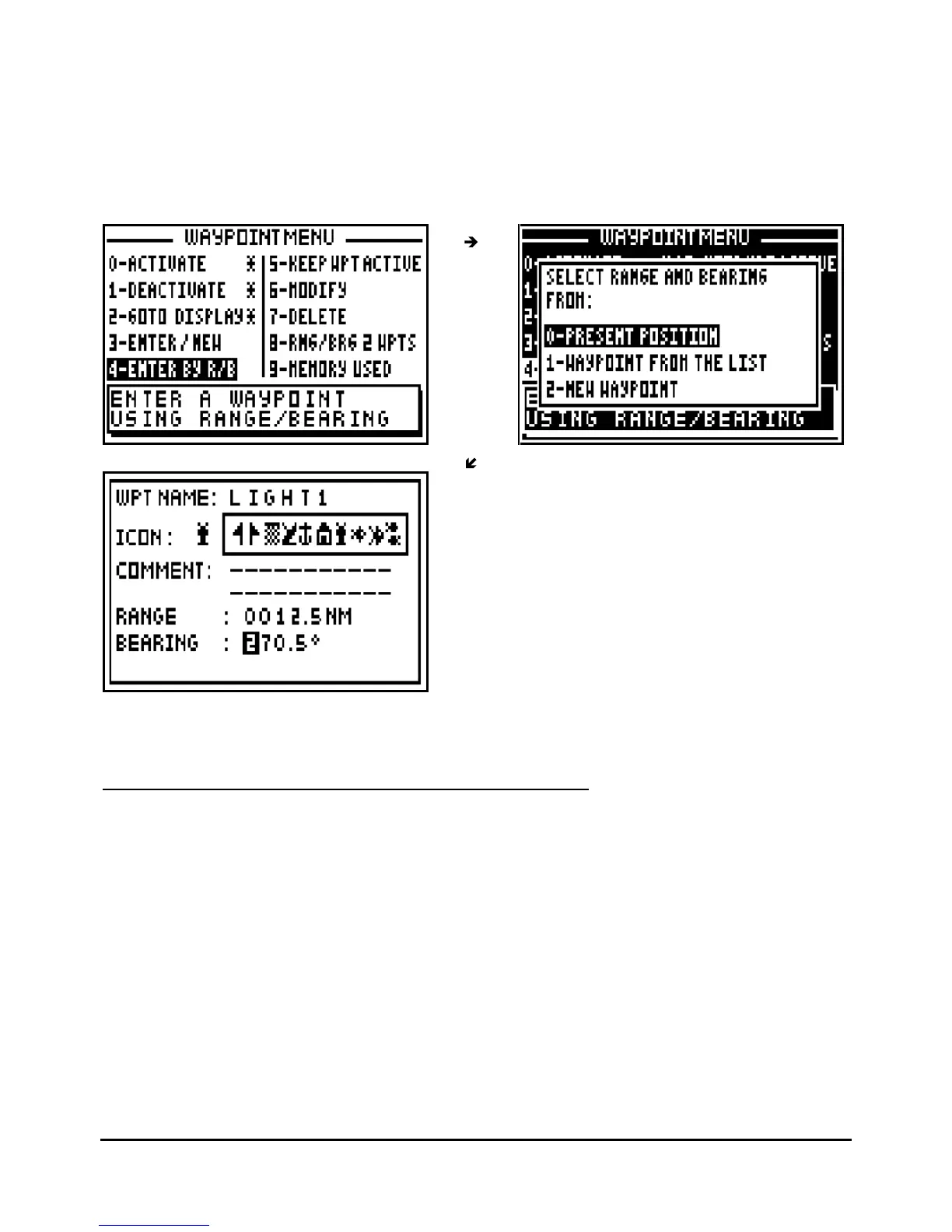
From the GOTO WAYPOINT function, press the
Menu
key then press the key 4 (or select 4–
ENTER BY R/B and press
Enter
) to display the options window. Select your reference position
from the options using the 0
,
1 or
2
keys and press
the
Enter
key. Follow the procedure
described in paragraph 3.5 - CREATING A NEW WAYPOINT for entering the name of the
waypoint, selecting an icon and writing a comment (optional). Now enter the distance and
bearing between the reference position and the waypoint position and press
Enter
to validate.
The receiver now calculates and stores the position of the waypoint
Tip: Do not forget to press the
Enter
key to validate your entry and store your new waypoint.
3.7.
–
KEEPING YOUR WAYPOINT
PERMANENTLY ACTIVE
You have the option of keeping your waypoint active after switching off your GPS. If a waypoint
is active before you switch off the GPS, it will be active again when you switch it on.
From the GOTO WAYPOINT function, press the
Menu
key then press the key 5 (or select 5-
KEEP WPT ACTIVE and press
Enter)
to display the option window. Select YES to keep the
waypoint active and press the
Enter
key.



 To Next Page