17
3.1 Using Wireless LAN
[ Wireless LAN ON/OFF]
< Reference >
• Wireless LAN supports IEEE 802.11 b/g
• To connect the wireless LAN, There should be AP(Access
Point) to support 802.11 b or 8002.11.g around.
• Please use the wireless LAN after manually or
automatically setting-up IP.
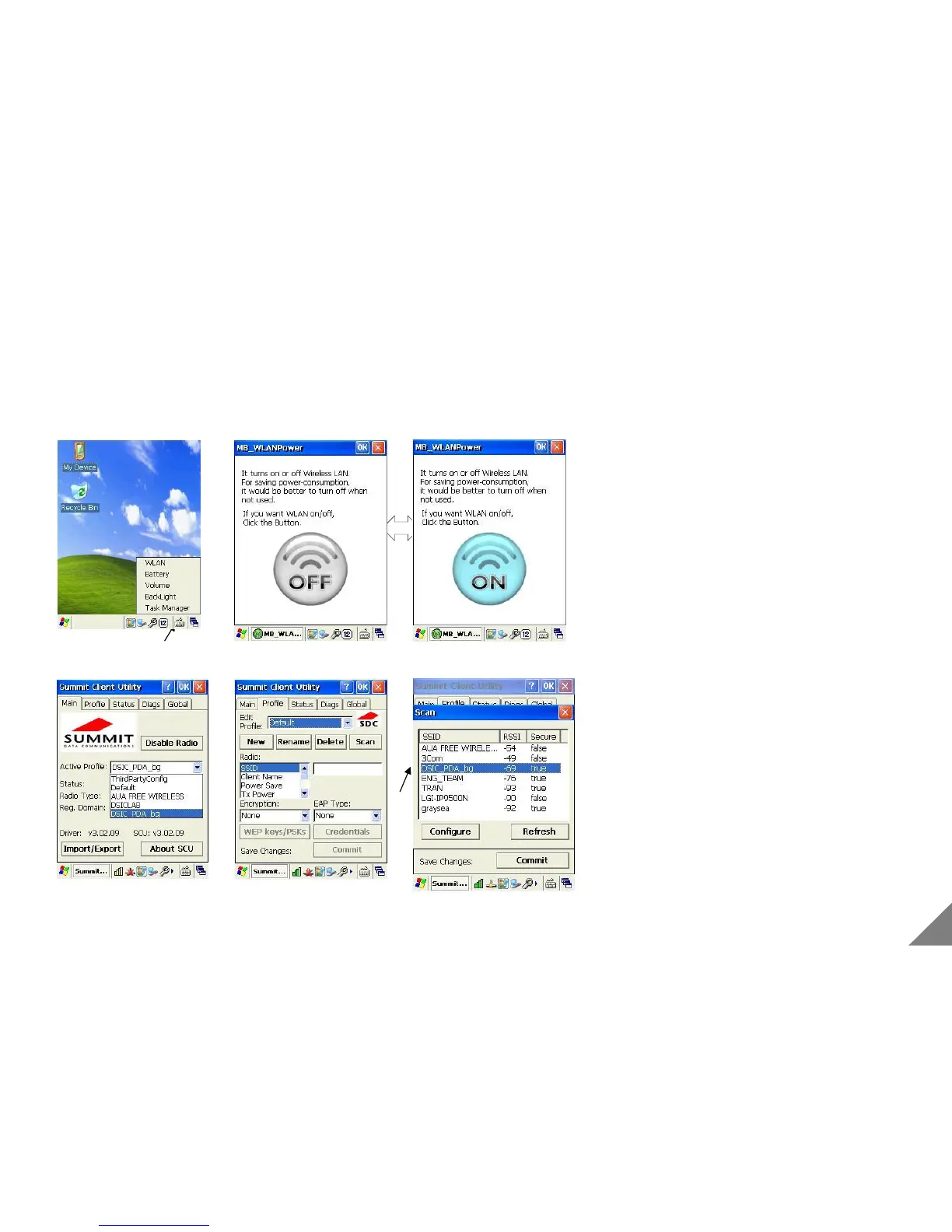
[Wireless LAN ON/OFF]
①After pressing the spanner icon in taskbar and selecting the
Wireless LAN, and pressing the ON/OFF icon.
②If Wireless LAN is correctly connected, Antenna icon is
appeared in taskbar.
[AP Access]
To connect AP, Wireless LAN should be ON.
①If pressing the Antenna icon double click, the Wireless LAN
Connection display is appeared.
②Move [Profile] tap, and press [Scan] button.
③After few seconds, the pop-up window of AP list and select
one of them and press [Configure] button.
* Wireless LAN function is just available with a product with a built-in Wireless LAN module.(Option)
[ AP Access ]


 To Next Page