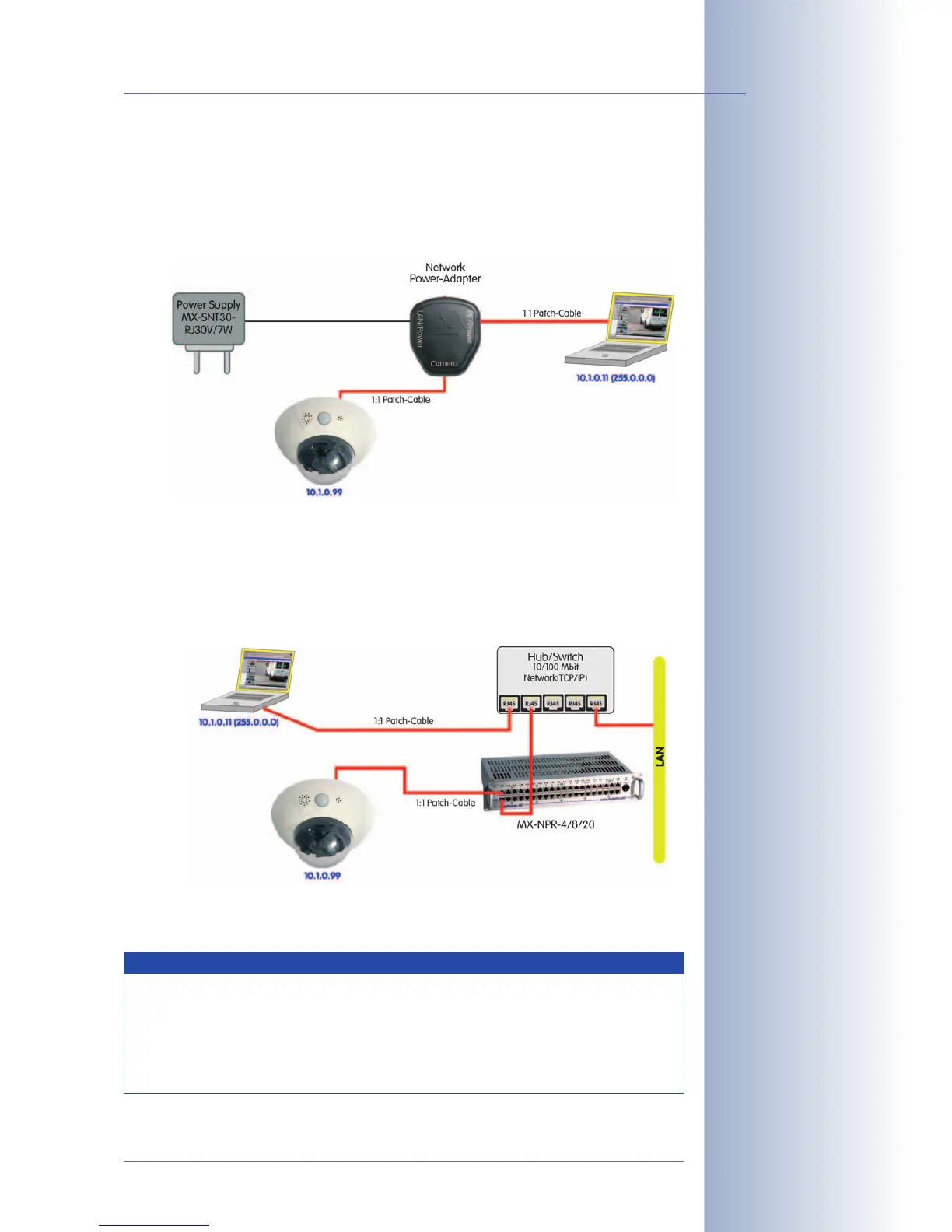
2b) Connecting directly to a computer:
• Connect the PC/Power connector of the Network Power Adapter to the
Ethernet port of the computer.
• Plug the RJ45 connector of the external power unit into the LAN/Power
connector of the NPA.
3.3.2 Ethernet: Power Supply Using a Network Power Rack (MX PoE)
• Connect the CAM connector of the Network Power Rack (MX-NPR-8/20)
to the 10BaseT/NET connector of the camera.
• Connect the LAN connector of the Network Power Rack to an Ethernet
connector of the switch/router.
A Network Power Box (MX-NPR-4) is connected in the same way.
© MOBOTIX AG • Security-Vision-Systems • Made in Germany
www.mobotix.com • sales@mobotix.com
89/124
D12 Camera Manual Part 1
• Wartungsfrei und langlebig durch Verzicht auf Lüfter.
Advantages of MOBOTIX PoE Products
• Zero maintenance and reliable without fans.
• Higher reliability of the system as a whole, since standard
switches without PoE can be used (lower risk of failure).
• Easy installation on DIN rails (
MX-NPR-4
) or in 19" racks (
MX-
NPR-8/20
).
The Network Power
Adapter replaces the
crossover cable when di-
rectly connecting to a
computer
MOBOTIX PoE products
have zero maintenance
and are reliable as the
systems do not require
fans



 To Next Page