3.3.4 ISDN: Power Supply Using a Network Power Adapter
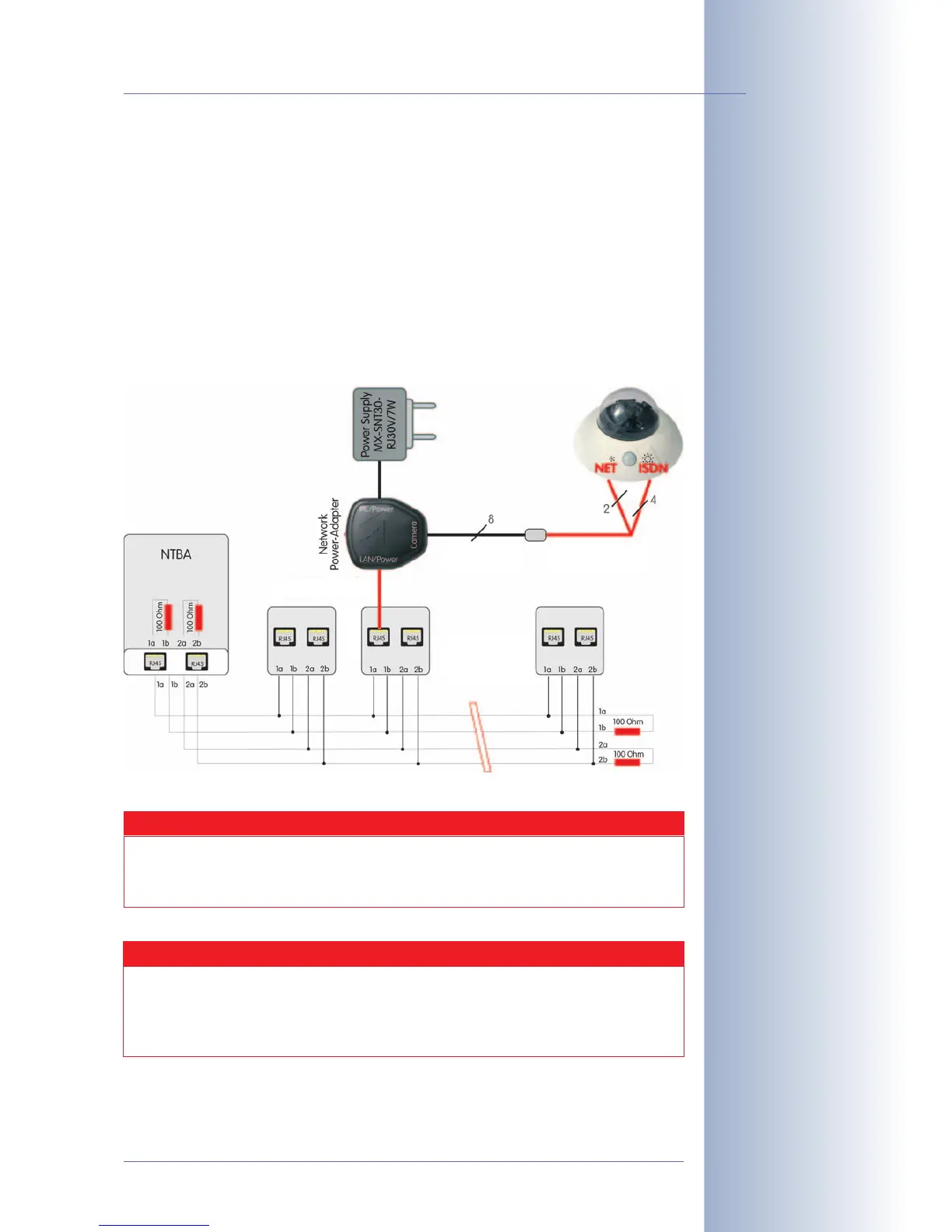
(1) Push the designated connector of the ISDN split cable (
MX-OPT-ISDN-SPLIT;
optional accessory) into the 10BaseT/NET connector and the remaining cable
into the ISDN connector of the camera.
(2) Use an 8-wire (patch) cable to connect the Camera connector of the Network
Power Adapter to the socket of the ISDN split cable.
(3) Connect the LAN/Power connector of the Network Power Adapter to the
ISDN S0 bus/NT.
(4) Plug the RJ45 connector of the external power unit into the PC/Power con-
nector of the Network Power Adapter.
© MOBOTIX AG • Security-Vision-Systems • Made in Germany
www.mobotix.com • sales@mobotix.com
91/124
D12 Camera Manual Part 1
Maximum Cable Lengths (ISDN)
Connection to ISDN outlet: max. 5-10 m (16 to 33 ft)
Connection to NT (without term. resistors): max. 5-10 m (16 to 33 ft)
Connection to NT (with termination resistors): 120 m (130 yd)
Caution
Missing termination resistors and wrong cable lengths are the
most common installation errors!
Always observe the instructions regarding maximum cable lengths
and proper ISDN termination!
1 cable
(pin 7-8,30V)
Max. 20m/
60 ft
MX Split
Cable
Max. 10m/30 ft
Make sure not to exceed
the maximum cable
lengths


 To Next Page