4
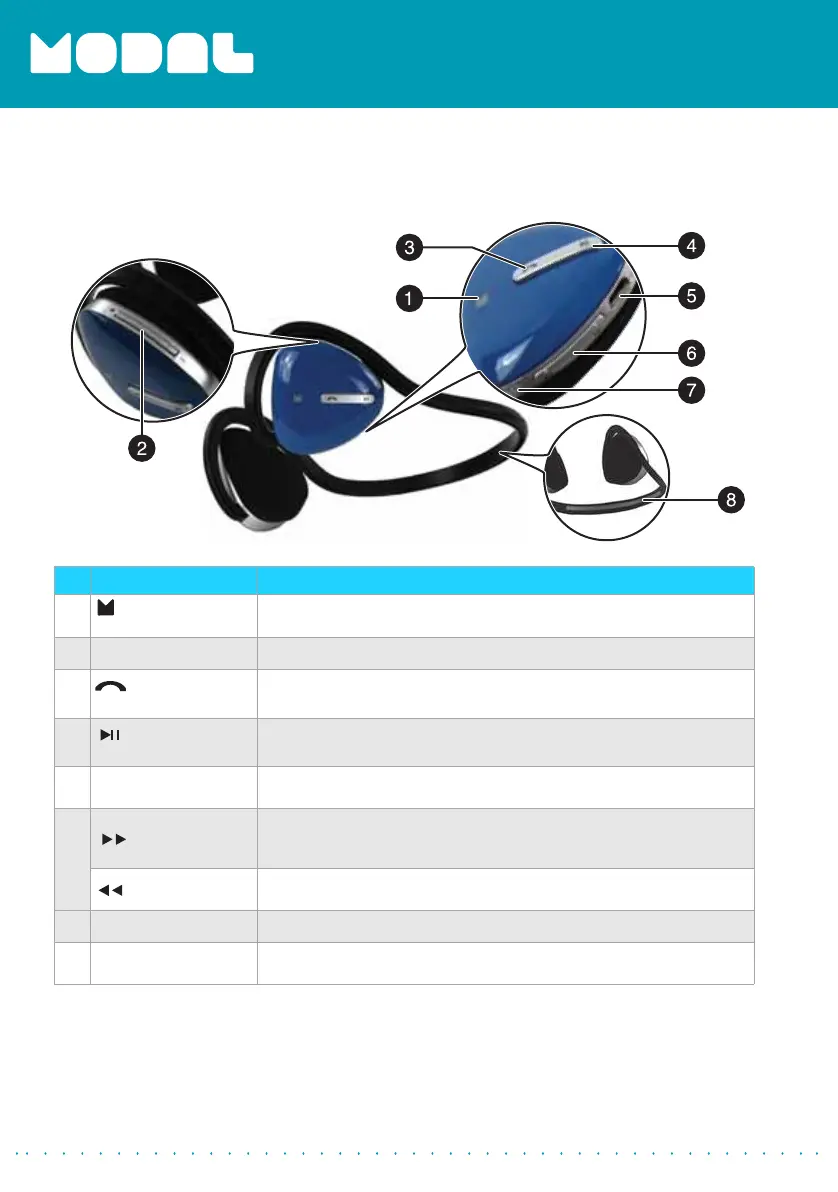
Side view
# Item Description
1
Logo with
indicator LED
Indicator LED show current status of the headphones. See the LED
Indicators table on page 5.
2
Volume Up/Down Press + or – to increase or decrease the volume.
3
(power/talk)
button
Press to turn on your stereo headphones. If you receive a phone
call, press to talk. Press to turn off your stereo headphones.
4
(play/pause)
button
Press to begin playback. During playback, press to pause
playback. Press again to resume playback.
5
Micro USB connector
Plug the micro USB connector from the AC adapter into this port
to charge your headphones.
6
(rewind)
• Press once to return to the beginning of a track.
• Press twice to go to the previous track.
• Press and hold to rewind.
(fast forward)
• Press once to skip to the next track.
• Press and hold to fast-forward.
7
Microphone
Allows you to talk on the telephone.
8
Reflective strip
An attractive feature and provides extra safety in low-light
conditions.
MD-HPBT01_14-0244_MAN_V1_ENG.fm Page 4 Tuesday, July 8, 2014 10:25 AM


 To Next Page