OPERATION
TO APPLY POWER
1. Plug power adapter connector into the associated socket located on the rear panel
of the COMP-U-DIFF.
2. Insert the power adapter plug into the wall outlet.
3. The screen will display the specimen entry form.
TO ENTER SPECIMEN ID AND COLLECTION DATE
1. The screen displays the word STORE and a flashing cursor will be noted over the
first digit of the Specimen number.
2. Enter the ten (10) digit Specimen number using [0-9] keys. [Note that data entry
is right justified].
3. Use the [INC] key to move cursor to the Date field. Enter the eight digit Data
using the [0-9] keys and the ddmmyyyy format.
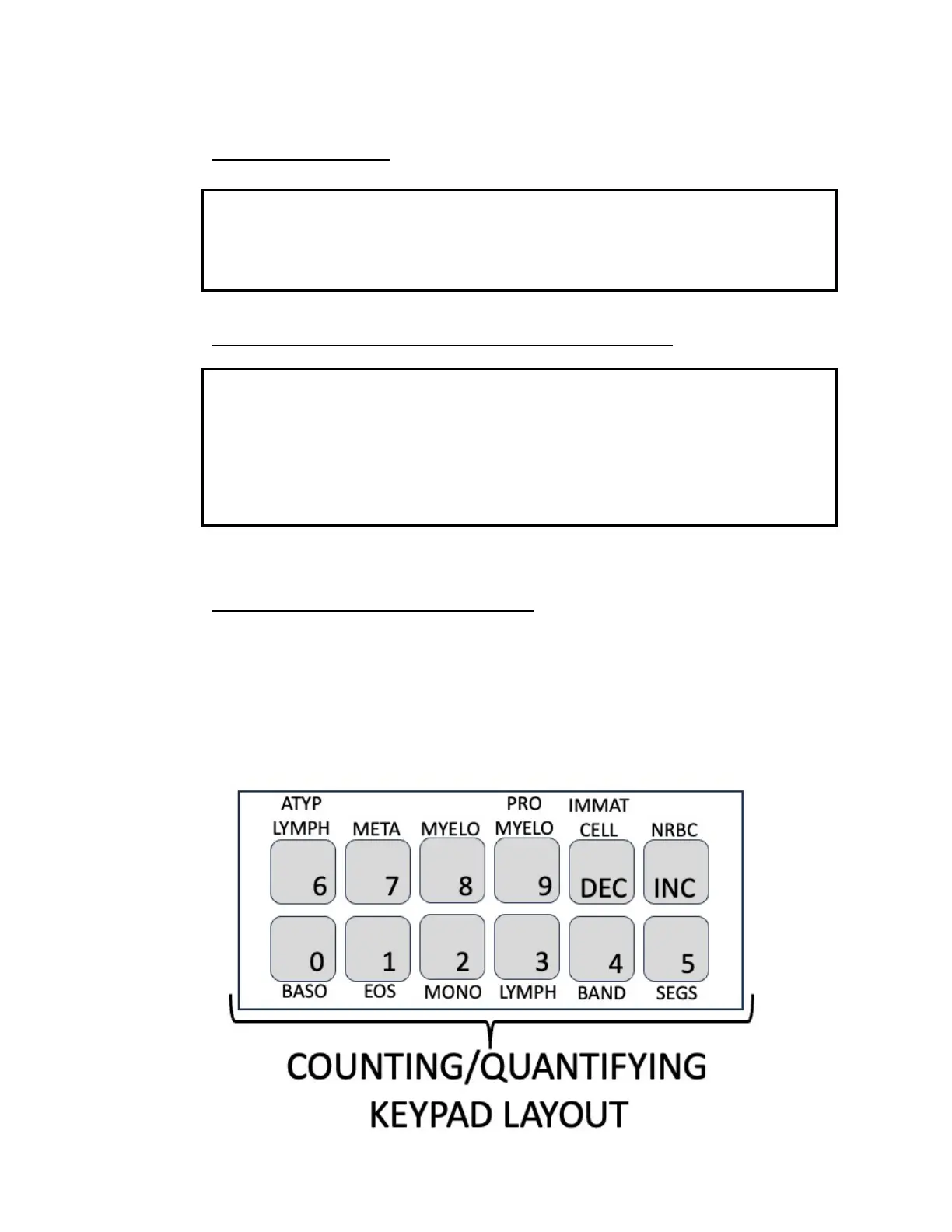
TO ENTER DIFFERENTIAL COUNTS
The 12-channel keyboard for entering differential counts is shown below. While the
default key assignment layout is indicated. Alternate assignments can be
programmed in the laboratory computer to accommodate key assignment matched to
the tech identification code.



 To Next Page