5
5
OPERATING THE SYSTEM
Please become familiar with the touchpad interface and you will soon nd it easy and convenient to select the vari-
ous opons that you have included in your system. The menu contains all of the current opons that are available
with moistureMASTER
tm
and may include some which you have not included in your purchase. For further infor-
maon on the opons which are available please enquire from one of our trained consultants or call our customer
services and support team.
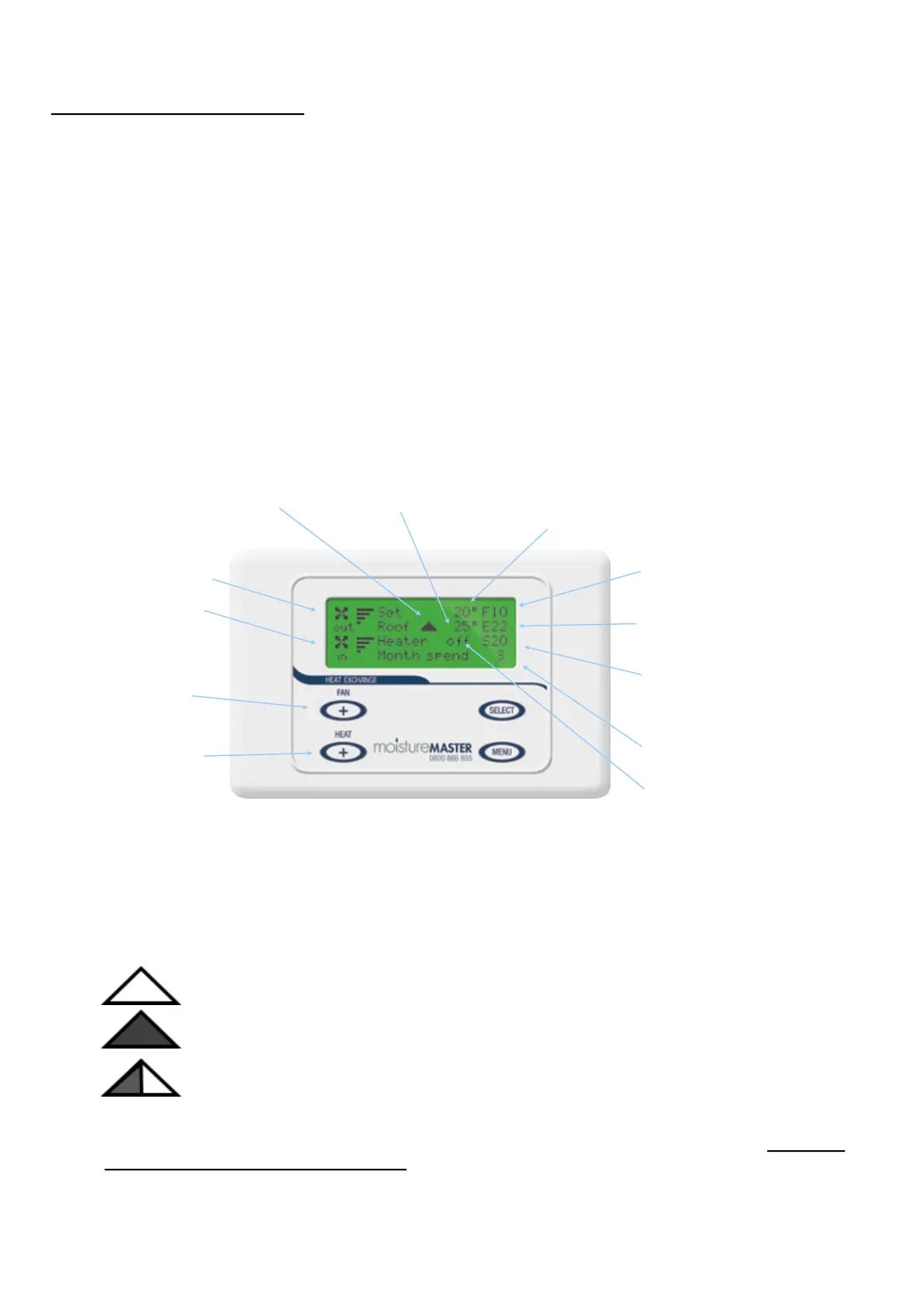
The graphic that you will see most of the me is the “main screen”. It includes all the basic operaonal informaon
that you will want to know. The main screen is only funconal when the backlight is illuminated. The rst press of
any buon illuminates the backlight and acvates the buons. Once the back light is illuminated the touch pad is
operaonal and will accept seng changes. The LCD control has been designed to default back to the main screen 10
seconds aer the last buon press. 4 seconds aer returning to the main screen the back light will exnguish and
the touch pad enters the “standby” mode. It will remain in the standby mode unl any buon is pressed again and
the back light is illuminated once more.
MAIN SCREEN - (Default)
Exhaust air temperature. (Inside Air
going out, air from inside home)
Supply air temperature (From HX to
the house, fresh warmed air to house)
Selects EXHAUST FAN and
HEAT levels (If heater is
included)
Supply Fan Indicator
Exhaust Fan Indicator
Fresh air supply temperature
(Outside air coming in)
Set House Temperature. Air delivery temperature for
system with the heat boost funcon
Roof Temperature Indicator
Roof Cavity Exhaust Status Indicator
Heater status indicator. (Only shows
if heater is included)
Cost Control CCP (Running costs of
Booster Heater if included)
CODE NUMBER: MK6HXLCD
Selects (SUPPLY) or FRESH
AIR FAN and HEAT levels
(If heater is included)
N.B. The temperatures displayed have an accuracy of at least + or – 1 degrees so cauon needs to be applied if you are relying
on them to ascertain eciency levels of the overall system.
Exhaust air all coming from the house “OFF”
Exhaust air all coming from the roof cavity “ON”
50% exhaust from the roof cavity and 50% exhaust from the house
ROOF CAVITY EXHAUST STATUS INDICATOR
N.B. Please see page 9 for details on seng the roof cavity exhaust. When AUTO is selected ALL
exhaust air comes from the house when the temperature is under the level selected and 50% from
the house and 50% from the roof cavity when the temperature is above the selected level.


 To Next Page
 Loading...