6
MENU SELECTIONS - How to make selecons
and set up opons.
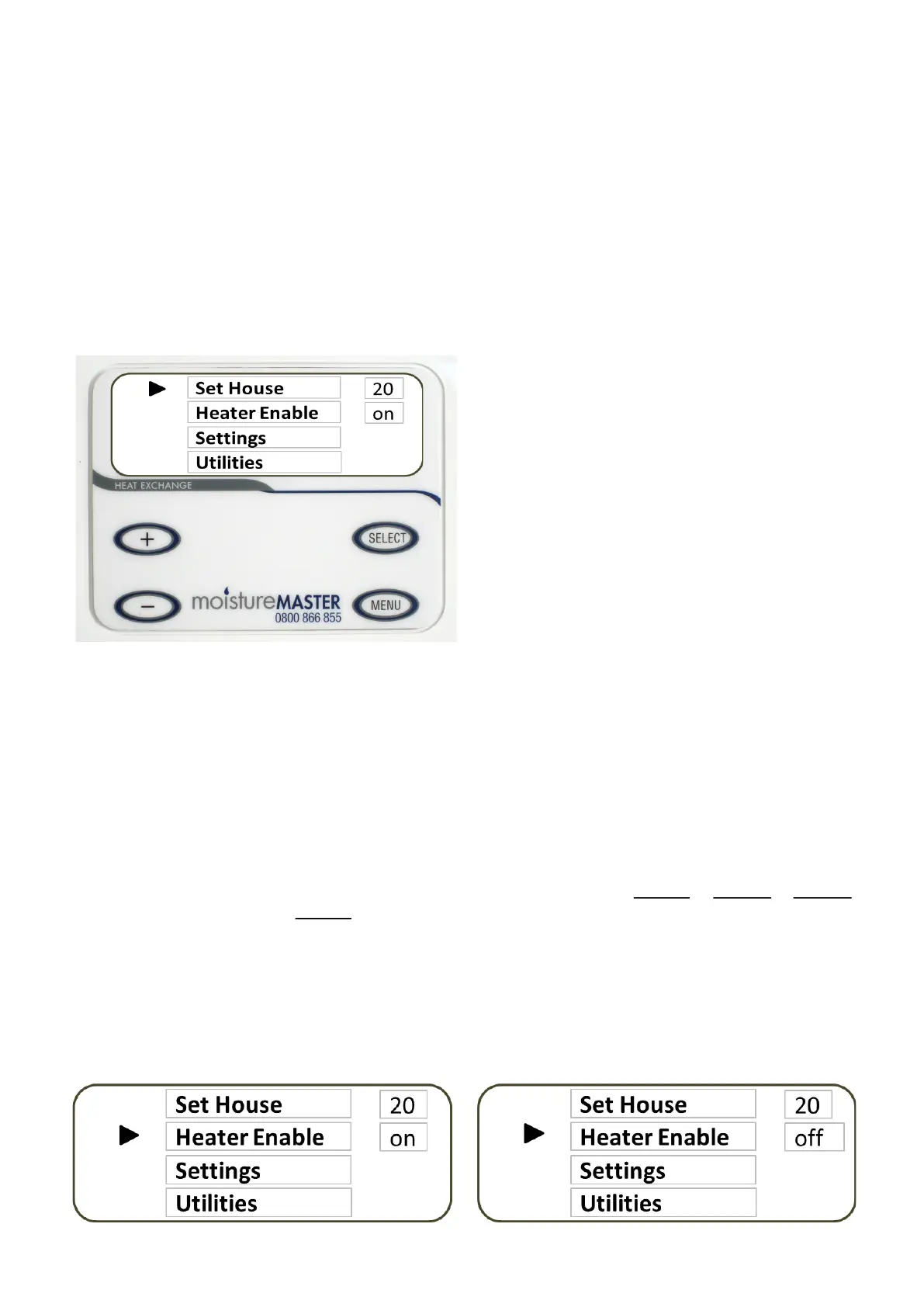
Press the MENU buon from the MAIN SCREEN
and the following screen appears. The selecon
cursor is next to the Set House item. To scroll
through this screen press the + or - sign to
move cursor up or down. When the cursor is next
to the item you want to select press the SELECT
buon and that item is highlighted. You can now
make your selecons using the + or - buons.
Follow this proceed through all of the menu selec-
ons.
Heater (Enable or Disable)
The HX unit can be operated with or without the in-built supplementary heater enabled or disabled; if disabled
the heater will not funcon. If enabled the temperature of the supply air may be regulated. Somemes there
may not be enough exisng heat within the home to deliver the supply air at a temperature that you desire. In
the (default) screen the temperature at the boom le of the screen is able to be adjusted up or down by
pressing the + or - buons. If enabled the in-built heater will cycle on and o and maintain the temperature
that you have selected. The supplementary heater should not be regarded as a heang system but merely to
ensure that cool air may be avoided regardless of the prevailing climac or weather condions. The ulmate
performance of the heater is dependent on the area of the home, how well the home is insulated and also the
amount of background heat that is present.
Heater Status On Heater Status O
Set House
This is the minimum air temperature that you want the HX system to deliver air on the supply side of the sys-
tem and is delivered to the room supply diusers. This seng is used in conjuncon with the booster heater
and is designed to always deliver the temperature selected. When there is not enough heat within the home to
deliver the Set House Temperature from the HX unit the booster heater can be “enabled” to come on and do
that job. See the next secon HEATER (Enable or Disable)
Fan Operaon
Both fans are able to be controlled independently. The + and - buons on the le of the control pad con-
trol the fan operaon.
The TOP fan on the LCD screen is the EXHAUST air fan which moves the stale, warmer air out of the home.
The BOTTOM fan is the FRESH air supply fan which moves the fresh air into the home.
In the SUMMER the FRESH air fan is able to be switched o manually or programmed to turn o automacally
at a user selected temperature to prevent the home from becoming hoer. The EXHAUST air fan cannot be
programmed to turn o automacally because it could be connected to the bathroom, ensuite or toilet extrac-
on system which may be required to run connuously even in the summer. However the EXHAUST air fan is
able to be turned o manually.


 To Next Page
 Loading...