8
Cost Control
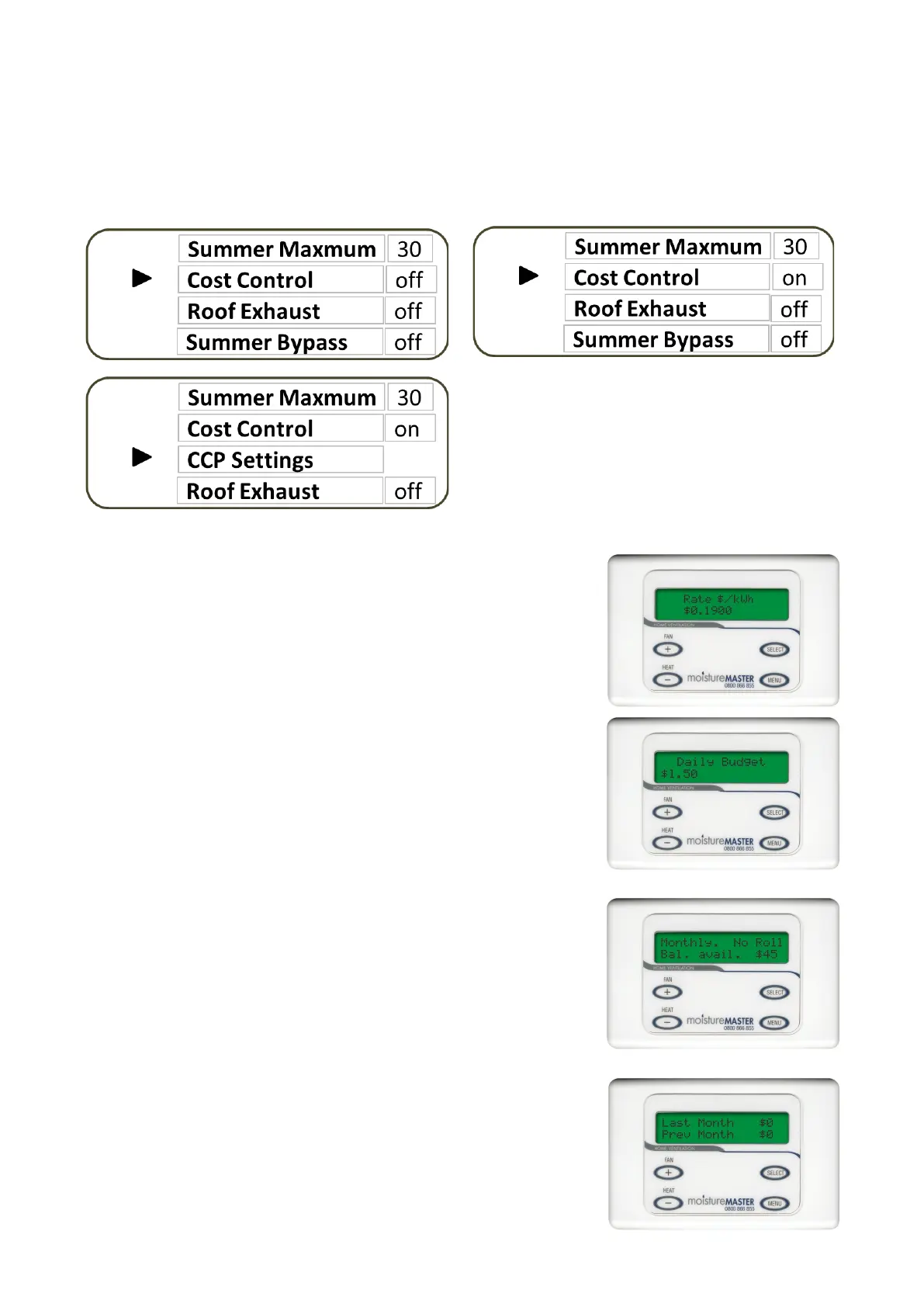
When the Cost Control Programme is selected to “on” CCP Sengs will appear immediately under Cost
Control. You will be able to enter a specic daily budget for the heater operaon by seng your house-
hold power costs and making a selecon on how much money you want to limit the heater operaon to in
your moistureMASTER system. Move the cursor to CCP sengs then press SELECT and a series of screens
will appear.
Funcon: Set the Daily Budget - (Daily maximum cost for heater operaon)
This is the second screen:
Press the + or - buon to select your desired budget. The budget is set in
50 cent increments. The daily cycle commences at 12 midnight. Once the daily
budget is expended the heater operaon will cease. If addional daily budget is
added the heater operaon will recommence.
Funcon: Set the Power rate - (Cents per kw hour from your monthly power
account)
This is the rst screen:
Press the + or - buon to select correct kw power charge. This can be reset
and any me and all calculaons will be re-done to reect the changed power
rate. To move to the next screen press the MENU buon.
Funcon: Monthly Roll Over - (Unspent balances will accumulated and can be
allocated to the next months budget)
This is the third screen:
Press the + or - buon to make your selecon
No Roll - Any accumulated unspent balance will not roll into the next month
Roll - Accumulated balances are carried over to the next month, apporoned
and added to each daily budget.
Funcon: View Monthly Costs - (History of heater costs)
This is the fourth screen:
This screen merely displays the last months costs for running the booster heater
and the month before that. The amount spent cannot total more that the daily
accumulave totals for the month except any unspent previous months alloca-
on which has been rolled into the new month will be included if it has been
used.
The screens provide you with the ability to enter
data that is necessary to calculate the heater run-
ning costs, Manage the budget that you sent and
provide you with historical feedback on the run-
ning costs of the Booster heater in the moisture-
MASTER HX system. Press menu to scroll through
each screen.
To Exit the CCP Sengs menu press SELECT. This will take you back to the Sengs Menu.


 To Next Page
 Loading...