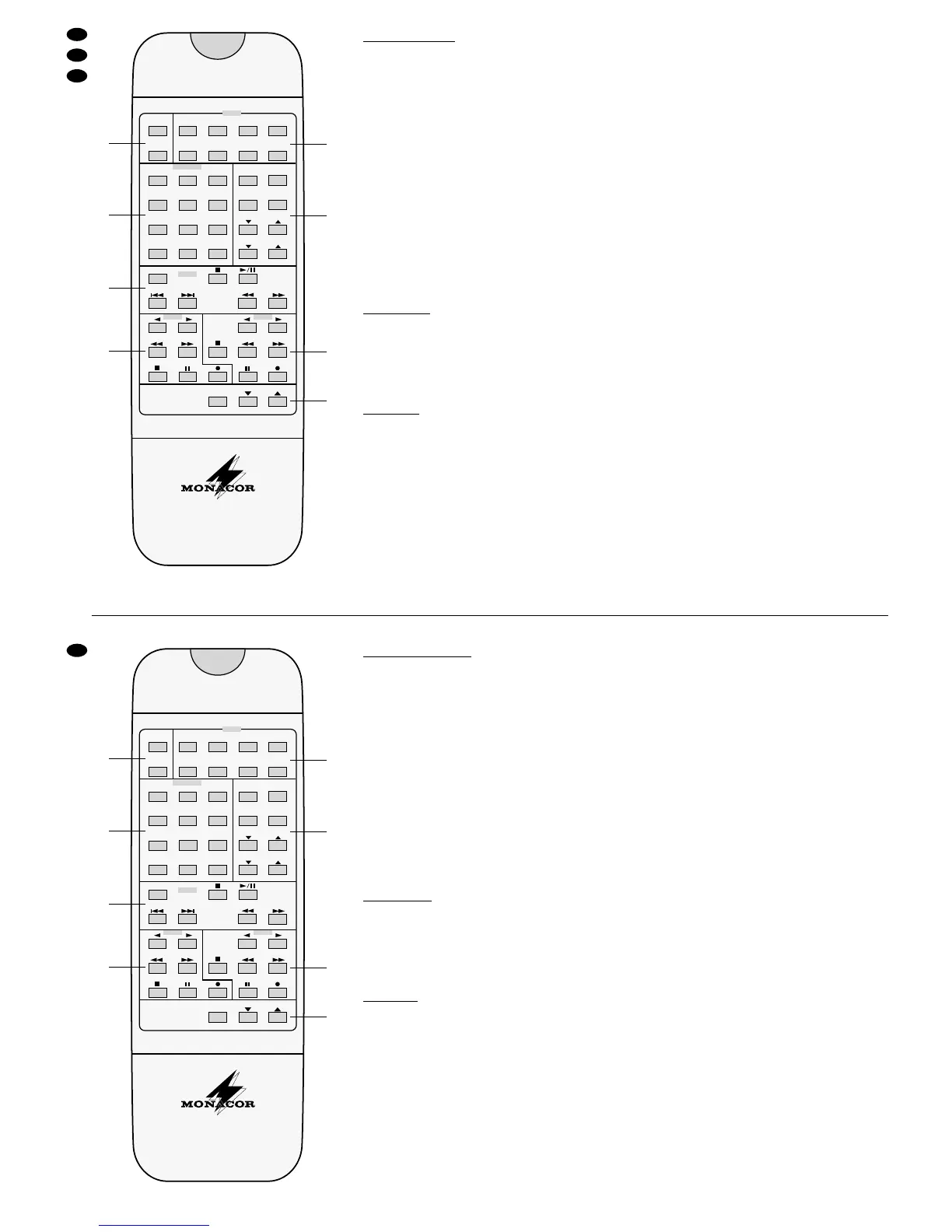
Fernbedienung RC-2000 ➅
5.4.1 Bedienfelder
A Tasten zum Ein-/Ausschalten und für den Timer
B Zifferntasten, Frequenzbandumschaltung AM/FM,
Taste PRESET SCAN zum manuellen und auto-
matischen Weiterschalten der gespeicherten
Sender (wie Taste P.CALL am Receiver).
C Funktionen für den MONACOR CD-Spieler CD-
2000
D Funktionen für Laufwerk 1 des MONACOR Dop-
pel-Tape-Decks TDD-2000
E Tasten zum Wählen der Eingangsquelle
F Funktionen für den Dolby Pro-Logic-Betrieb
G Funktionen für Laufwerk 2 des MONACOR Dop-
pel-Tape-Decks TDD-2000
H Lautstärke und Taste MUTE für Ton Ein/Aus
Funktionen, die nur mit der Fernbedienung möglich
sind:
5.4.2 Ton Aus
Mit der Taste MUTE auf der Fernbedienung kann der
Ton abgeschaltet und auch wieder eingeschaltet
werden (z. B. bei einem Telefonanruf). Ist der Ton ab-
schaltet, blinkt die rote LED auf dem Lautstärkereg-
ler. Zum Wiedereinschalten des Tons Taste MUTE
erneut drücken oder eine der Tasten VOLUME.
5.4.3 Timer
Durch Drücken der Taste SLEEP auf der Fernbedie-
nung kann eine Zeit eingestellt werden, nach der der
Receiver und die über die Netzbuchsen (40) ange-
schlossenen Geräte ein- oder ausschalten.
1) Taste SLEEP so oft drücken, bis die gewünschte
Zeit rechts im Display erscheint (90, 60, 30, 20
oder 10 Minuten). Die Helligkeit des Display wird
verringert, und im Display erscheint rechts oben
die Anzeige
SLEEP.
2) Die HiFi-Anlage schaltet nach der eingestellten
Zeit aus oder, wenn der Receiver mit der Taste
POWER ausgeschaltet wird, nach der eingestell-
ten Zeit wieder ein.
6 Fernseh- und Videobetrieb
6.1 Fernsehbetrieb
1) Das Fernsehgerät einschalten.
2) Mit dem Eingangswähler INPUT SELECTOR (10)
den Eingang wählen, an dem das Fernsehgerät
angeschlossen ist
-
entweder VIDEO 2 oder
AUX, siehe Kapitel 4.3.6 “Videorecorder und TV-
Gerät” und Kapitel 4.4 “Video-Verbindungen”.
3) Am Fernsehgerät die Fernsehlautsprecher aus-
schalten (Lautstärke auf Minimum), damit der Ton
komplett über die HiFi-Anlage läuft.
6.2 Videokassette abspielen
1) Das Fernsehgerät und den Videorecorder ein-
schalten.
2) Mit dem Eingangswähler INPUT SELECTOR (10)
den Eingang wählen, an dem der Videorecorder
angeschlossen ist
-
entweder VIDEO 1 oder
VIDEO 2, siehe Kapitel 4.4 “Video-Verbindungen”.
3) Am Fernsehgerät den Eingang wählen, an dem
der Receiver angeschlossen ist, und die Fern-
sehlautsprecher ausschalten (Lautstärke auf Mi-
nimum), damit der Ton komplett über die HiFi-An-
lage läuft.
6.3 Videoaufnahmen
Der Aufnahmerecorder muß an den Buchsen
VIDEO 1 (31 + 36) angeschlossen sein und das Wie-
dergabegerät (z. B. zweiter Videorecorder oder Bild-
plattenspieler) an den Buchsen VIDEO 2 (32 + 37)
1) Das Fernsehgerät bzw. den Monitor, den Video-
recorder und das Wiedergabegerät einschalten.
2) Am Fernsehgerät bzw. am Monitor den Eingang
wählen, an dem der Receiver angeschlossen ist,
und die Fernsehlautsprecher ausschalten (Laut-
stärke auf Minimum), damit der Ton komplett über
die HiFi-Anlage läuft.
3) Mit dem Eingangswähler INPUT SELECTOR (10)
den Eingang VIDEO 2 wählen.
4) Das Wiedergabegerät und das Aufnahmegerät
starten.
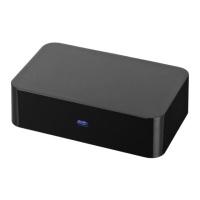
Remote Control RC-2000 ➅
5.4.1 Operating Fields
A Keys for switching on/off and for the timer
B Numerical keys, selector switch AM/FM, button
PRESET SCAN for manual and automatic contin-
uous switching of the stored stations (like button
P.CALL at the receiver).
C Functions for the MONACOR CD player CD-2000
D Functions for player mechanism 1 of the MO-
NACOR double tape deck TDD-2000.
E Keys to select the input source
F Functions for the Dolbys Pro-Logic operation
G Functions for player mechanism 2 of the MO-
NACOR double tape deck TDD-2000
H Volume and key MUTE for tone On/Off
Functions which are only possible with the remote
control:
5.4.2 Tone Off
With the key MUTE on the remote control the tone
can be switched off and on again (e.g. in case of a
telephone call). If the tone is switched off, the red
LED on the volume control is blinking. To switch on
the tone again, press the key MUTE again or one of
the keys VOLUME.
5.4.3 Timer
By pressing the key SLEEP on the remote control a
time can be adjusted according to which the receiver
and the units connected via the mains jacks (40) are
switched on or off.
1) Press the key SLEEP so many times, until the de-
sired time is displayed at the right (90, 60, 30, 20,
or 10 minutes). The brightness of the display is re-
duced and
SLEEP is displayed above at the right.
2) The HiFi system switches off after the adjusted
time or, if the receiver being switched off with the
POWER button, it switches on again after the ad-
justed time.
6 TV and video operation
6.1 TV operation
1) Switch on the TV set.
2) With the INPUT SELECTOR knob (10) select the
input at which the TV set is to be connected -
either VIDEO 2 or AUX, see chapter 4.3.6 “Video
recorder and TV set” and chapter 4.4 “Video
connections”.
3) Switch off the TV speakers at the TV set (volume
to minimum) so that the tone is only reproduced
by the HiFi system.
6.2 Playing a video cassette
1) Switch on the TV set and the video recorder.
2) With the INPUT SELECTOR knob (10) select the
input at which the video recorder is connected -
either VIDEO 1 or VIDEO 2, see chapter 4.4
“Video connections”.
3) At the TV set select the input at which the receiver
is connected, and switch off the TV speakers (vol-
ume to minimum) so that the tone is only reprodu-
ced by the HiFi system.
6.3 Video recordings
The recorder must be connected to the jacks
VIDEO 1 (31 + 36) and the playing unit (e. g. a se-
cond video recorder or picture turntable) to the jacks
VIDEO 2 (32 + 37).
1) Switch on the TV set resp. the monitor, the video
recorder, and the playing unit.
2) Select the input of the TV set resp. the monitor at
which the receiver is connected, and switch off
the TV speakers (volume to minimum) so that the
tone is only reproduced by the HiFi system.
3) With the INPUT SELECTOR knob (10) choose
the input VIDEO 2.
4) Start the player and recorder.


 To Next Page