Potensi Elevator
2
/
13
3. Boot interface, monitoring screen and main interface
1. Boot interface
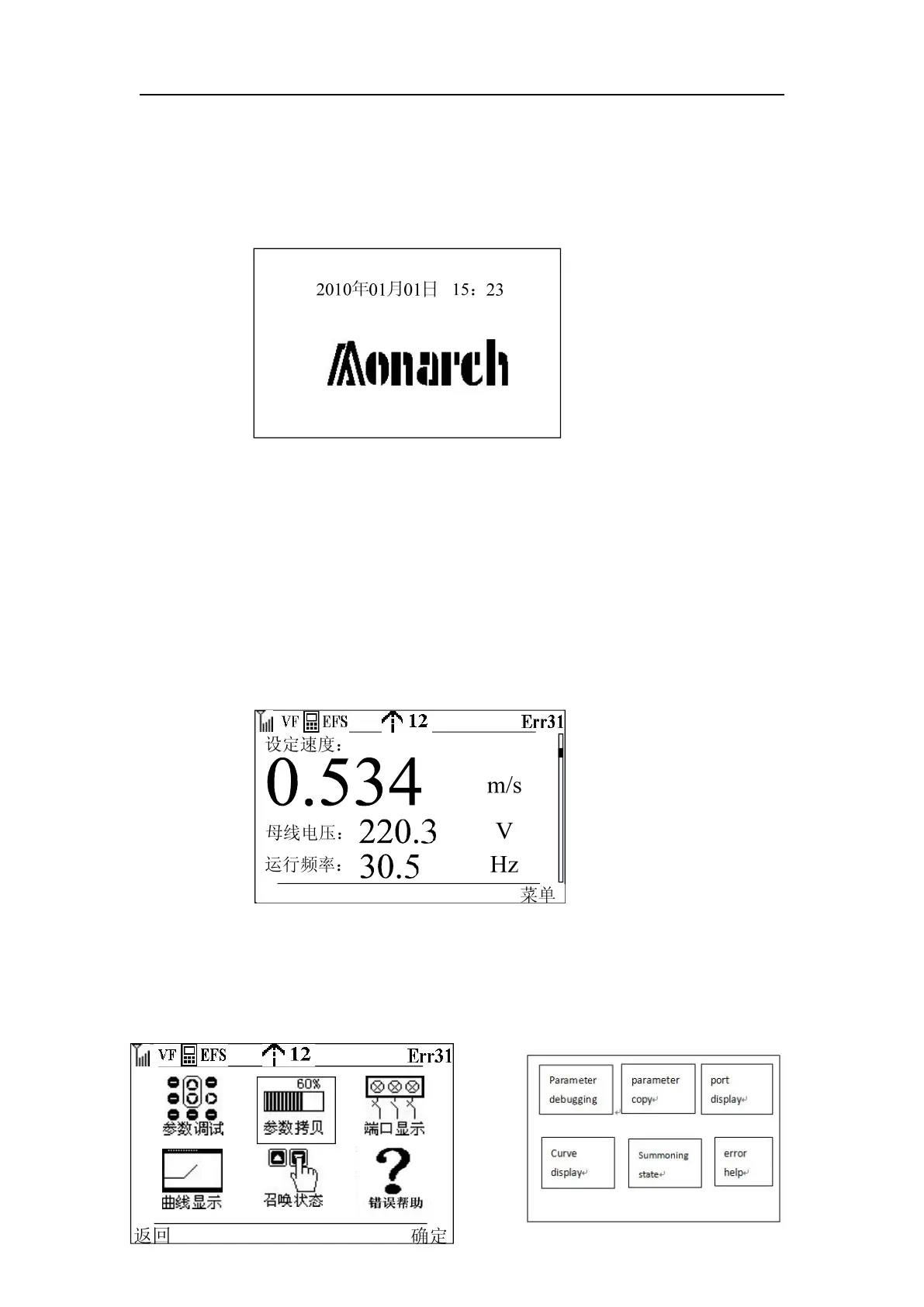
This interface is displayed when the MDKE3 operator is powered on. After staying in this
interface for a few seconds, if the verification information is correct, it will automatically
enter the next interface. If the verification is incorrect, a prompt message will be given.
Button function: All buttons have no effect, and the knob has no effect.
2. Monitoring screen
When powered on, it will automatically enter this screen through the boot screen. In this
screen, the value of the monitoring parameters is mainly displayed. The monitoring
parameters mainly refer to the values set in FA-01 and FA-02, such as the BIT0 bit of FA-01.
Indicates whether the set speed is displayed or not. If BIT0 is set to 0, the item of set speed
will not be displayed on this screen, and if BIT0 is set to 1, the item of set speed will be
displayed on this screen. A maximum of 32 parameters can be monitored in this screen, and
these 32 parameters scroll as the knob is turned.
Key function: function key 2 directly enters the menu interface
3. Main interface
In the MDKE3 LCD operator, the main interface is an icon displayed with animation effects, which
is vivid and vivid. Each icon reflects a function of the MDKE3 operator. The interface is as follows



 To Next Page