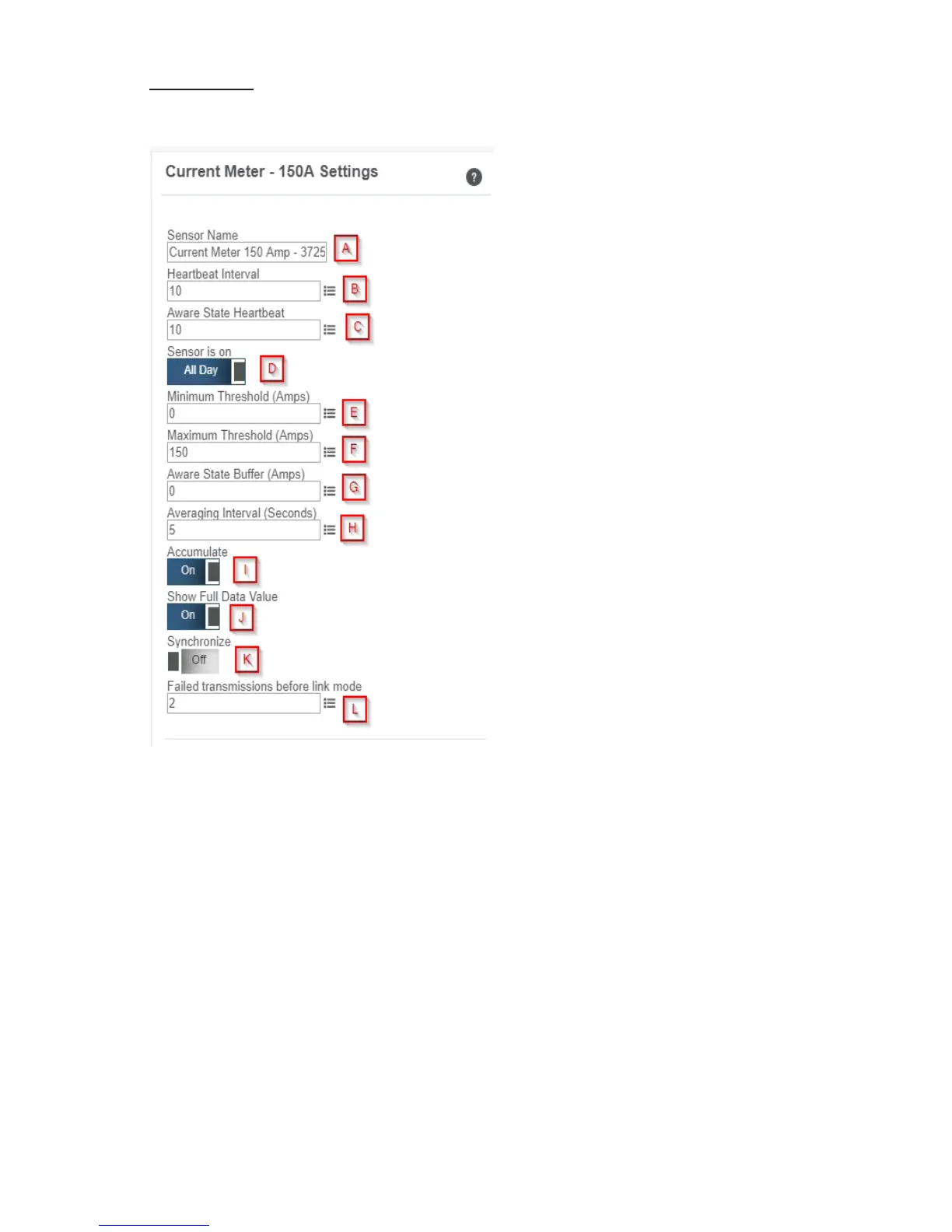
Settings View
To edit the operational settings for a sensor, choose the “Sensor” option in the main
navigation menu then select the “Settings” tab to access the conguration page.
A. Sensor Name is a unique name you
give the meter to easily identify it in a list
and in any notications.
B. The Heartbeat Interval is how often
the meter communicates with the gateway
if no activity is recorded.
C. Aware State Heartbeat is how often
the meter communicates with the gateway
while in an Aware State.
D. Sensor is on is the time of day the
sensor is actively working. No signal
communication will be sent while meter is
hibernating.
E. Minimum Threshold is the lowest
amp threshold allowable. Assessments
below this value will cause the sensor to
enter the Aware State.
F. Maximum Threshold is the highest
reading the meter should record before
entering an Aware State.
G. The Aware State Buer is a buer
to prevent the sensor from bouncing
between Standard Operation and Aware
State when the assessments are very
close to a threshold.
H. Averaging Interval is the average time in seconds when data is reported to iMonnit on
every heartbeat.
I. Accumulate will accumulate the readings heartbeat after heartbeat. Accumulation rolls
over at 65535 (2^16 or 0xFFFF).
J. Show Full Data Value when on, will not cut o data value and show the full reading.
K. In small sensor networks the sensors can be set to synchronize their communications.
The default setting o allows the sensors to randomize their communications therefore
maximizing communication robustness. Setting this will synchronize the communication of
the sensors.
L. Failed transmissions before link mode is the number of transmissions the sensor
sends without response from a gateway before it goes to battery saving link mode. In link
mode, The sensor will scan and Join a gateway at the following intervals: @ 0 Seconds, 3
sec, 6 sec, 9 sec, 15 sec, 30 sec, 1 min, 2 min, 5 min, 15 min, 30 min, and 60 min, then 60
minutes thereafter. While attempting to link, the sensor will continue to measure. A lower
number will allow sensors to nd new gateways with fewer missed readings. High numbers
will enable the sensor to remain with its current gateway in a noisy RF environment better.
PAGE 9


 To Next Page