Creating a Calibration Certicate
Creating a calibration certicate will mask the calibration tab from those who should not
have permissions to adjust these settings. Permissions for self-certifying a calibration must
be enabled in user permissions.
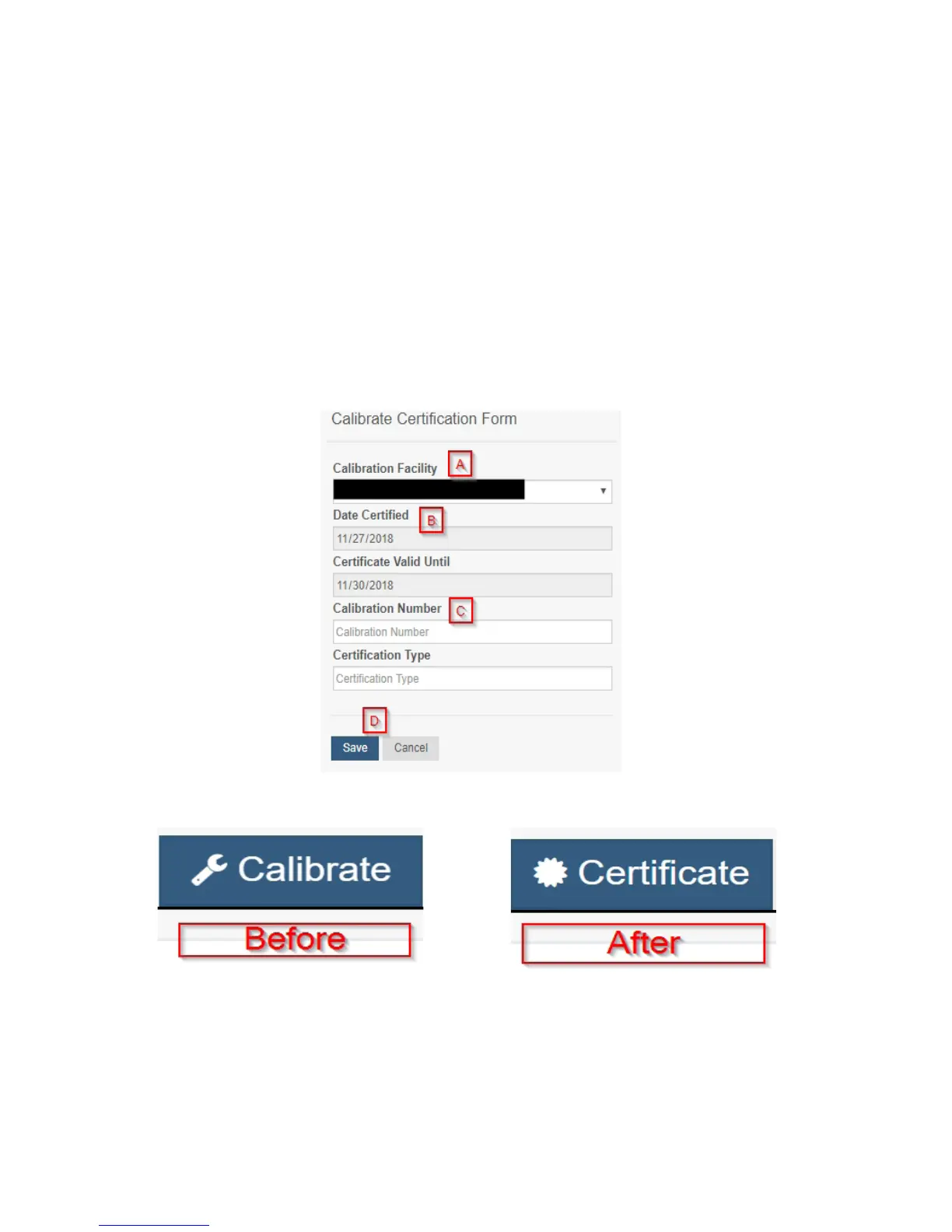
Directly below the calibrate button is the selection to "Create Calibration Certicate.
A. The Calibration Facility Field will be lled. Select the dropdown menu to change your
facility.
B. The date for "Certicate Valid Until" must be set one day in the future after the date
contained in the "Date Certied" eld.
C. "Calibration Number" and "Calibration Type" are unique values to your certicate.
D. Choose the "Save" button before moving on.
When the new certicate is accepted, the Calibration tab will change to a Certicate tab.
You will still be able to edit the certicate by choosing the Certicate Tab and navigating
down to "Edit Calibration Certicate."
The tab will revert back to "Calibrate" after the period for the certicate ends.
PAGE 11


 To Next Page